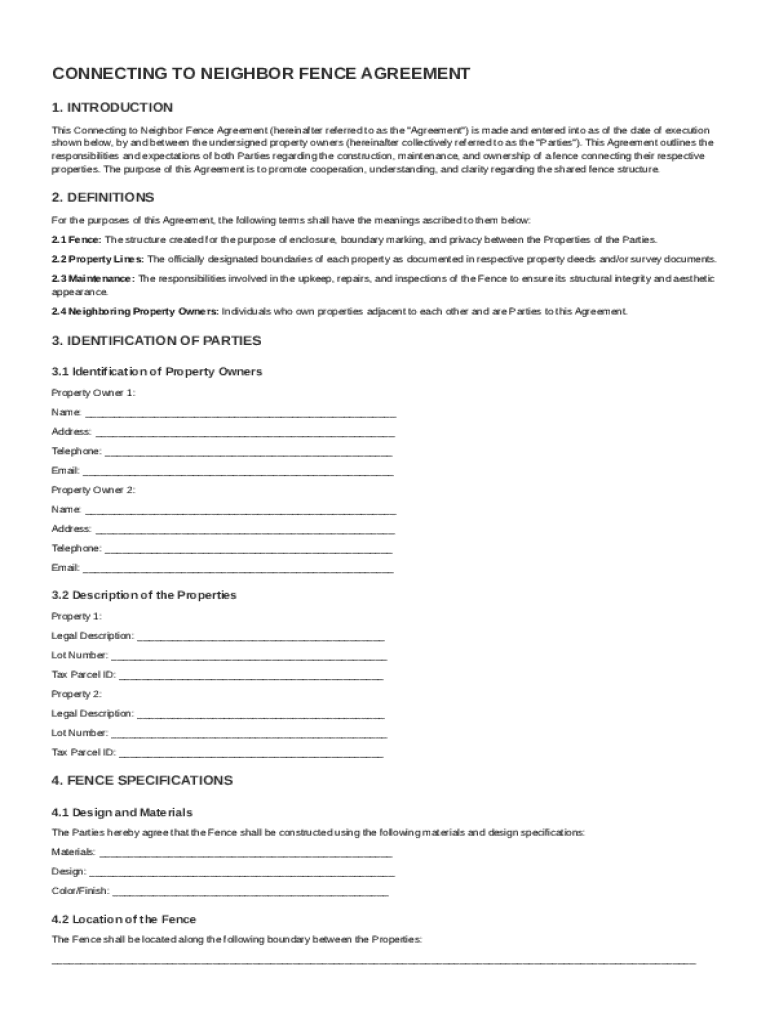
Connecting To Neighbor Fence Agreement Form
Use a Connecting To Neighbor Fence Agreement Template template to make your document workflow more streamlined.
What this fence agreement documents
A Connecting To Neighbor Fence Agreement Form is a written record between adjoining property owners about a fence affecting both properties. It can identify the owners and addresses, describe the fence location and materials, assign installation, maintenance, repair, and payment responsibilities, and capture each party’s approval. With signNow, a sender uploads the form, reviews detected fillable fields, assigns signature or date fields, and sends it to the neighbors. Each signer reviews the completed terms, signs electronically, and receives a finished copy with an audit trail. Local property, recording, and boundary rules still apply.
Who completes this fence agreement
Adjacent homeowners
Homeowners use the form to document fence location, ownership, maintenance, access, and cost-sharing terms with an adjoining property owner. Clear signatures reduce later disputes about the agreed boundary and responsibilities.
Property professionals
Property managers, landlords, and contractors use the agreement to coordinate construction or repairs, identify authorized parties, and preserve written approval before work begins near a shared property line.
Features that fit fence agreements
signNow connects the form’s property terms, signer assignments, execution evidence, and finished record in one documented workflow.
Field detection
Upload the fence agreement and review signNow’s detected fields before assigning owner names, property descriptions, cost terms, and signature locations.
Signer routing
Assign each signature, initials, date, and text field to the correct neighboring property owner before sending the document for completion.
Remote signing
Collect signatures remotely, reducing the need for adjoining owners to coordinate a simultaneous in-person meeting about fence work.
Audit trail
Capture timestamps, signer actions, delivery events, and authentication details that help explain how the agreement was executed.
Secure storage
Keep the completed agreement and execution history together so authorized parties can retrieve the final terms after signing.
Reusable template
Use reusable templates when a property-management team repeatedly prepares fence permissions, repair approvals, or shared-maintenance agreements.
How to complete the fence agreement
Use this sequence to prepare, route, sign, and preserve the Connecting To Neighbor Fence Agreement Form.
Upload form:
Upload the completed fence agreement. Check fields:
Review detected fields and property terms. Add signers:
Assign each neighbor’s signature fields. Send document:
Send the agreement for electronic signature. Store records:
Download the signed PDF and audit trail.
 Best ROI. Our customers achieve an average 7x ROI within the first six months.
 Scales with your use cases. From SMBs to mid-market, airSlate SignNow delivers results for businesses of all sizes.
 Intuitive UI and API. Sign and send documents from your apps in minutes.
What the fence agreement audit trail records
The audit trail documents execution evidence for the fence agreement rather than merely describing how to create the form.
Authenticate signer:
Capture timestamps:
Hash document:
Seal record:
Verify attribution:
Export audit trail:
Recommended fence agreement setup
Configure the workflow around signer identity, execution evidence, secure storage, and the property rules governing the adjoining parcels.
| Setting | Recommendation |
|---|---|
| Authentication method | Email verification for adjoining owners |
| Signature type | Electronic signature with signer intent |
| Audit trail | Enabled with final PDF export |
| Document retention | Follow applicable state property rules |
| Encryption | TLS 1.2/1.3 and AES-256 |
Signer authentication and certificates
PKI support:
X.509 certificates:
Two-factor authentication:
SMS OTP:
ID verification:
Audit evidence:
Privacy and disclosure issues to prevent
Listing a full street address, phone number, or unrelated identity information can expose personal data when every signer receives the completed fence agreement. A signer may approve installation terms without clearly consenting to electronic records; retain the applicable ESIGN consumer disclosure where the transaction is consumer-facing. Sending the agreement to an unintended neighbor or contractor can disclose property details and create uncertainty about who actually authorized the fence work. Leaving amendment or maintenance permissions open-ended can expose future disputes because the signed record does not identify who may change the original arrangement.
Keep fence agreement records complete and traceable
Retain the signed agreement, execution evidence, and amendments together so property-boundary decisions remain understandable and defensible.
Confirm the applicable retention period
Export the audit trail
Archive records securely
Preserve every agreement version



Fence agreement questions and troubleshooting
These answers address signing, authentication, storage, and state-law issues that can affect a Connecting To Neighbor Fence Agreement Form.
The Business plan includes templates and audit trails at $8/user/month when billed annually. Upload the agreement, assign each neighbor’s fields, and confirm the final PDF and audit trail are retained after completion.
The Business Premium plan is listed at $15/user/month when billed annually and includes bulk send. For one neighbor-to-neighbor agreement, standard routing may be sufficient; bulk send is relevant only for repeated property workflows.
Use signNow’s signer authentication options, including SMS OTP where configured, and preserve the audit trail. ESIGN requires intent, consent, attribution, and record retention; consumer-facing records also require the disclosure described in 15 U.S.C. §7001(c).
A fence agreement may concern a deed, easement, or boundary issue governed by state law. ESIGN and UETA do not replace recording, notarization, witness, or local land-record requirements; check the applicable county recorder or state authority before relying on the document.
signNow supports secure records using TLS 1.2/1.3 in transit and AES-256 at rest, with SOC 2 Type II and ISO 27001 certifications. Access controls should still be limited to parties and administrators handling this agreement.
Use a signNow template for repeated fence permissions, maintenance approvals, or repair agreements, but review every property address, boundary description, cost allocation, and signer assignment before sending. A template does not replace property-specific legal review.
Key performance indicators that demonstrate SignNow's proven track record.
BE READY TO GET MORE
Get this form now!

If you believe that this page should be taken down, please follow our DMCA take-down process.