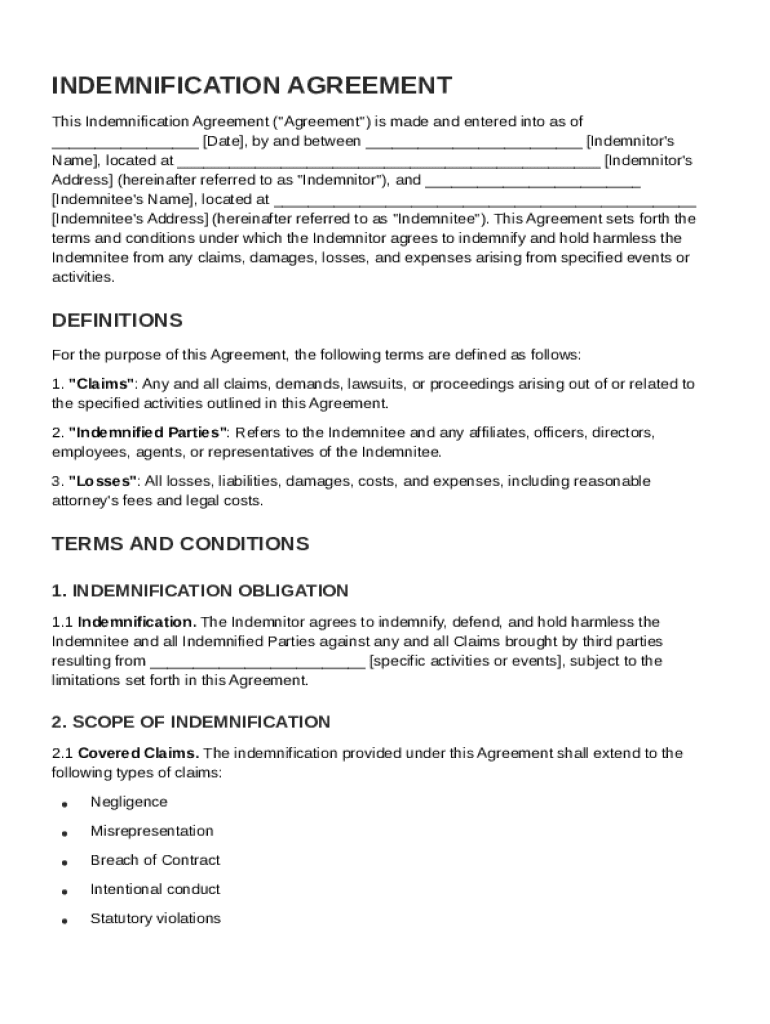
Indemnification Agreement Form
Use a Indemnification Agreement Template template to make your document workflow more streamlined.
What an Indemnification Agreement Form does
An Indemnification Agreement Form records a promise by one party to protect another from specified losses, claims, damages, or liabilities. It identifies the parties, covered conduct, exclusions, notice duties, limits, and signatures that make the allocation of risk reviewable. In a U.S. business transaction, the agreement’s effect depends on its wording, applicable state contract law, and proper execution. signNow lets the sender upload the document, detect fields, route it for signatures, and retain the completed record with an audit trail.
Business types that use indemnification forms
The form is most useful where contracts allocate responsibility for losses, claims, property damage, or third-party obligations.
Solo attorneys use the form to document client-approved indemnity language, identify responsible parties, and preserve signed versions with an accessible audit trail for matter files. Construction subcontractors use it before site access or payment milestones, clarifying responsibility for specified losses while collecting signatures from owners, contractors, and insurers. Enterprise procurement teams use reusable templates for vendors and service providers, routing the Indemnification Agreement Form through designated approvers before retaining the executed record.
These tasks are executed by both individual contributors and centralized administrators depending on organizational policy and required controls.
Who uses this agreement form
Real estate
Real estate brokers and property managers use indemnification clauses for vendor, tenant, and contractor obligations, with signer order and audit evidence preserved for transaction files.
Construction and legal
Construction companies and legal departments use the form to document risk allocation between owners, contractors, subcontractors, and service providers before work begins.
Features that support agreement completion
Indemnification Agreement Form workflows combine defined obligations, controlled signing, and retained evidence for business transactions involving allocated risk.
Clear obligations
Define the parties, covered activities, exclusions, and financial responsibilities in one structured document before performance begins.
Required fields
Place signature, initials, date, and required approval fields directly on the Indemnification Agreement Form for complete execution.
Signer routing
Route the agreement to multiple parties in a defined order, reducing missed approvals between owners, vendors, and contractors.
Audit evidence
Capture intent, timestamps, signer actions, and completion evidence alongside the executed agreement for later review.
Reusable template
Use a reusable template for recurring vendor, lease, construction, or service-provider agreements while preserving consistent language.
Document control
Store completed agreements and certificates in a searchable workflow connected to the systems your team already uses.
 Best ROI. Our customers achieve an average 7x ROI within the first six months.
 Scales with your use cases. From SMBs to mid-market, airSlate SignNow delivers results for businesses of all sizes.
 Intuitive UI and API. Sign and send documents from your apps in minutes.
How signNow processes this agreement
The signNow workflow moves the Indemnification Agreement Form from upload through field preparation, signature collection, and auditable storage.
Upload document: Upload the Indemnification Agreement Form and let signNow detect fillable areas. Set fields: Review detected fields and add signatures, initials, dates, and approvals. Send agreement: Send the agreement to each party in the required signing order. Store evidence: Collect signatures and store the completed PDF with its audit trail.
How the audit trail records agreement evidence
signNow records the technical events that connect each signer to the completed Indemnification Agreement Form and its retained evidence.
Authenticate signer:
Timestamp event:
Hash document:
Seal record:
Log activity:
Retrieve evidence:
Security controls for signed agreements
Transport encryption:
Storage encryption:
SOC 2 Type II:
ISO 27001:
HIPAA compliance:
ESIGN and UETA:



Pitfalls when completing the agreement
Leaving parties, covered activities, exclusions, or notice requirements undefined can create disputes about the indemnity’s actual scope. Using a signature without documented intent, consent, or signer attribution can weaken the agreement’s evidentiary value under ESIGN or UETA. Sending different agreement versions to multiple signers can create conflicting obligations and make the executed record difficult to identify. Failing to restrict access can expose addresses, payment details, insurance information, or other sensitive business data in signed documents.
When the agreement has legal standing
An Indemnification Agreement Form may be admissible when the parties show intent, consent to electronic records, signer attribution, and reliable retention under ESIGN and UETA. Those frameworks exclude wills, codicils, testamentary trusts, certain court orders, official court filings, and specified family-law documents.

Best practices for completing the form
Careful drafting, field assignment, version control, and evidence retention make the signed Indemnification Agreement Form easier to interpret and defend.
Define every indemnity obligation
Assign fields to correct parties
Control versions and permissions
Set a documented retention policy
State rules and excluded documents
State law
Recording delay
Excluded document
Excluded document
Filing restriction
Troubleshooting agreement completion
Resolve field, authentication, plan, and compliance questions before sending an Indemnification Agreement Form for signature.
Upload the source PDF again, confirm that it is not password-protected, and review detected fields before sending. signNow templates can preserve the corrected field arrangement for later Indemnification Agreement Form workflows.
The Business plan includes legally binding eSignatures, audit trails, templates, and mobile apps. Confirm that the selected plan meets your organization’s authentication, integration, retention, and regulatory requirements before routing this agreement.
Use signNow’s signer authentication options and preserve the completion certificate. ESIGN and UETA recognize electronic signatures when intent, consent, attribution, and record retention requirements are satisfied; state contract law still governs the indemnity terms.
A consumer-facing transaction may require an ESIGN disclosure explaining paper records, electronic access, and withdrawal procedures under 15 U.S.C. §7001(c). Add the appropriate disclosure before sending when the counterparty acts as a consumer.
Business Premium includes bulk send for repeated agreement distribution. Use it only when each recipient should receive substantially the same Indemnification Agreement Form and verify variable fields before sending.
HIPAA compliance is available with a business associate agreement when the agreement contains protected health information. For a construction, real estate, or vendor agreement without PHI, apply the organization’s own access and retention policy.
Key performance indicators that demonstrate SignNow's proven track record.
BE READY TO GET MORE
Get this form now!

If you believe that this page should be taken down, please follow our DMCA take-down process.