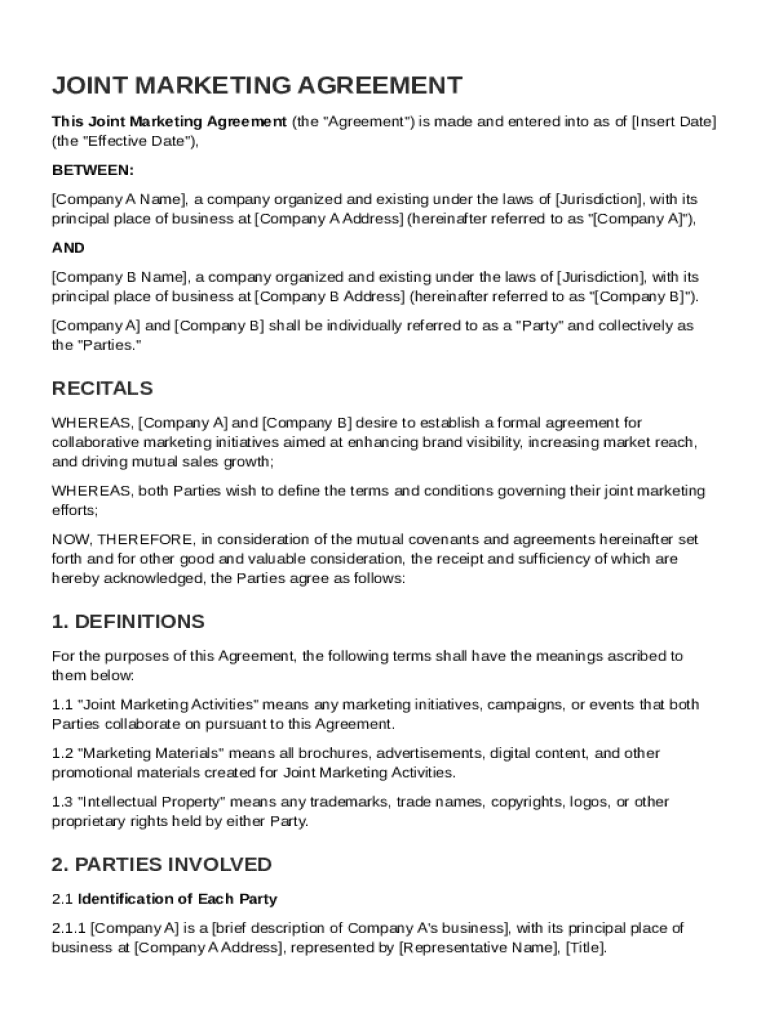
Joint Marketing Agreement Form
Use a Joint Marketing Agreement Template template to make your document workflow more streamlined.
What this joint marketing agreement does
A Joint Marketing Agreement Form records how two or more businesses will plan, fund, approve, and measure a shared marketing campaign. It identifies the participating parties, campaign scope, responsibilities, contribution amounts, ownership of leads and content, confidentiality duties, approval rights, and termination terms. Each party reviews the completed document and signs it electronically through signNow. The final agreement and certificate of completion provide an organized record of consent and execution. ESIGN and applicable state electronic-transactions laws can support electronic signatures when intent, consent, attribution, and record retention requirements are satisfied.
Who uses this agreement
Marketing partnerships
Marketing agencies and brand partnerships teams use the form to define campaign scope, co-branding approvals, shared costs, lead ownership, reporting duties, and termination rights before launching joint promotions.
Internal reviewers
Legal, procurement, and finance teams review the agreement, confirm authorized signers, document contribution obligations, and retain the executed record with its signNow audit trail.
Business types using joint agreements
Joint Marketing Agreement Form helps organizations document shared campaigns before partners exchange leads, spend jointly, or publish co-branded materials.
Independent marketing consultants can use the form to define campaign ownership, cost sharing, lead handling, and approval rights before promoting a client jointly. Regional agencies can coordinate co-branded campaigns with another agency, documenting deliverables, audience permissions, expense allocations, and the process for approving public materials. Enterprise marketing departments can route agreements through legal and procurement, use reusable templates, and preserve signed versions for partner audits and internal governance.
These tasks are executed by both individual contributors and centralized administrators depending on organizational policy and required controls.
Key features for joint campaigns
The Joint Marketing Agreement Form organizes campaign responsibilities, partner approvals, signature evidence, and completed-record handling in one workflow.
Shared responsibilities
Define each partner’s campaign duties, contribution amounts, approval rights, and reporting obligations in one signed record.
Role-based signing
Assign signature and approval fields to the businesses or representatives responsible for each agreement term.
Audit trail
Capture consent, timestamps, signer actions, and completion evidence through signNow’s audit trail.
Reusable templates
Use reusable templates for recurring partnerships while updating campaign-specific budgets, channels, and dates.
Business integrations
Connect approved records with Salesforce, NetSuite, Google Drive, or other supported systems.
Mobile signing
Review and sign from desktop or mobile devices without requiring an in-person meeting.
How to complete the agreement
Follow this signNow workflow to prepare, route, sign, and retain the Joint Marketing Agreement Form.
Upload form:
Upload the Joint Marketing Agreement Form to signNow. Check fields:
Review detected fields and add missing partner details. Assign signers:
Assign signer, date, and approval fields to each party. Send agreement:
Send the agreement for electronic signatures. Store records:
Download the completed agreement and certificate of completion.
 Best ROI. Our customers achieve an average 7x ROI within the first six months.
 Scales with your use cases. From SMBs to mid-market, airSlate SignNow delivers results for businesses of all sizes.
 Intuitive UI and API. Sign and send documents from your apps in minutes.
Recommended setup for this agreement
Use these configuration choices to coordinate partner approvals, protect agreement records, and preserve evidence of each signature.
| Setting | Recommendation |
|---|---|
| Authentication method | Email verification with optional SMS authentication |
| Signature type | Typed, drawn, or uploaded electronic signature |
| Audit trail | Capture signer identity, timestamps, IP address, and actions |
| Document retention | Retain according to contract and applicable business records policy |
| Encryption and provisioning | AES-256 protection with administrator-managed user access |
Platform requirements for signing
Complete the Joint Marketing Agreement Form through signNow using Chrome, Firefox, Safari, or Edge on Windows or macOS. signNow also provides mobile apps for iOS and Android, allowing partners to review and sign from supported phones and tablets.
Browser support Chrome, Firefox, Safari, and Edge Desktop systems Windows and macOS desktop access Mobile access iOS and Android mobile apps
Organizations should manage access through approved devices and user permissions when agreements contain campaign budgets, partner contacts, or lead information. Teams requiring API access, SSO provisioning, or regulated workflows should confirm the applicable signNow plan and configure those controls before sending the agreement.



Best practices for agreement records
Complete the commercial terms first, then preserve the signed agreement with evidence showing who approved and signed it.
Identify parties and campaign scope
Document contributions and lead ownership
Preserve the signed record and audit trail
Review privacy and state-law requirements
Retention periods for related records
A Joint Marketing Agreement Form has no single nationwide retention period; choose the period tied to the records created by the campaign and applicable law.
3 years from filing
6 years for understatement
Indefinite for fraud
3 years for payroll
State period may exceed
Risks from incomplete agreements
Disputed authority
Attribution dispute
Evidentiary gap
Privacy exposure
Privacy and disclosure pitfalls
Partners may disclose campaign contact data beyond the agreed audience because the form does not specify permitted uses, access limits, or deletion responsibilities. A missing consumer consent record can weaken the parties’ ability to show why a marketing message or lead transfer was authorized. Unassigned approval fields can leave one partner’s pricing, logo use, or campaign copy unapproved before publication. Shared links and broad permissions can expose the signed agreement or campaign details to unintended recipients.
Pricing and features for agreement workflows
signNow pricing and plan features are shown first; competitor pricing and capabilities are marked Not verified when the supplied source does not confirm them.
| Features | signNow | DocuSign | Adobe Sign | PandaDoc | Dropbox Sign |
|---|---|---|---|---|---|
| Starting price | $8/user/month, annual billing | Not verified | Not verified | Not verified | Not verified |
| Free trial | 7 days, no credit card required | Not verified | Not verified | Not verified | Not verified |
| Bulk send | Business Premium includes bulk send | Not verified | Not verified | Not verified | Not verified |
| Audit trail | Included with Business plan | Not verified | Not verified | Not verified | Not verified |
| HIPAA support | Available with BAA and applicable plan | Not verified | Not verified | Not verified | Not verified |
Troubleshooting the joint agreement workflow
These answers address field setup, plan selection, electronic-signature validity, privacy, authentication, and execution records for this agreement.
Upload the completed Joint Marketing Agreement Form as a PDF or supported document, then use signNow’s field tools to place signature, initials, date, and text fields where partners must respond. Review every detected field before sending because automated detection does not replace contract review.
The Business plan includes templates, audit trails, and legally binding eSignatures at $8/user/month when billed annually. If the campaign requires bulk sending to multiple partner records, Business Premium adds bulk send at $15/user/month annually.
signNow supports ESIGN and UETA compliance. The parties should still demonstrate intent, consent to electronic records, signer attribution, and retention or reproduction of the completed agreement under 15 U.S.C. §§7001 and 7006 and applicable state law.
If the agreement includes personal information or health information, limit fields and recipients to the stated campaign purpose. signNow identifies HIPAA compliance as requiring a BAA; obtain that BAA before handling protected health information.
Use signNow’s signer authentication options, including email delivery and SMS verification where configured, when partner identity requires more evidence than an email invitation. Record the selected method in your internal approval procedure.
Open the completed document’s audit trail and export it with the signed agreement. The record should preserve signer actions, timestamps, and completion evidence so the parties can reproduce the executed Joint Marketing Agreement Form.
Key performance indicators that demonstrate SignNow's proven track record.
BE READY TO GET MORE
Get this form now!

If you believe that this page should be taken down, please follow our DMCA take-down process.