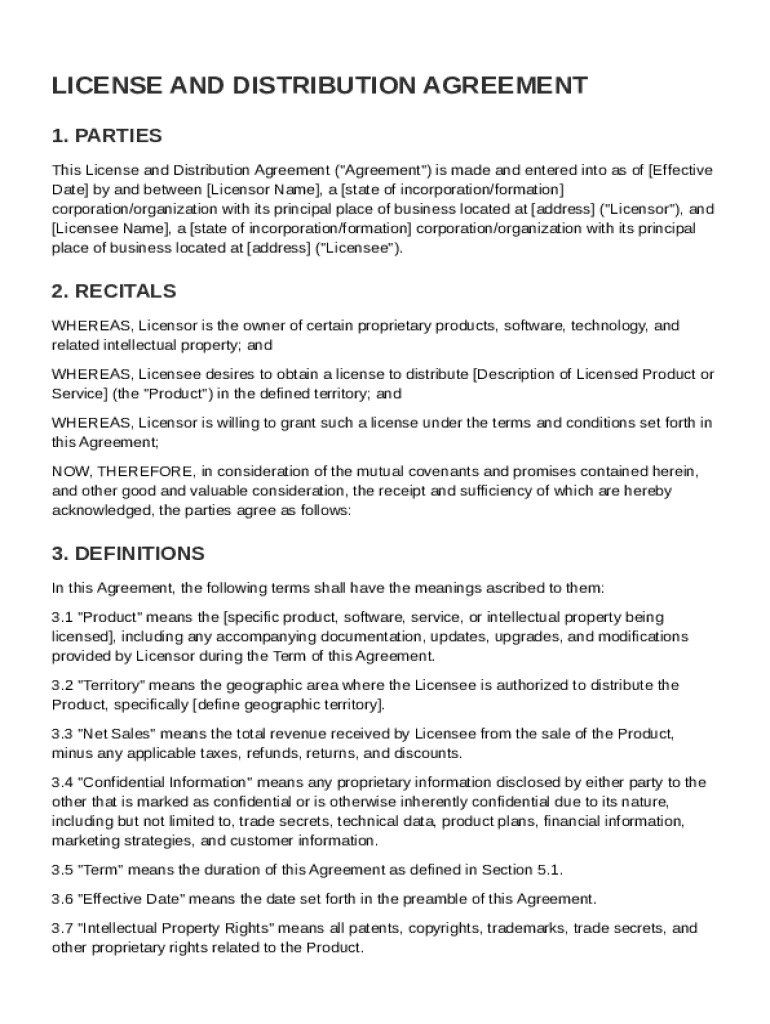
License And Distribution Agreement Form
Use a License And Distribution Agreement Template template to make your document workflow more streamlined.
What this agreement form covers
A License And Distribution Agreement Form records the terms under which one party permits another to use, market, sell, or distribute specified products, content, software, or intellectual property. It identifies the parties, licensed rights, territory, term, exclusivity, payment or royalty obligations, quality standards, reporting duties, confidentiality requirements, and termination procedures. In the United States, electronic execution may be recognized under the ESIGN Act, 15 U.S.C. chapter 96, and applicable state law, including UETA or New York ESRA. The parties should confirm that the completed agreement matches their transaction and any industry-specific requirements.
Who uses this agreement form
Brand owners
Brand owners use this form to define permitted territory, channels, product scope, royalties, quality controls, and reporting duties for distributors.
Distributors
Distributors use the agreement to document authorized sales rights, delivery obligations, payment terms, marketing limits, and termination conditions.
Typical users of this agreement
A software company’s licensing manager uses the form to authorize resellers, record territory limits, and coordinate signatures with channel partners. signNow templates preserve approved commercial language while audit trails document who accepted each obligation and when, supporting contract administration across recurring distribution arrangements. A consumer-goods distributor uses the form to obtain executed rights from manufacturers before selling products. The team tracks pricing, minimum purchase commitments, branding rules, and renewal dates in one signed record, reducing uncertainty when sales, legal, and operations teams review the relationship.
Why teams look for DocuSign alternatives
Organizations seek alternatives when they need different pricing models, stronger native automation, simpler bulk affidavit workflows, or more flexible identity-verification options than those available in a legacy envelope-based vendor.

 Best ROI. Our customers achieve an average 7x ROI within the first six months.
 Scales with your use cases. From SMBs to mid-market, airSlate SignNow delivers results for businesses of all sizes.
 Intuitive UI and API. Sign and send documents from your apps in minutes.
Complete the agreement in signNow
Prepare the License And Distribution Agreement Form in signNow by uploading, checking, routing, signing, and storing the completed record.
Upload document:
Upload the finalized agreement. Place fields:
Review detected fields and add missing signature, date, and initials fields. Assign signers:
Assign fields to the licensor and distributor. Send request:
Send the agreement by email or signing link. Store records:
Download the completed agreement and audit trail.
Recommended agreement workflow setup
Configure the License And Distribution Agreement Form around signer identity, field assignment, audit evidence, secure storage, and controlled access.
| Setting | Recommendation |
|---|---|
| Authentication method | Email verification with SMS OTP |
| Signature type | Legally binding electronic signature |
| Audit trail | Enabled with completed-document export |
| Document retention | Apply transaction-specific retention policy |
| Encryption and access | AES-256 storage with managed provisioning |
How the agreement audit trail works
signNow records the signing events that connect each party to the completed License And Distribution Agreement Form.
Signer authentication:
Timestamp capture:
Document integrity:
Tamper evidence:
Action attribution:
Audit retrieval:
Security for signed agreements
Transport encryption:
Stored-document encryption:
Security reporting:
Information security:
U.S. eSignature framework:
Protected health information:
Platform requirements for signing
A License And Distribution Agreement Form can be prepared through a supported web browser using Chrome, Firefox, Safari, or Edge on Windows or macOS. signNow also provides mobile apps for iOS and Android, allowing parties to review and sign the agreement from supported mobile devices.
Browsers Chrome, Firefox, Safari, Edge Operating systems Windows, macOS, iOS, Android Mobile signing signNow mobile apps
Organizations should use managed devices, current browser versions, and controlled user access when agreements contain confidential pricing, territories, royalty terms, or intellectual-property rights. Teams needing automated routing can evaluate signNow API access, SSO provisioning, and integrations according to their plan and security requirements.
Risks in incomplete agreements
Scope dispute
Territory conflict
Execution gap
Proof weakness



Troubleshooting this agreement workflow
Resolve field, signer, plan, and compliance questions before sending the License And Distribution Agreement Form for execution.
Upload the final License And Distribution Agreement Form as a PDF or supported document, then use signNow’s field detection and editor to place signature, date, initials, and text fields. The Business plan includes templates and audit trails; verify every detected field before sending.
A signer can usually open the request from the email or signing link without creating an account. If the agreement requires stronger identity evidence, Business Premium supports kiosk mode, while Enterprise adds advanced signer authentication options.
For U.S. transactions, capture intent and electronic consent, identify the signer, and preserve a reproducible record. The ESIGN Act and applicable UETA generally support electronic contracts, but excluded records such as wills and court orders require separate legal handling.
Business is listed at $8 per user per month with annual billing and includes legally binding eSignatures, templates, and audit trails. Paid plans include 100 signature invites per user annually; confirm overage treatment before sending high-volume agreements.
Use signNow’s audit trail and completed-document records to preserve signer actions, timestamps, and delivery history. Retain the agreement according to the transaction, industry, and applicable state requirements; no single federal period applies to every distribution contract.
A signer can use email delivery, a shareable signing link, or signNow mobile apps. If a distributor signs on site, Business Premium includes kiosk mode. Confirm that the selected method captures the intended signer and required disclosures.
Key performance indicators that demonstrate SignNow's proven track record.
BE READY TO GET MORE
Get this form now!

If you believe that this page should be taken down, please follow our DMCA take-down process.