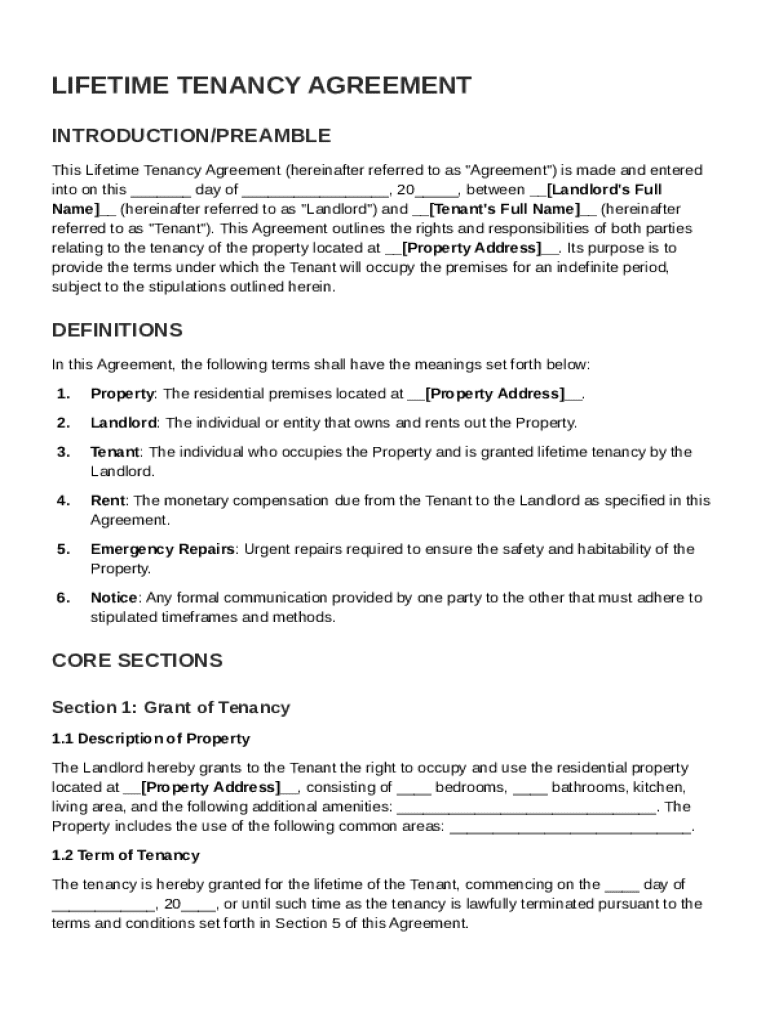
Lifetime Tenancy Agreement Form
Use a Lifetime Tenancy Agreement Template template to make your document workflow more streamlined.
What a lifetime tenancy agreement does
A Lifetime Tenancy Agreement Form records an arrangement allowing a named person to occupy or use specified residential property for life, subject to its written terms and applicable state law. It usually identifies the property, parties, duration, responsibilities, restrictions, and signatures. The document does not automatically transfer title, replace a deed, or override recording and notarization requirements. Parties should confirm whether the arrangement creates a leasehold, life estate, license, or another interest under the relevant state’s property law before signing.
Who benefits from this agreement
The form is most useful when parties need a clear lifetime occupancy record and a controlled signing process, subject to state property law.
Individual property owners can document lifetime occupancy rights for a parent or other named resident, clarifying maintenance, taxes, access, and termination conditions without confusing the arrangement with a deed. Real estate attorneys can use a controlled template to collect owner and resident signatures, preserve the final agreement, and identify state-specific recording or notarization steps before delivery. Property management teams can coordinate multiple signatures and retain completed occupancy agreements with audit trails when their organization’s legal counsel approves electronic execution.
These tasks are executed by both individual contributors and centralized administrators depending on organizational policy and required controls.
Complete the agreement in signNow
Prepare the Lifetime Tenancy Agreement Form in signNow by checking every property term before sending it to the named parties.
Upload:
Upload agreement Check fields:
Review detected fields Add parties:
Assign signers Send:
Send for signatures Archive:
Download completed copy
Ways to send and sign the agreement
- Use the signNow web app when preparing the agreement on a desktop, placing signature fields, assigning parties, and reviewing the completed tenancy record.
- Use the signNow mobile app when landlords, tenants, or authorized representatives need to review and sign the agreement from iOS or Android devices.
- Use kiosk mode when several parties sign together at a property office or meeting, with one managed device presenting the agreement sequentially.
- Use a shareable signing link when distributing the same prepared agreement through a trusted channel, while retaining signer identification and completion records.
 Best ROI. Our customers achieve an average 7x ROI within the first six months.
 Scales with your use cases. From SMBs to mid-market, airSlate SignNow delivers results for businesses of all sizes.
 Intuitive UI and API. Sign and send documents from your apps in minutes.
Review the agreement audit trail
The audit trail records how each party interacted with the Lifetime Tenancy Agreement Form, supporting review of identity, timing, document integrity, and completion evidence.
Authenticate signer:
Capture timestamp:
Hash document:
Seal record:
Log actions:
Export trail:
Recommended agreement workflow setup
Use a controlled signing configuration that preserves party identity, final terms, document integrity, and the state-law requirements applicable to the property.
| Setting | Recommendation |
|---|---|
| Authentication method | Email verification with SMS authentication |
| Signature type | Typed or drawn electronic signature |
| Audit trail | Enabled with downloadable completion record |
| Document retention | Follow applicable state property-law requirements |
| Encryption | TLS 1.2 or TLS 1.3 and AES-256 |
Security for tenancy agreements
Data in transit:
Data at rest:
Independent controls:
Security management:
Electronic signatures:
Signing evidence:
Platform requirements for signing
Prepare the Lifetime Tenancy Agreement Form through a current Chrome, Firefox, Safari, or Edge browser on Windows or macOS. signNow mobile apps support signing on iOS and Android, with encrypted connections using TLS 1.2 or TLS 1.3.
Browser support Chrome, Firefox, Safari, Edge Desktop systems Windows and macOS desktops Mobile signing iOS and Android mobile apps
Organizations should use managed Windows, macOS, iOS, or Android devices when agreements contain addresses, identity details, or property information. Administrators can also evaluate API access, SSO provisioning, and certificate or long-term-validation configuration against internal retention and evidence policies before production use.



Challenges when preparing this agreement
A lifetime tenancy agreement can omit property boundaries, maintenance duties, access rights, or termination conditions, creating avoidable interpretation disputes later. Using a generic lease template may fail to distinguish a lifetime occupancy right from a fixed-term lease or transfer of title. Missing notarization or recording steps can weaken the agreement’s usefulness when state law requires formalities for property-related interests. Sending an unsigned or incomplete copy can leave parties without reliable evidence of consent, final terms, or signing sequence.
Legal standing and practical value
A signed Lifetime Tenancy Agreement Form can document the parties’ intent and agreed occupancy terms, while ESIGN and UETA generally recognize qualifying electronic records and signatures. They do not replace state property-law formalities, deeds, recording rules, or excluded documents such as wills and court orders.

Rules and exclusions to review
Notarization rules
Wills and codicils
Family law documents
Real-estate deeds
Key performance indicators that demonstrate SignNow's proven track record.
Troubleshoot signing and legal issues
These answers address field detection, evidence, plan capabilities, electronic-signature rules, and property-law formalities for this agreement.
Upload the original PDF again, then confirm signNow detected every signature, date, initials, and acknowledgment field. Review property descriptions and party names manually because automatic field detection does not determine whether the agreement satisfies state property law.
Use signNow’s audit trail and completion record to review signer identity, timestamps, actions, and the final document. For a dispute about ownership or enforceability, consult state-specific counsel rather than relying solely on the platform record.
The signNow Business plan includes legally binding eSignatures, templates, mobile apps, and audit trails. Business Premium adds bulk send and kiosk mode; choose features based on the agreement workflow, not on a legal conclusion.
Electronic signing generally requires intent, consent, attribution, and a record that can be retained and reproduced under ESIGN and applicable state law. For consumer-facing records, review the ESIGN disclosure requirements in 15 U.S.C. §7001(c).
Do not use an electronic signing workflow alone for a will, codicil, testamentary trust, court filing, or family-law decree. ESIGN excludes these categories, and state procedures may require witnesses, notarization, or in-person filing.
If the agreement concerns a deed, life estate, or another interest requiring notarization or recording, obtain the required acknowledgment and record it with the applicable local authority. A completed signNow record does not itself complete those steps.
BE READY TO GET MORE
Get this form now!

If you believe that this page should be taken down, please follow our DMCA take-down process.