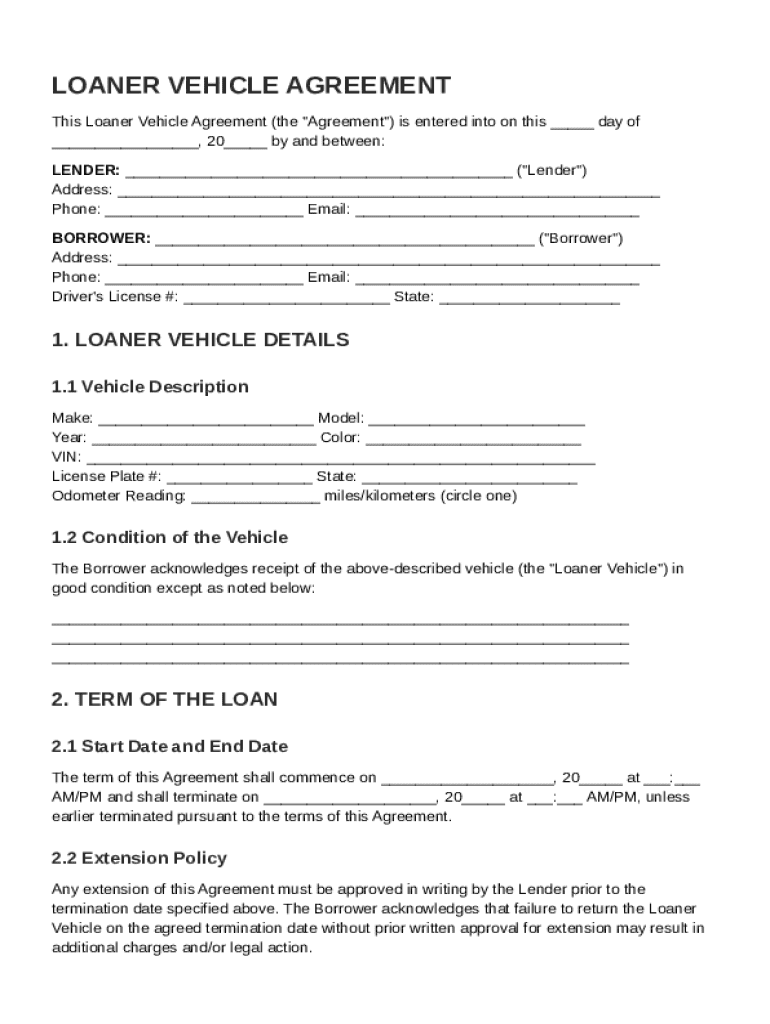
Loaner Vehicle Agreement Form
Use a Loaner Vehicle Agreement Template template to make your document workflow more streamlined.
What a loaner vehicle agreement covers
A Loaner Vehicle Agreement Form records a customer’s temporary receipt and use of a vehicle from a dealership, repair facility, body shop, or fleet operator. It identifies the vehicle and customer, records mileage and condition, states permitted-use and return responsibilities, and captures signatures before release. With signNow, staff upload the approved form, review detected fillable fields, add customer and employee signers, and send it electronically. The completed agreement and audit trail can then be stored with the vehicle or service record. State contract, insurance, and consumer-disclosure requirements may also apply.
Businesses that use loaner agreements
Loaner Vehicle Agreement Form is most useful where staff temporarily release a specific vehicle and must document its condition, authorized use, and return obligations.
Independent repair shops use the form at vehicle pickup to document customer identity, odometer readings, visible damage, permitted use, and return obligations without waiting for an in-person paperwork process. Dealership service departments use reusable agreements across locations, connecting each signed record to a loaner unit, service order, customer, and employee workflow while controlling who may edit templates or send documents. Enterprise rental and fleet operations use role-based sending for high-volume handoffs, preserving consistent vehicle condition records and signed responsibility terms across branches, drivers, and customer-service teams.
These tasks are executed by both individual contributors and centralized administrators depending on organizational policy and required controls.
Features for loaner vehicle agreements
The form combines vehicle handoff details, customer acknowledgments, electronic signatures, and audit evidence in a workflow suited to service and fleet operations.
Vehicle details
Record the VIN or unit identifier, license plate, mileage, fuel level, and visible condition before the vehicle leaves the facility.
Customer record
Capture the customer’s name, contact details, driver information, and required acknowledgment in one structured agreement.
Use terms
State permitted use, geographic limits, additional-driver rules, fuel expectations, and return responsibilities clearly before signing.
Electronic signatures
Collect customer and staff signatures electronically through a signNow invitation, reducing paper handling during vehicle pickup.
Audit trail
Preserve timestamps, signer activity, IP information, and completion history with the signed loaner agreement.
Reusable workflow
Reuse an approved template while connecting completed agreements to service, fleet, or customer records through supported integrations.
Complete a loaner vehicle agreement
Use this signNow workflow to prepare vehicle details, obtain the customer’s signature, and preserve the completed agreement.
Upload form:
Upload the approved Loaner Vehicle Agreement Form to signNow. Check fields:
Review detected fields and add missing vehicle or signer fields. Add signer:
Enter the customer’s email and assign signature fields. Send agreement:
Send the agreement, then monitor completion status. Store record:
Store the completed form with its audit trail.
 Best ROI. Our customers achieve an average 7x ROI within the first six months.
 Scales with your use cases. From SMBs to mid-market, airSlate SignNow delivers results for businesses of all sizes.
 Intuitive UI and API. Sign and send documents from your apps in minutes.
How the loaner agreement audit trail works
signNow records the signing events behind each Loaner Vehicle Agreement Form, creating a reviewable history for customer and fleet records.
Authenticate signer:
Capture timestamps:
Hash document:
Seal record:
Track actions:
Export evidence:
Configure the loaner agreement workflow
Configure authentication, signatures, audit evidence, retention, and encryption before sending Loaner Vehicle Agreement Form records to customers.
| Setting | Recommendation |
|---|---|
| Authentication method | Email verification with SMS OTP |
| Signature type | Typed or drawn electronic signature |
| Audit trail | Enabled for every completed agreement |
| Document retention | Follow documented business and state policy |
| Encryption | AES-256 at rest and TLS 1.2/1.3 |



Security for loaner agreements
Encryption at rest:
Transport security:
Security certification:
Information security:
Signature compliance:
Health data protection:
Best practices for loaner agreements
Accurate vehicle data, clear customer consent, and controlled records make a Loaner Vehicle Agreement Form easier to administer and review.
Maintain one approved master template
Verify vehicle details before sending
Explain terms before signature
Retain the signed agreement securely
Who manages loaner agreement access
Fleet managers
Service departments
Body shops
Dealership groups
Troubleshoot loaner agreement signing
Resolve field, authentication, plan, enforceability, audit-trail, and HIPAA questions before releasing a loaner vehicle.
Upload the approved PDF again and inspect the detected fields. signNow’s Business plan includes templates and audit trails, but staff should confirm vehicle, mileage, condition, and signature fields before sending.
A signer can use a typed or drawn signature after opening the signNow invitation. If stronger attribution is required, configure SMS OTP or another available authentication method before sending the Loaner Vehicle Agreement Form.
The Business plan is listed at $8 per user monthly when billed annually and includes 100 signature invites per user yearly. Business Premium adds bulk send; verify plan usage before sending many agreements.
signNow states that its eSignatures comply with ESIGN and UETA. Legal effect still depends on intent, consent, attribution, and record retention; consumer transactions may require disclosures under 15 U.S.C. §7001(c).
The audit trail records signing activity, timestamps, IP information, and the completion history. Export or retain it with the signed agreement when your policy requires evidence connecting the customer to the vehicle handoff.
If a loaner transaction includes protected health information, signNow identifies HIPAA compliance as requiring a BAA. Confirm that your organization is a covered entity or business associate and execute the BAA before processing PHI.
Key performance indicators that demonstrate SignNow's proven track record.
BE READY TO GET MORE
Get this form now!

If you believe that this page should be taken down, please follow our DMCA take-down process.