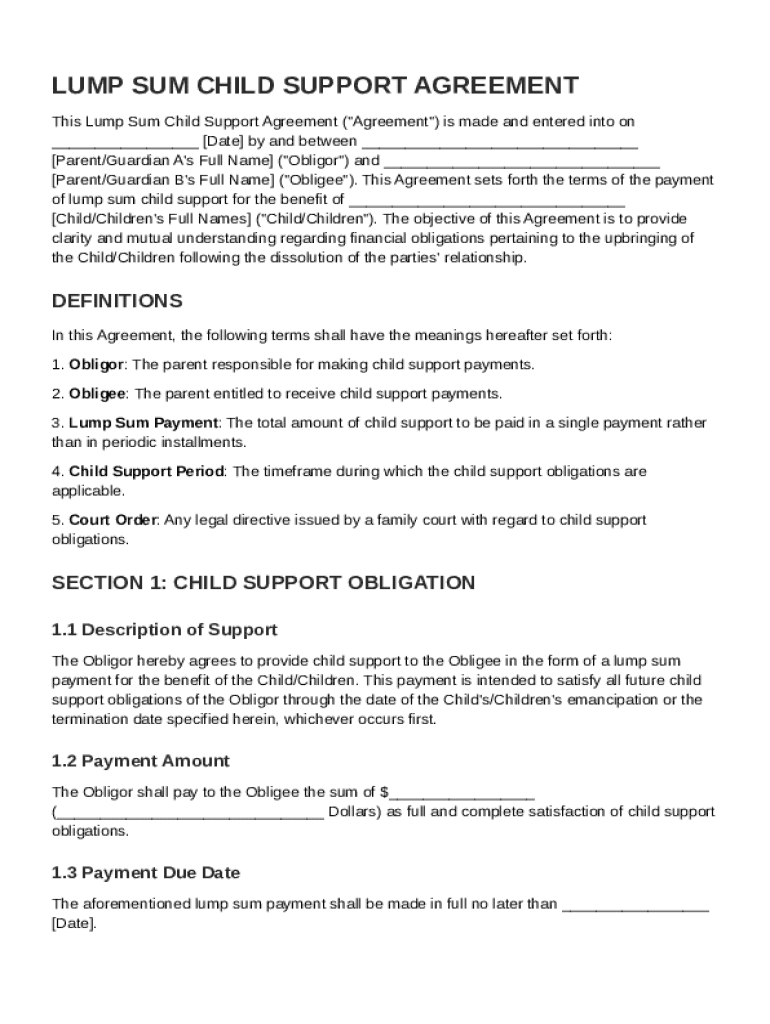
Lump Sum Child Support Agreement Form
Use a Lump Sum Child Support Agreement Template template to make your document workflow more streamlined.
What this child support agreement does
A Lump Sum Child Support Agreement Form records parents’ agreement to satisfy specified child support obligations through a single payment or defined lump-sum arrangement. It should identify the children covered, parties, amount, payment date, and any remaining obligations, with signatures from the required participants. State family-law rules determine whether the agreement needs court approval, notarization, or incorporation into an order. signNow can route the document for electronic signatures, capture an audit trail, and preserve the completed record, but it does not determine legal sufficiency or replace a court’s authority.
Why teams look for DocuSign alternatives
Organizations seek alternatives when they need different pricing models, stronger native automation, simpler bulk affidavit workflows, or more flexible identity-verification options than those available in a legacy envelope-based vendor.

Who uses this agreement form
Parents and guardians
Parents and guardians can use the form to document the agreed lump-sum amount, payment timing, child-related terms, and signatures before submitting materials to counsel or a court.
Family-law professionals
Family-law attorneys and legal-aid teams can prepare, circulate, and retain signed agreements while checking whether state law requires court approval, notarization, or a formal support order.
Organizations that benefit from this form
The form is most useful when parents, counsel, or family-services teams need a documented lump-sum payment agreement with identifiable signers and controlled records.
Solo family-law attorneys can prepare one parent-to-parent agreement, collect signatures remotely, and retain the signed PDF with its audit trail for the client file. Legal-aid organizations can standardize intake agreements for eligible families while limiting access to sensitive child and financial information through controlled signing workflows. Enterprise family-services teams can route high-volume support documentation through shared templates, delegated sending, and integrations while preserving signer history for each matter.
These tasks are executed by both individual contributors and centralized administrators depending on organizational policy and required controls.
Complete the child support agreement
Prepare the payment terms, review every personal detail, then route the agreement for signature and secure recordkeeping.
Upload document:
Upload the agreement PDF to signNow. Check fields:
Review detected fields and add missing amount, date, and signature fields. Assign signer:
Assign the parent or authorized representative as signer. Send agreement:
Send the completed agreement for electronic signature. Store records:
Download the signed copy and audit trail.
 Best ROI. Our customers achieve an average 7x ROI within the first six months.
 Scales with your use cases. From SMBs to mid-market, airSlate SignNow delivers results for businesses of all sizes.
 Intuitive UI and API. Sign and send documents from your apps in minutes.
How the agreement workflow works
The digital workflow preserves the agreement’s payment terms while adding an organized signing record for the parents, counsel, or authorized representatives.
Upload agreement: The sender uploads the child support agreement PDF. Detect fields: signNow detects fillable areas for review and editing. Assign fields: The sender assigns required fields to each signer. Collect signatures: Signers review, consent, and complete the agreement electronically.
Features for lump-sum support agreements
The workflow focuses on accurate payment terms, identified signers, documented consent, and a retrievable record for counsel or authorized family-services personnel.
Defined payment terms
Place the lump-sum amount, payment date, and continuing-obligation language in clearly assigned fields so signers review the terms before signing.
Signer routing
Route the agreement to each parent or authorized representative in a specified signing order when sequential review is required.
Required fields
Use required fields for names, child information, signatures, and dates to reduce incomplete agreement records.
Audit trail
Capture signer activity, timestamps, and document history alongside the completed agreement for later review.
Protected records
Protect sensitive family and financial information with encrypted transmission and storage supported by signNow compliance controls.
Remote signing
Allow signers to review and complete the agreement from a desktop or supported mobile app when remote participation is appropriate.
Security for child support agreements
Data encryption:
Security certification:
Information security:
Privacy compliance:
Signature compliance:
Transport protection:
Privacy and disclosure pitfalls
Listing a single payment without stating the exact amount, payment date, or whether obligations remain afterward. Including Social Security numbers, addresses, or children’s medical details without limiting access to authorized participants. Sending the agreement before capturing each signer’s consent to electronic records and signatures. Using a completed agreement as a court order without checking state family-law approval requirements.
Recommended agreement workflow setup
Use a controlled signing workflow that protects sensitive family information and preserves the agreement, signer actions, and applicable legal records.
| Setting | Recommendation |
|---|---|
| Authentication method | Email verification with SMS OTP |
| Signature type | Typed or drawn electronic signature |
| Audit trail | Export signed agreement and history |
| Document retention | Follow state-law and case policy |
| Encryption | TLS 1.2/1.3 and AES-256 |
What the audit trail records
For this agreement, the audit trail connects signer identity, signing activity, document history, and the final record without changing the underlying payment terms.
Authenticate signer:
Timestamp action:
Seal record:
Export evidence:
Retrieve record:
Verify contents:
Check state-law exclusions
May require court review
Excluded from ESIGN
State rules may apply
Separate deed rules apply
Best practices for this agreement
Accurate terms, controlled access, informed consent, and disciplined recordkeeping reduce avoidable disputes about what the parties agreed to sign.
Verify every payment term
Restrict sensitive information
Document electronic consent
Preserve the final record
Troubleshoot child support agreement signing
Resolve signing, consent, plan, and legal-scope questions before treating the electronic record as complete.
Business includes legally binding eSignatures, templates, audit trails, and mobile apps at $8/user/month with annual billing. The 7-day free trial requires no credit card. Confirm that the agreement’s state-law requirements are satisfied separately.
signNow supports ESIGN and UETA-compliant electronic signatures. For a consumer-facing agreement, provide the required electronic-record disclosure, confirm access to the electronic format, and explain how consent may be withdrawn under 15 U.S.C. §7001(c).
An electronic agreement is not automatically a court-approved support order. ESIGN’s exceptions include court orders and family-law decrees, including adoption and divorce decrees. Check the applicable state court and family-law process before relying on this form.
Use signNow’s field review to verify the lump-sum amount, payment date, child information, and signer assignments before sending. Correcting an incomplete agreement may require a new signing transaction and a new audit record.
Business Premium costs $15/user/month with annual billing and adds bulk send and kiosk mode. A single family agreement usually needs neither feature, so choose a plan based on actual workflow volume and authentication requirements.
signNow provides audit trails and signed-document history, while retention periods come from the applicable law and case requirements. Export the completed agreement and audit trail, then preserve them under counsel’s approved retention policy.
Key performance indicators that demonstrate SignNow's proven track record.
BE READY TO GET MORE
Get this form now!

If you believe that this page should be taken down, please follow our DMCA take-down process.