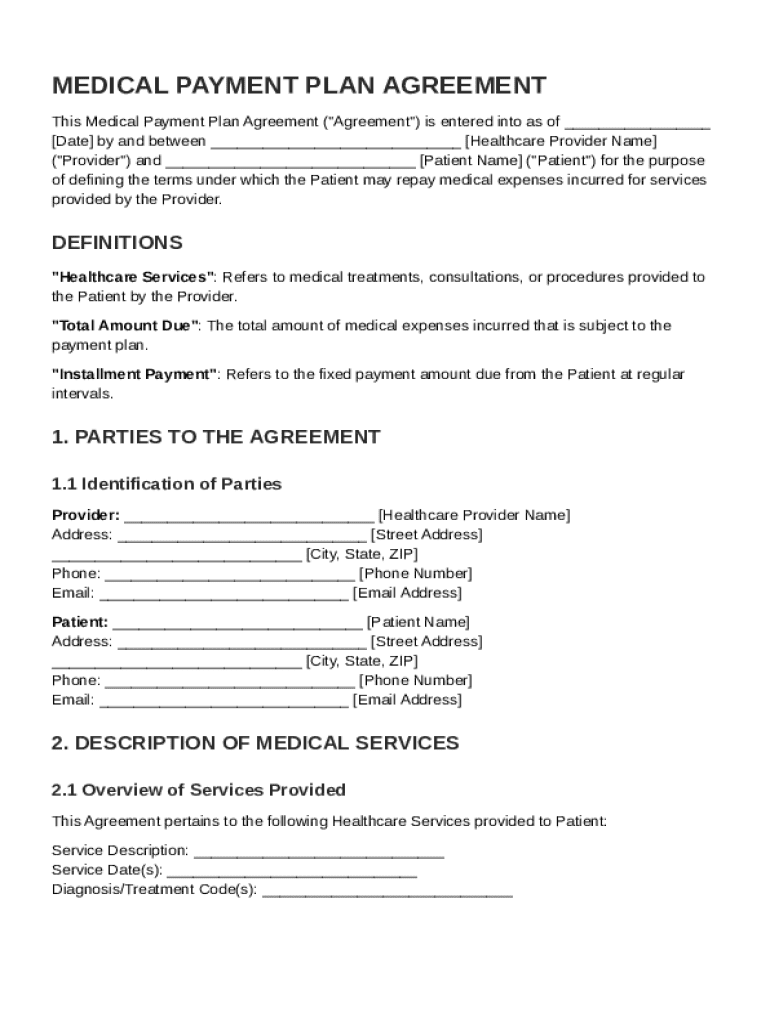
Medical Payment Plan Agreement Form
Use a Medical Payment Plan Agreement Template template to make your document workflow more streamlined.
What this medical payment agreement does
A Medical Payment Plan Agreement Form records how a patient or guarantor will pay an outstanding healthcare balance over scheduled installments. It identifies the parties, account or service balance, payment amounts, due dates, accepted methods, financial responsibility, and signatures. A provider can upload the agreement to signNow, place fields for the patient and authorized representative, send it for electronic signature, and retain the completed PDF with its audit trail. For consumer-facing records, ESIGN requires electronic-consent disclosures and access procedures under 15 U.S.C. §7001(c).
Who uses this medical payment agreement
Healthcare providers
Medical providers use this agreement to document installment amounts, due dates, patient responsibilities, insurance adjustments, and authorization for recurring medical payments.
Patients and guarantors
Patients and guarantors review balances, payment schedules, consent language, and signature fields before returning an enforceable payment arrangement.
Healthcare organizations using the form
The form fits patient billing workflows that require documented installment terms, accountable signatures, and controlled access to payment information.
Solo medical practices use the form to document self-pay balances, installment amounts, and patient signatures without adding repeated paper appointments to billing workflows. Hospital and clinic billing teams use standardized agreements to coordinate patient, guarantor, and representative signatures while protecting payment information under HIPAA requirements. Healthcare enterprises use shared templates, delegated sending, and audit exports to manage payment plans across departments, facilities, and authorized revenue-cycle staff.
These tasks are executed by both individual contributors and centralized administrators depending on organizational policy and required controls.
Features for medical payment agreements
signNow combines field assignment, signer authentication, audit evidence, and protected storage for patient-specific installment arrangements.
Payment schedule
Record the total medical balance, installment amount, due dates, late-payment terms, and responsible party in one patient-specific agreement that billing staff can review consistently.
Role-based fields
Use assigned fields for patients, guarantors, providers, and representatives so each signer completes only the information connected to their payment obligation.
Audit evidence
Capture electronic signatures, timestamps, delivery events, and signer activity alongside the completed payment agreement for later billing or dispute review.
HIPAA safeguards
Protect agreements containing patient balances and health-related information through HIPAA-compliant workflows when a business associate agreement is in place.
Reusable templates
Send the same approved payment-plan template across locations while preserving required provider disclosures and patient-consent language.
Mobile signing
Allow patients to review and sign the payment arrangement from desktop or mobile devices without requiring an in-person billing appointment.
Complete the medical payment agreement
Follow these steps to turn the patient’s agreed installment terms into a signed, auditable record.
Upload agreement:
Upload the approved medical payment agreement PDF. Place fields:
Let signNow detect fields, then add patient and guarantor fields. Assign signers:
Assign signatures, payment terms, dates, and initials. Send agreement:
Send the agreement and authentication instructions. Store evidence:
Review the signed PDF and export its audit trail.
 Best ROI. Our customers achieve an average 7x ROI within the first six months.
 Scales with your use cases. From SMBs to mid-market, airSlate SignNow delivers results for businesses of all sizes.
 Intuitive UI and API. Sign and send documents from your apps in minutes.
How signNow handles this agreement
The workflow keeps patient payment terms, signer actions, and completion evidence connected from upload through archival.
Upload: Upload the patient-specific payment plan. Prepare: Auto-detect fields and assign each signer. Deliver: Send the agreement through email or link. Complete: Store signatures with the audit trail.
Recommended medical agreement setup
Configure signer identity, evidence, storage, and access controls around the patient payment terms recorded in this agreement.
| Setting | Recommendation |
|---|---|
| Authentication method | SMS OTP for patient signers |
| Signature type | Typed or drawn electronic signature |
| Audit trail | Export certificate with completed agreement |
| Document retention | 6 years for HIPAA records |
| Encryption | TLS 1.2/1.3 and AES-256 |
How the payment agreement audit trail works
The audit trail records technical evidence around this patient payment arrangement, from signer authentication through retrieval of the completed record.
Authenticate signer:
Capture timestamps:
Seal document:
Link activity:
Create certificate:
Export evidence:
Authenticate medical payment plan signers
PKI foundation:
X.509 certificates:
Two-factor authentication:
SMS OTP:
ID verification:
Signer attribution:
Privacy pitfalls in payment agreements
Including diagnosis details or full insurance numbers exposes more patient information than the payment arrangement requires. Missing electronic-consent language can weaken evidence that a patient agreed to receive and sign records electronically. Shared links without signer authentication can expose balances, payment terms, and protected health information to unintended recipients. Broad staff permissions allow unauthorized changes, downloads, or disclosures of completed medical payment agreements.
Legal standing of the payment agreement
An electronically signed Medical Payment Plan Agreement Form can be enforceable when the parties show intent, consent, attribution, and reliable record retention under ESIGN, 15 U.S.C. ch. 96, and applicable state law such as UETA. Wills, court orders, family-law decrees, and other statutory exclusions remain outside those rules.

State rules and document exclusions
State notarization
Wills and trusts
Family law
Real-estate deeds
Processing the payment agreement
Use a controlled sequence to prepare, deliver, sign, and archive the Medical Payment Plan Agreement Form without losing payment evidence.
Prepare the document
Deliver to signers
Review and sign
Complete and archive
Medical payment agreement retention periods
Retain signed agreements according to the record category and the strictest applicable federal or state requirement.
6 years for HIPAA records
3 years for tax records
3 years for payroll records
5 years for injury records
7 years for audit records
Best practices for agreement records
Accurate retention and controlled archival preserve the payment terms, signer evidence, and patient-data safeguards needed for later review.
Classify records before setting retention
Export the audit trail with agreements
Archive agreements with restricted access
Review retention rules annually
Medical payment agreement troubleshooting
Resolve field, consent, authentication, HIPAA, and plan-limit questions before sending a patient’s payment arrangement.
Upload the original PDF again and confirm that every patient, guarantor, amount, due-date, and signature field is assigned to the intended signer. signNow’s field placement and template tools help rebuild the agreement before sending.
Use a signNow Business Premium or Enterprise workflow when the same approved payment agreement must be sent to many patients. Business Premium includes bulk send, while Business includes templates and audit trails without bulk-send functionality.
A healthcare provider should confirm that its signNow arrangement includes the required business associate agreement before processing protected health information. signNow identifies HIPAA compliance as requiring a BAA; the provider remains responsible for its disclosures and controls.
For consumer-facing electronic records, provide the ESIGN consumer disclosure, explain the right to receive paper records, demonstrate electronic access, and provide withdrawal procedures under 15 U.S.C. §7001(c). SignNow can capture signatures, but the provider must deliver compliant disclosures.
Use SMS OTP or another configured authentication method when the payment agreement requires stronger signer attribution. signNow audit trails record timestamps and signer actions, but staff should verify the patient’s contact information before sending.
Business plans include 100 signature invites per user annually, with overage fees; Site License pricing is $1.50 per signature invite. Confirm the selected plan before sending high-volume patient agreements or relying on unlimited workflow volume.
Key performance indicators that demonstrate SignNow's proven track record.
BE READY TO GET MORE
Get this form now!

If you believe that this page should be taken down, please follow our DMCA take-down process.