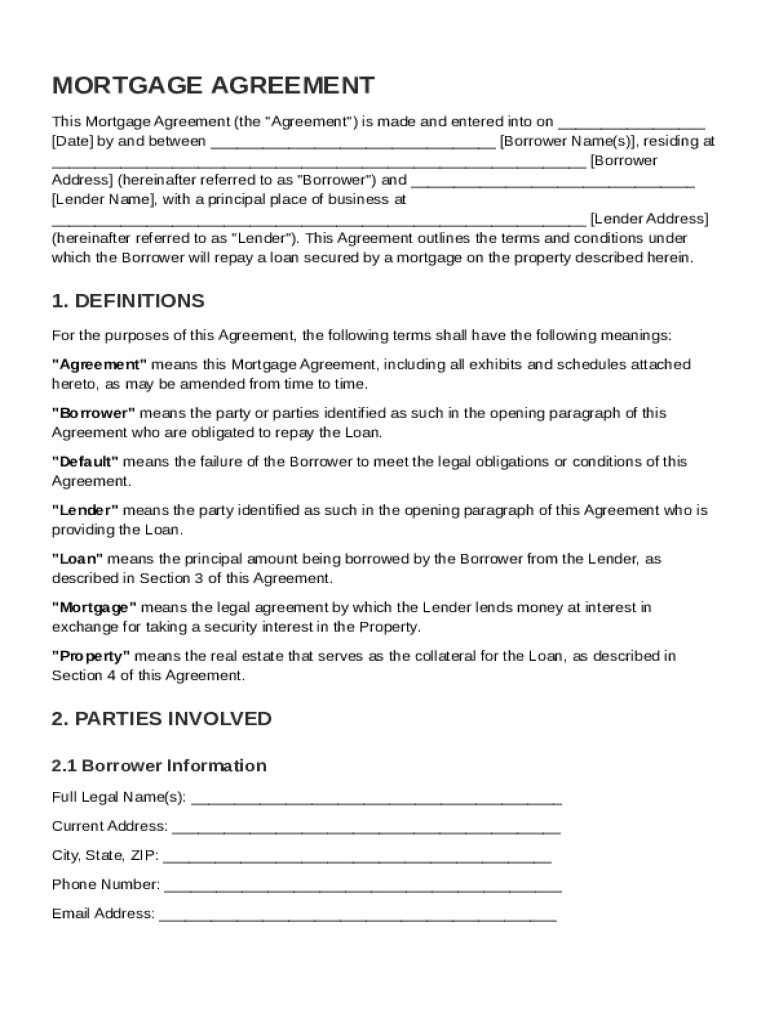
Mortgage Agreement Form
Use a Mortgage Agreement Template template to make your document workflow more streamlined.
What a Mortgage Agreement Form does
A Mortgage Agreement Form records the borrower’s and lender’s agreement about a loan secured by real property. It usually identifies the parties, property, principal, interest terms, payment obligations, default provisions, and signatures, although exact clauses vary by transaction and state law. With signNow, a sender uploads the approved document, reviews detected fillable fields, assigns each field to the correct signer, and sends it electronically. Signers review and complete their assigned fields, while signNow records timestamps and actions in an audit trail for the completed agreement. Recording or notarization requirements remain subject to applicable state law.
Who benefits from mortgage agreement workflows
Mortgage Agreement Form workflows help lending, real estate, and legal teams collect signatures consistently while preserving document history and access controls.
Mortgage brokers and independent loan officers use reusable Mortgage Agreement Form templates to collect borrower and lender signatures without coordinating repeated office appointments. Real estate law practices use role-based sending and audit trails to organize signed Mortgage Agreement Forms alongside closing records and related transaction documents. Enterprise lending departments use shared templates, delegated sending, and administrator controls to standardize Mortgage Agreement Form workflows across branches and approved users.
These tasks are executed by both individual contributors and centralized administrators depending on organizational policy and required controls.
How Mortgage Agreement Form works
The signNow workflow moves the Mortgage Agreement Form from approved draft to assigned signatures and an auditable completed record.
Upload the form: Upload the approved Mortgage Agreement Form and let signNow identify available fillable fields. Check the fields: Review property, loan, payment, and signature fields before assigning each field to a signer. Route for signing: Send the agreement by email or generate a signing link for authorized participants. Complete and retain: Store the completed agreement with its audit trail and follow applicable state recording requirements.
How the mortgage agreement audit trail works
A signNow audit trail records who handled the Mortgage Agreement Form, when each action occurred, and how the completed record can be reviewed later.
Signer authentication:
Timestamp capture:
Document hashing:
Tamper-evident sealing:
Event logging:
Audit export:
 Best ROI. Our customers achieve an average 7x ROI within the first six months.
 Scales with your use cases. From SMBs to mid-market, airSlate SignNow delivers results for businesses of all sizes.
 Intuitive UI and API. Sign and send documents from your apps in minutes.
Platform requirements for mortgage agreements
Use Chrome, Firefox, Safari, or Edge on Windows or macOS for Mortgage Agreement Form preparation. signNow mobile apps support iOS and Android, while TLS 1.2 or 1.3 protects data in transit.
Browser support Chrome, Firefox, Safari, and Edge on Windows or macOS Mobile access iOS and Android mobile apps support document review and signing Secure connection TLS 1.2 or 1.3 protects transmitted form data
Organizations preparing Mortgage Agreement Forms should manage supported Windows, macOS, iOS, and Android devices through their security policies. Confirm browser updates, identity controls, and retention settings before sending forms. Teams using API access, SSO provisioning, or regulated workflows should also validate certificates, authentication requirements, and access permissions with their administrators.
Recommended mortgage agreement setup
Configure the Mortgage Agreement Form workflow around signer identity, electronic signature evidence, secure storage, and the retention rules governing the transaction.
| Setting | Recommendation |
|---|---|
| Authentication and provisioning | Use signer verification with role-based access |
| Signature type | Use typed or drawn electronic signatures |
| Audit trail | Capture timestamps, IP data, and actions |
| Document retention | Retain records under applicable state policy |
| Encryption | Use TLS 1.2 or 1.3 and AES-256 |
Security controls for mortgage agreements
Data encryption:
Transport security:
Stored data:
Security certification:
Information security:
Signature compliance:
Best practices for mortgage agreements
Accurate fields, clearly assigned signatures, and controlled record handling make a completed Mortgage Agreement Form easier to review and defend.
Verify transaction terms
Assign every signature field
Archive the signed record
Set a documented retention rule
State rules and document limits
State acknowledgment
Deed formalities
Missing audit evidence
Incorrect signatures
Key features for mortgage agreements
signNow connects field preparation, signer routing, audit evidence, and secure record handling to the specific Mortgage Agreement Form workflow.
Field preparation
Upload the approved Mortgage Agreement Form and review automatically detected fields before assigning borrower, lender, guarantor, or witness information to the appropriate signer.
Signer routing
Route the agreement to multiple parties in a defined order, helping borrowers and lenders complete signatures without exchanging successive paper copies.
Audit trail
Capture timestamps, signer actions, and document history with the completed Mortgage Agreement Form so transaction teams can review the signing sequence.
Reusable templates
Use reusable Mortgage Agreement Form templates for recurring lending transactions while preserving control over approved language and assigned fields.
Mobile signing
Review and sign from signNow mobile apps when a borrower or loan professional is away from a desktop workstation.
Data protection
Protect mortgage records with encryption in transit and at rest, supporting controlled handling of financially sensitive information.
Key performance indicators that demonstrate SignNow's proven track record.
Mortgage Agreement Form troubleshooting
Resolve the most specific Mortgage Agreement Form issues by checking field assignments, signer identity, state formalities, audit evidence, and plan capabilities.
Upload the approved PDF again and inspect detected fields before sending. On the Business plan, signNow provides templates, audit trails, and mobile apps; manually add or reassign any field that automatic detection does not place correctly.
Check that the borrower’s email address is correct, the signer assignment matches the field owner, and the invitation has not expired. Generate a fresh invitation or signing link after correcting the recipient details.
A typed, drawn, or click-based signature can support the Mortgage Agreement Form when intent, consent, attribution, and record retention are established under ESIGN and applicable UETA rules. Confirm any additional lender or state requirements before use.
signNow’s audit trail records signing actions, timestamps, and document history. Export the completed Mortgage Agreement Form with its audit evidence, then preserve both files under the lender’s retention and litigation-hold procedures.
Mortgage agreements may involve notarization, witnesses, or recording requirements that vary by state. ESIGN does not eliminate those separate formalities; confirm the applicable state statute, recorder requirements, and lender instructions before relying on an electronic signature.
The Business plan is listed at $8 per user per month with annual billing and includes 100 signature invites per user per year. Business Premium adds bulk send, while Enterprise adds advanced signer authentication and formula fields.
BE READY TO GET MORE
Get this form now!

If you believe that this page should be taken down, please follow our DMCA take-down process.