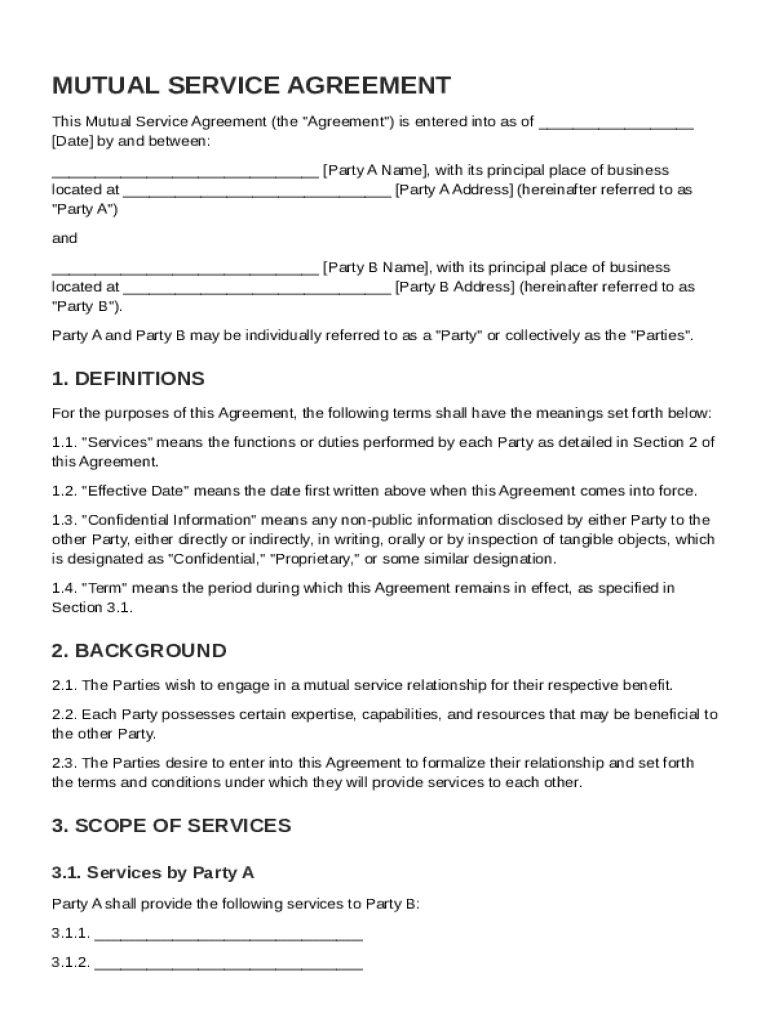
Mutual Service Agreement Form
Use a Mutual Service Agreement Template template to make your document workflow more streamlined.
What the Mutual Service Agreement Form does
A Mutual Service Agreement Form records the terms two parties accept when exchanging defined services, responsibilities, payment conditions, confidentiality obligations, or other negotiated commitments. It normally identifies the parties, describes the services, states each party’s duties, and provides signature and effective-date fields. With signNow, a sender uploads the agreement, confirms fillable fields, routes it to the named parties, and receives a signed copy with an audit trail. ESIGN and applicable state law can support electronic execution when intent, consent, attribution, and record retention requirements are satisfied.
How to complete the agreement online
Use this signNow workflow to prepare, route, sign, and preserve the Mutual Service Agreement Form without losing its negotiated terms.
Upload form:
Upload the Mutual Service Agreement Form and review its existing fields. Check fields:
Use signNow field detection, then confirm names, dates, and signature locations. Send agreement:
Add each contracting party and send the agreement for electronic signature. Store records:
Review the signed copy and retain its audit trail with the agreement.
How the Mutual Service Agreement Form audit trail works
The audit trail records identity, timing, integrity, and retrieval evidence for each signed Mutual Service Agreement Form.
Signer authentication:
Identity verification:
Timestamp capture:
Document hashing:
Tamper-evident seal:
Audit export:
 Best ROI. Our customers achieve an average 7x ROI within the first six months.
 Scales with your use cases. From SMBs to mid-market, airSlate SignNow delivers results for businesses of all sizes.
 Intuitive UI and API. Sign and send documents from your apps in minutes.
Recommended agreement workflow setup
Configure authentication, signatures, audit evidence, retention, encryption, and access around the Mutual Service Agreement Form’s business context.
| Setting | Recommendation |
|---|---|
| Authentication method | Email verification with SMS OTP |
| Signature type | Electronic signature with signer intent |
| Audit trail | Enabled with completion certificate |
| Document retention | Apply the underlying record rule |
| Encryption | TLS 1.2 or 1.3 and AES-256 |
Platform requirements for signing
Complete the Mutual Service Agreement Form in Chrome, Firefox, Safari, or Edge on Windows or macOS. signNow also provides iOS and Android mobile apps for reviewing and signing agreement documents. Use a current browser with TLS-enabled connectivity and maintain reliable access to email or configured signer authentication.
Browsers Chrome, Firefox, Safari, and Edge Desktop systems Windows and macOS computers Mobile apps iOS and Android mobile apps
Organizations handling confidential service terms should use managed Windows, macOS, iOS, or Android devices, restrict downloads, and assign workspace permissions carefully. Enterprise deployments may connect signNow through API integrations or SSO provisioning, while regulated workflows should configure authentication, audit-trail access, and certificate or long-term-validation requirements according to the records being created.



Best practices for this agreement
Use these controls to preserve the negotiated terms, signer evidence, privacy, and retention history of each Mutual Service Agreement Form.
Confirm negotiated terms before sending
Assign each party a signer role
Archive the agreement and audit trail
Limit access to agreement records
Retention periods for signed agreements
Retention depends on the business context attached to the Mutual Service Agreement Form, so apply the rule governing the underlying records.
Six years for HIPAA records
Three years for tax records
Six years for larger understatements
Three years for payroll records
Five years for injury records
Privacy and disclosure pitfalls
Personal addresses, payment details, or service terms may remain visible to every recipient included on the signed agreement. A missing electronic-record consent disclosure can weaken the evidence that each party agreed to transact electronically. Sending the agreement to an unverified email address can misattribute a signature to the wrong contracting party. Broad workspace permissions may let unauthorized staff download, edit, or redistribute the completed agreement.
Troubleshooting signed agreement workflows
Resolve field, signer, consent, plan, legal-scope, and retention questions before relying on a completed Mutual Service Agreement Form.
Upload the signed agreement, confirm every detected field, and compare the populated text with the negotiated version. signNow Business includes templates and audit trails, but the sender remains responsible for correcting misplaced fields before delivery.
A signer can use an email invitation or configured SMS OTP when stronger identity evidence is needed. signNow supports two-factor authentication options, but authentication strength should match the agreement’s confidentiality and risk requirements.
For consumer-facing transactions, provide the ESIGN Act electronic-record disclosure and confirm the recipient can access the format. Section 15 U.S.C. §7001(c) also requires a way to withdraw consent and request paper records.
signNow Business is listed at $8 per user per month with annual billing and includes 100 signature invites per user annually. Business Premium is $15 and adds bulk send; Enterprise is $30 and adds advanced signer authentication.
A Mutual Service Agreement Form is not a will, court order, family-law decree, or other excluded record under 15 U.S.C. §7003. If the document incorporates an excluded transaction, obtain qualified legal review before relying on electronic execution.
Export the completed agreement and audit trail together, then apply the rule for the underlying record. For HIPAA-covered records, 45 CFR §164.530(j) requires six years; other business records may follow different federal or state rules.
Key performance indicators that demonstrate SignNow's proven track record.
BE READY TO GET MORE
Get this form now!

If you believe that this page should be taken down, please follow our DMCA take-down process.