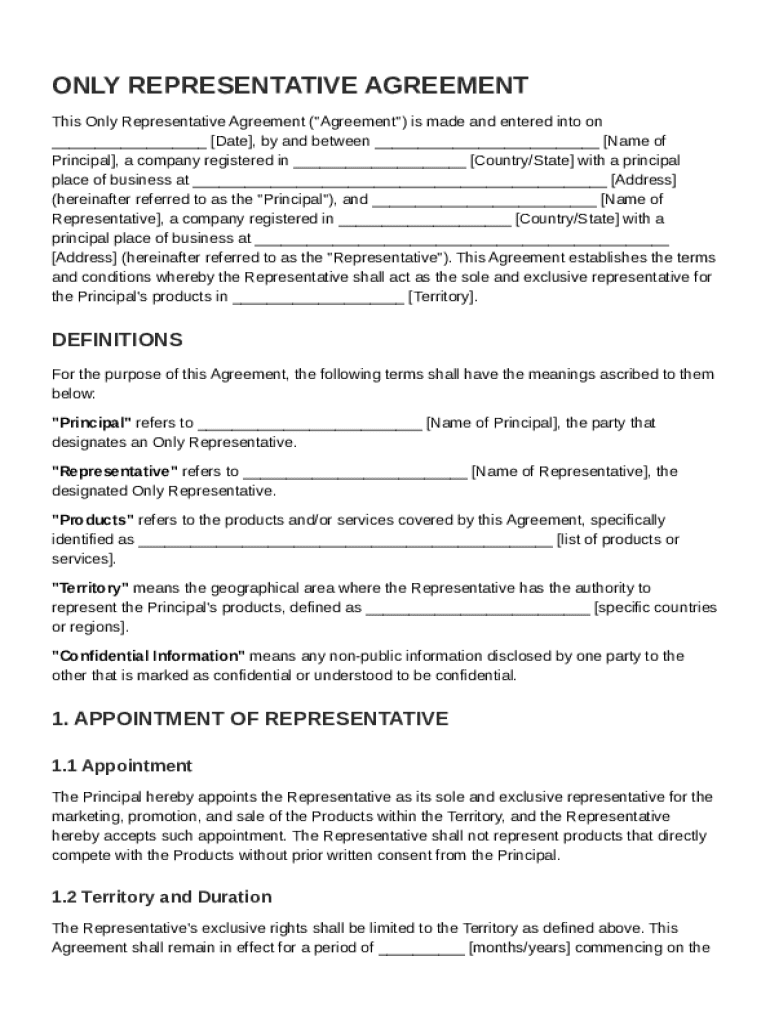
Only Representative Agreement Form
Use a Only Representative Agreement Template template to make your document workflow more streamlined.
What this representative agreement does
An Only Representative Agreement Form appoints a named person or organization to act for another party within defined limits. It records the representative’s identity, the appointing party, the scope of authority, responsibilities, effective dates, and signatures. In signNow, upload the agreement, let the platform detect fillable areas, assign fields to each signer, and send it by email or signing link. The completed PDF and audit trail preserve the signing history. ESIGN and UETA generally support electronic records when intent, consent, attribution, and reproducible retention are established.
Who uses this representative agreement
Small businesses
Businesses appointing an authorized representative use the agreement to document authority, responsibilities, communication channels, and approval boundaries before work begins.
Regulated teams
Legal, healthcare, financial, and construction teams use signed representative agreements alongside contracts, consent forms, invoices, and controlled internal records.
Complete the agreement in signNow
Use this sequence to prepare the Only Representative Agreement Form, obtain signatures, and preserve the completed record.
Upload document:
Upload the current agreement to signNow. Check fields:
Review detected fields and add missing representative details. Assign roles:
Assign signature and date fields to each signer. Send agreement:
Send by email or create a signing link. Archive record:
Review the completed PDF and audit trail.
Recommended agreement workflow setup
Configure the Only Representative Agreement Form around clear signer identity, attributable consent, audit evidence, and the retention rule governing the underlying record.
| Setting | Recommendation |
|---|---|
| Authentication method | Email attribution with SMS OTP |
| Signature type | Typed or drawn eSignature |
| Audit trail | Enable completion history |
| Document retention | Apply the governing record rule |
| Encryption | TLS 1.2/1.3 and AES-256 |
 Best ROI. Our customers achieve an average 7x ROI within the first six months.
 Scales with your use cases. From SMBs to mid-market, airSlate SignNow delivers results for businesses of all sizes.
 Intuitive UI and API. Sign and send documents from your apps in minutes.
How the audit trail supports evidence
The signNow audit trail connects the representative’s actions to the finished agreement and helps preserve a reviewable signing history.
Authenticate signer:
Capture timestamps:
Record document history:
Seal completion:
Link certificate:
Export audit trail:
Signer authentication and certificates
Signer attribution:
Two-factor authentication:
ID verification:
Digital certificates:
Certificate standard:
Audit evidence:



Best practices for representative agreements
Clear authority language, controlled fields, proportionate authentication, and complete archival strengthen the agreement’s operational and evidentiary value.
Define authority before sending
Control the approved template
Match authentication to risk
Archive the complete record
Retention periods for signed records
Keep the agreement, completion certificate, and audit trail according to the record category and applicable federal or industry rule.
Three years from filing
Six years for understatement
Six years for HIPAA
Six years for broker records
Seven years for audit records
Legal standing of the agreement
A properly completed agreement clarifies authority and gives the parties a reproducible record of consent, attribution, and scope. Under ESIGN, 15 U.S.C. ch. 96, and applicable UETA provisions, an electronic signature can support enforceability when statutory requirements are met. Wills, court filings, and specified family-law documents remain excluded.

Platform requirements for signing
Open the Only Representative Agreement Form in Chrome, Firefox, Safari, or Edge on Windows or macOS. signNow mobile apps support iOS and Android, while encrypted connections use TLS 1.2/1.3.
Web browsers Chrome, Firefox, Safari, Edge Mobile apps iOS and Android signNow apps Secure connection TLS 1.2/1.3 connection
Organizations should manage access through approved devices and user permissions. Enterprise deployments may require SSO, API access, or advanced authentication; confirm the selected signNow plan before assigning the agreement workflow to a larger team.
Challenges when preparing the agreement
The representative’s legal name, authority, or organization details may be incomplete, making the agreement harder to attribute to the intended party. Unassigned signature, date, or acknowledgment fields can leave the Only Representative Agreement Form incomplete after delivery. Different versions of the agreement can circulate when teams edit local files instead of using one controlled signNow template. The final signed document may lack its audit trail if staff download only the PDF and omit the completion record.
Only Representative Agreement Form troubleshooting
Resolve field assignment, authentication, consent, compliance, and archival questions before sending this agreement for signature.
Open the Only Representative Agreement Form in signNow, confirm every required representative field is assigned, and use the Business plan’s audit trail to document signer actions. ESIGN and UETA recognize electronic signatures when intent, consent, attribution, and record reproduction are established.
The Business plan includes legally binding eSignatures, templates, and audit trails for this agreement. If your workflow requires bulk sending, Business Premium adds bulk send; Enterprise adds advanced signer authentication and conditional fields.
For a consumer-facing agreement, provide an ESIGN disclosure explaining electronic-record access, paper-record rights, and consent withdrawal procedures under 15 U.S.C. §7001(c). Capture that consent before the representative signs in signNow.
Use signNow’s SMS verification or another available authentication control when representative identity needs stronger evidence. Advanced signer authentication is listed with Enterprise, while the audit trail records authentication-related actions and timestamps.
If the agreement contains protected health information, use a signNow HIPAA workflow with a business associate agreement. HIPAA compliance requires the applicable safeguards and a six-year retention period under 45 CFR §164.530(j).
Export the completed agreement and its signNow audit trail together, then store both in a controlled repository. The record should remain reproducible, attributable, and available for the retention period required by the applicable transaction or industry rule.
Key performance indicators that demonstrate SignNow's proven track record.
BE READY TO GET MORE
Get this form now!

If you believe that this page should be taken down, please follow our DMCA take-down process.