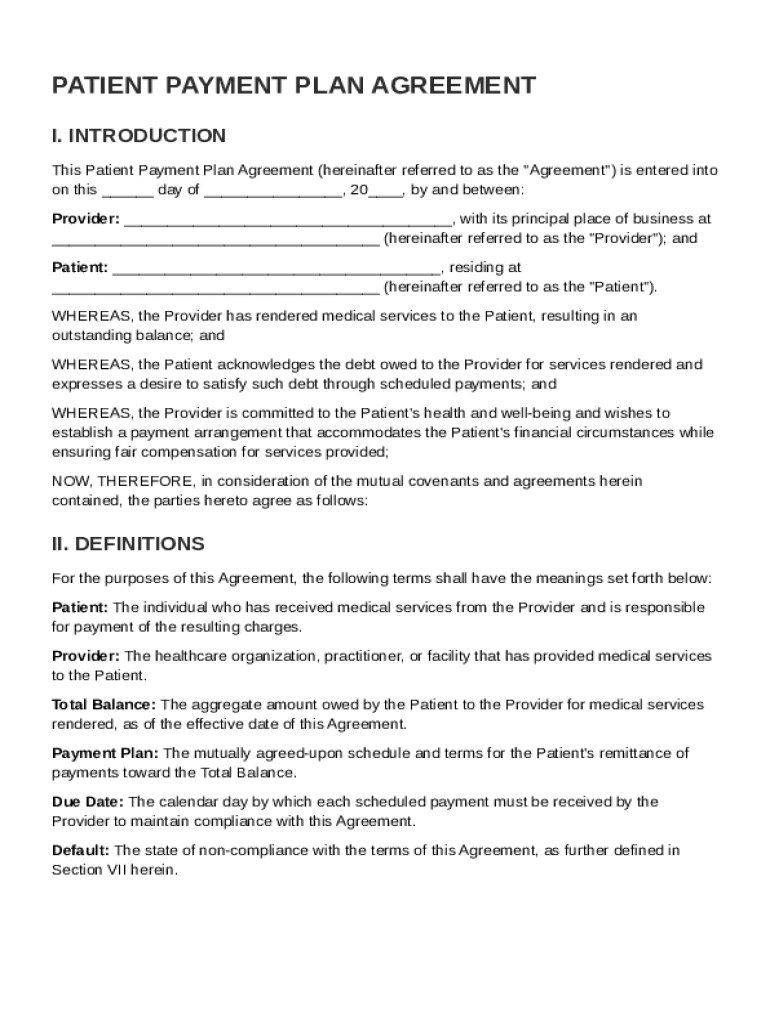
Patient Payment Plan Agreement Form
Use a Patient Payment Plan Agreement Template template to make your document workflow more streamlined.
What a patient payment plan agreement does
A Patient Payment Plan Agreement Form records a patient’s consent to repay an outstanding healthcare balance under stated terms. It identifies the patient and provider, describes the balance or services covered, sets the payment amount and schedule, and records signatures. The completed agreement helps both parties understand when payments are due, how missed payments are handled, and where notices should be sent. In a U.S. healthcare workflow, staff should review applicable state contract rules, consumer disclosures, and HIPAA obligations before sending it for electronic signature.
Who uses this payment plan form
Healthcare providers
Medical practices and clinics use the form to document patient balances, installment amounts, due dates, and authorization for recurring or scheduled payments.
Patients and representatives
Patients or authorized representatives review the balance, payment schedule, missed-payment terms, and electronic-record consent before signing the agreement.
Who benefits from patient payment plans
Healthcare organizations use this form to document installment terms while giving patients a clear, reviewable record of their obligations.
A solo medical practice can send installment terms after reviewing a patient balance, collect the patient’s signature remotely, and retain the completed agreement with its signing history. A multi-location clinic can standardize payment-plan templates, route agreements to patients electronically, and give billing teams a consistent record of signed terms across locations. A hospital revenue-cycle department can manage high-volume patient agreements through controlled templates, signer authentication, and auditable storage for authorized finance and compliance staff.
These tasks are executed by both individual contributors and centralized administrators depending on organizational policy and required controls.
Features for patient payment agreements
signNow combines field preparation, patient signing, audit evidence, security controls, and integrations for documenting healthcare payment arrangements.
Reusable template
Upload the Patient Payment Plan Agreement Form and place patient, provider, date, and acknowledgment fields without rebuilding the document from paper.
Remote signing
Route the agreement to the patient by email or signing link, reducing delays caused by clinic visits or mailed paperwork.
Audit trail
Capture signer actions, timestamps, and completion evidence so billing staff can connect the signed terms to the patient account.
Signer authentication
Use SMS OTP or other available authentication controls when the clinic needs stronger confidence in signer identity before accepting payment terms.
Healthcare security
Keep payment information protected with TLS 1.2/1.3 in transit, AES-256 at rest, and HIPAA-compliant workflows requiring a BAA.
System integration
Send completed agreements into connected systems such as NetSuite, Salesforce, Google Drive, Box, or Microsoft 365 for controlled follow-up.
How the patient agreement workflow works
The workflow moves from payment-term preparation to patient review, electronic signature, and auditable record storage.
Upload document: Billing staff upload the Patient Payment Plan Agreement Form. Prepare fields: signNow detects fields or staff place them manually. Assign roles: Staff assign patient and provider signing responsibilities. Collect signature: The patient reviews and signs electronically.
Complete the patient agreement in signNow
Prepare the payment terms, check the fields, and send the agreement only after verifying patient and provider details.
Upload form:
Upload the patient payment plan document. Check fields:
Review detected and required fields. Assign signers:
Assign patient and staff roles. Send agreement:
Send the agreement for signature.
 Best ROI. Our customers achieve an average 7x ROI within the first six months.
 Scales with your use cases. From SMBs to mid-market, airSlate SignNow delivers results for businesses of all sizes.
 Intuitive UI and API. Sign and send documents from your apps in minutes.
Ways to send and sign patient agreements
- Use the signNow web app when billing staff prepare and send the Patient Payment Plan Agreement Form from a clinic workstation.
- Use the signNow mobile app when authorized staff or patients review and sign the agreement from an iOS or Android device.
- Use kiosk mode for supervised, in-office signing when a clinic representative controls the device and patient review process.
- Use a shareable signing link when the clinic needs to distribute the same approved payment-plan workflow through a controlled channel.
Recommended payment-plan workflow settings
Configure the Patient Payment Plan Agreement Form around patient identity, minimum necessary information, reliable evidence, and controlled access.
| Setting | Recommendation |
|---|---|
| Authentication method | Email invitation with SMS OTP |
| Signature type | Typed or drawn electronic signature |
| Audit trail | Retain certificate and action history |
| Document retention | Follow HIPAA and state policy |
| Encryption | TLS 1.2/1.3 and AES-256 |
Platform requirements for patient agreements
Complete the Patient Payment Plan Agreement Form in Chrome, Firefox, Safari, or Edge on Windows 10, macOS 12, iOS 16, or Android 12. Use a current connection supporting TLS 1.2 or TLS 1.3, and install the signNow mobile app when signing from an iPhone or Android device.
Supported browsers Chrome, Firefox, Safari, and Edge Operating systems Windows 10, macOS 12, iOS 16, Android 12 Signing devices Desktop browsers and signNow mobile apps
Healthcare organizations should use managed devices, role-based access, and approved storage locations when handling patient payment agreements. API or integration access should follow the organization’s security review, while HIPAA workflows require an appropriate Business Associate Agreement and retention policy.



Security controls for patient agreements
HIPAA protection:
Transit encryption:
Stored encryption:
SOC 2 Type II:
ISO 27001:
Signature compliance:
Privacy and disclosure pitfalls
Including diagnosis details or unnecessary treatment information can expose protected health information beyond the payment purpose. Sending the agreement without documented electronic-record consent may create an ESIGN consumer-disclosure problem. Granting broad billing access can expose patient balances, payment terms, and signed records to unauthorized staff. Failing to define missed-payment consequences clearly can create disputes over notices, late charges, or account escalation.
Best practices for patient payment plans
Use precise financial terms, informed electronic consent, minimum necessary information, and controlled archival for every patient payment agreement.
Use minimum necessary payment information
Verify every amount and payment date
Document electronic-record consent
Archive the agreement and audit trail
How the patient agreement audit trail works
The audit trail records who handled the patient agreement, what happened, and when each signing event occurred.
Authenticate signer:
Capture timestamp:
Link document:
Seal history:
Log actions:
Export trail:
Rollout and retention for patient plans
Use a controlled rollout that covers form preparation, staff access, patient signing, and retention obligations for healthcare records.
Prepare agreement:
First send:
Team onboarding:
7-day trial:
HIPAA retention:
Completed record:
Policy review:
Access review:
Legal standing of patient agreements
A signed Patient Payment Plan Agreement Form can support evidence of the patient’s payment intent, agreed balance, and installment terms when the parties demonstrate intent, consent, attribution, and reliable record retention. ESIGN and UETA generally recognize qualifying electronic signatures, but they do not replace state contract rules or authorize electronic wills, family-law decrees, or court filings.

Key performance indicators that demonstrate SignNow's proven track record.
Patient payment plan troubleshooting
Resolve field, authentication, privacy, and retention questions before sending this healthcare payment agreement for signature.
Upload the completed Patient Payment Plan Agreement Form to signNow, then use automatic field detection or place signature, date, and acknowledgment fields manually. Confirm that each field is assigned to the patient or authorized representative before sending.
The Business plan includes templates and audit trails at $8/user/month when billed annually. Business Premium adds bulk send at $15/user/month, while Enterprise adds advanced signer authentication at $30/user/month.
Use signNow’s HIPAA-compliant workflow with a Business Associate Agreement when the agreement contains protected health information. Limit the form to payment information needed for the transaction and control access by role.
ESIGN requires intent, attribution, consent, and a record that can be retained and reproduced. For consumer-facing electronic records, provide the required paper-record disclosure and confirm electronic access before signing.
If a patient cannot complete SMS authentication, send an email signing invitation and apply an available stronger authentication method. Business Premium and Enterprise provide additional workflow capabilities; advanced signer authentication is listed for Enterprise.
After completion, signNow provides the signed document and certificate of completion with audit-trail evidence. Authorized staff should export or store those records under the organization’s HIPAA and state retention policy.
BE READY TO GET MORE
Get this form now!

If you believe that this page should be taken down, please follow our DMCA take-down process.