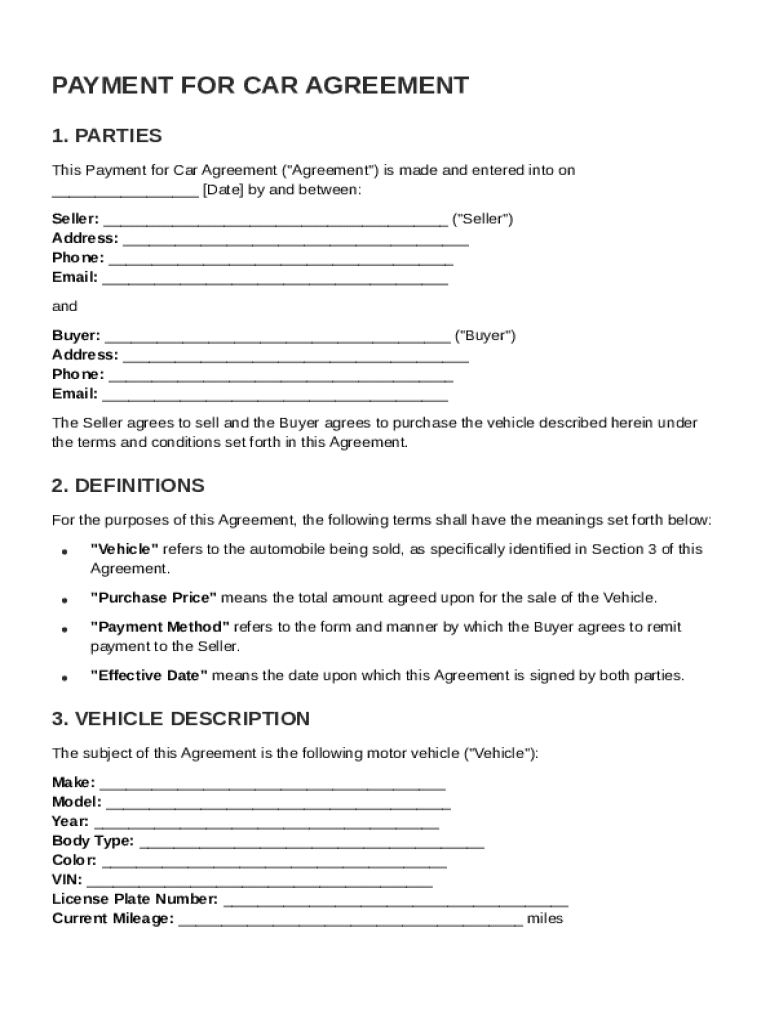
Payment For Car Agreement Form
Use a Payment For Car Agreement Template template to make your document workflow more streamlined.
What the payment agreement form does
Payment For Car Agreement Form records how a buyer will pay for a vehicle and provides a place for the parties to confirm those terms. It can identify the buyer and seller, describe the vehicle, state the purchase price, and document installments, due dates, signatures, and related conditions. With signNow, upload the form, review automatically detected fillable fields, assign fields to each signer, send the agreement, and preserve the completed document with its audit trail. State contract, title, disclosure, and consumer-protection requirements may add obligations beyond the form itself.
Who uses vehicle payment agreements
The form supports private vehicle transactions, dealership workflows, and commercial purchases where parties need written payment terms and signed records.
Independent vehicle sellers can document a buyer’s purchase price, deposit, installments, and due dates without coordinating a paper meeting, while retaining a signed copy for their transaction file. Dealership finance teams can route vehicle payment agreements to buyers, co-signers, and authorized staff, using assigned fields and audit trails to reduce incomplete paperwork during vehicle delivery. Fleet and commercial operators can standardize payment agreements across multiple vehicle purchases, connect signed records with internal systems, and preserve consistent evidence for accounting and contract administration.
These tasks are executed by both individual contributors and centralized administrators depending on organizational policy and required controls.
Features that clarify vehicle payment agreements
Payment For Car Agreement Form combines structured vehicle terms, signer routing, and an auditable electronic record for clearer payment commitments.
Field detection
Upload the Payment For Car Agreement Form and review detected fields before adding vehicle details, payment terms, signatures, and dates. This reduces omissions and keeps the agreement ready for electronic completion.
Payment details
Add buyer, seller, vehicle, price, installment, and due-date information directly to the agreement. Clearly structured fields help both parties review the financial terms before signing.
Signer routing
Send the completed Payment For Car Agreement Form to the buyer, seller, or guarantor in the required signing order. Each recipient receives only the fields assigned to them.
Signing links
Use a shareable signing link when parties need flexible access to the same vehicle payment agreement. The link supports remote review without requiring an in-person meeting.
Audit trail
Capture timestamps, signer actions, and document history alongside the signed agreement. The resulting audit trail helps explain who signed and when the payment terms were accepted.
Secure records
Keep the signed Payment For Car Agreement Form with its completion record for later reference. Organized electronic records make payment disputes and agreement reviews easier to investigate.
How to complete the payment agreement
Use this signNow workflow to prepare, route, sign, and retain the vehicle payment agreement.
Upload the form:
Upload the vehicle payment agreement to signNow. Check the fields:
Review detected fields and add missing terms. Assign recipients:
Assign vehicle and payment fields to signers. Send for signing:
Send the agreement for electronic signatures. Store the record:
Download the completed agreement with its audit trail.
 Best ROI. Our customers achieve an average 7x ROI within the first six months.
 Scales with your use cases. From SMBs to mid-market, airSlate SignNow delivers results for businesses of all sizes.
 Intuitive UI and API. Sign and send documents from your apps in minutes.
How the agreement audit trail works
For Payment For Car Agreement Form, signNow records identity, timing, document activity, and completion evidence separately from the agreement’s visible payment terms.
Authenticate signer:
Capture timestamps:
Record actions:
Check integrity:
Seal completion:
Export evidence:
Platform requirements for the agreement
Payment For Car Agreement Form can be prepared and signed through Chrome or Edge on Windows and macOS, with mobile access through iOS and Android apps. Use a current browser and an internet connection for document delivery, signer authentication, and audit-trail updates.
Desktop browsers Chrome and Edge Desktop systems Windows and macOS Mobile systems iOS and Android
Teams handling vehicle agreements should use managed devices when payment details or identification information are included. Administrators can also evaluate SSO provisioning, API access, and storage integrations when the agreement process connects with CRM, accounting, or dealership systems.
Payment agreement processing timeline
The signNow workflow moves the vehicle payment agreement from preparation through signing and record storage without requiring paper circulation.
Prepare the agreement
Deliver to signers
Complete signer review
Archive the record
Best practices for signed vehicle agreements
Accurate vehicle details, controlled signer access, and a reproducible audit record make Payment For Car Agreement Form easier to review after completion.
Verify every vehicle and payment term
Assign each signer only necessary fields
Preserve the signed document and audit trail
Set retention according to applicable law
Security for vehicle payment records
Transport encryption:
Stored document protection:
Independent controls:
Information security:
U.S. e-signature framework:
Signer verification:
Common payment agreement challenges
Vehicle identification numbers, payment amounts, or due dates may differ between the agreement and the underlying sales paperwork. Unassigned signature, date, or acknowledgment fields can leave a vehicle payment agreement incomplete or ambiguous. Changing installment terms after signing can create competing versions and weaken the record of which payment obligation was accepted. Sharing a completed agreement without access controls may expose buyer identity, payment details, or vehicle information to unintended recipients.
Payment agreement troubleshooting
These answers address field detection, signer verification, plan limits, consumer consent, and revisions for Payment For Car Agreement Form.
Upload the original Payment For Car Agreement Form as a supported PDF or document file, then review the imported layout. If fields are not detected, place signature, date, vehicle, and payment fields manually before sending.
The Business plan includes templates and audit trails for sending this agreement. Business Premium adds bulk send, while Enterprise adds advanced signer authentication. Select a plan based on the number of agreements and verification controls required.
Use SMS verification or another available authentication method when the parties need stronger signer attribution. The audit trail records authentication, timestamps, and actions, supporting the intent and attribution evidence considered under ESIGN and UETA.
For a consumer transaction, provide the required ESIGN consent disclosure and confirm the consumer can access and retain the electronic record. The agreement should remain reproducible with its completion history after signing.
Business plans include 100 signature invites per user annually, with overage fees applying after the included amount. The Site License uses a $1.50 signature-invite model for qualifying high-volume document operations.
If payment terms change after sending, void the pending transaction and issue a revised agreement rather than editing a signed copy. Preserve the original audit trail and identify the replacement document clearly.
Key performance indicators that demonstrate SignNow's proven track record.
BE READY TO GET MORE
Get this form now!

If you believe that this page should be taken down, please follow our DMCA take-down process.