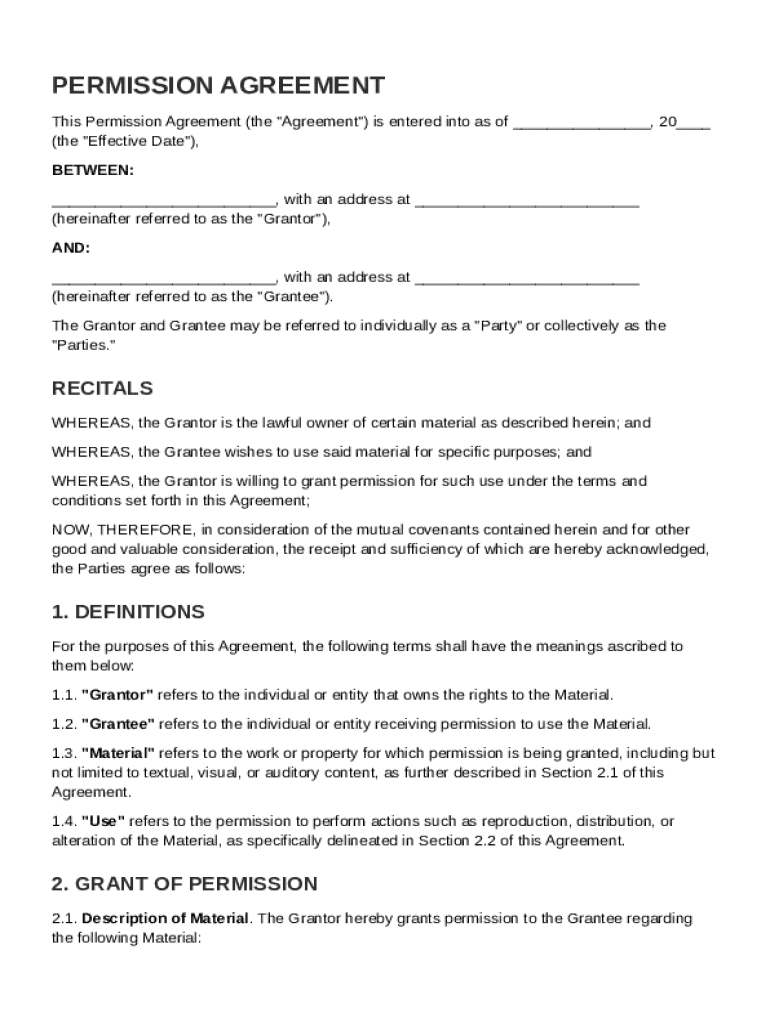
Permission Agreement Form
Use a Permission Agreement Template template to make your document workflow more streamlined.
What a Permission Agreement Form does
A Permission Agreement Form records a person’s informed permission for a named activity, use, disclosure, or transaction. It identifies the parties, describes exactly what is authorized, states limits or expiration terms, and captures the signer’s approval and date. A business can upload the form to signNow, place or auto-detect fillable fields, assign signers, and send it for electronic signature. The completed record can include the signed document and audit trail. In the United States, ESIGN and applicable state electronic-transactions law may support enforceability when intent, consent, attribution, and record retention requirements are satisfied.
Why teams look for DocuSign alternatives
Organizations seek alternatives when they need different pricing models, stronger native automation, simpler bulk affidavit workflows, or more flexible identity-verification options than those available in a legacy envelope-based vendor.

Who uses Permission Agreement Forms
Real estate
Real estate teams can use Permission Agreement Forms for property access, marketing permissions, tenant communications, and related approvals, while keeping each authorized purpose explicit.
Healthcare
Healthcare organizations can request patient permissions for defined disclosures or administrative activities. HIPAA-related records require safeguards and documentation retention for six years under 45 CFR 164.530(j).
Business types using permission forms
Permission Agreement Forms help organizations document precisely who authorized an activity, for what purpose, and under which conditions.
A solo legal practitioner can send a Permission Agreement Form for client-authorized disclosures, preserve the signed record, and avoid coordinating paper signatures across separate meetings. A healthcare practice can collect patient permissions on desktop or mobile devices while applying HIPAA safeguards and retaining related documentation under 45 CFR 164.530(j). An enterprise administrator can standardize permission templates, route forms to designated signers, and retain audit trails across departments using controlled signNow workflows.
These tasks are executed by both individual contributors and centralized administrators depending on organizational policy and required controls.
 Best ROI. Our customers achieve an average 7x ROI within the first six months.
 Scales with your use cases. From SMBs to mid-market, airSlate SignNow delivers results for businesses of all sizes.
 Intuitive UI and API. Sign and send documents from your apps in minutes.
Complete a Permission Agreement Form
Use this sequence to prepare, sign, verify, and retain a Permission Agreement Form through signNow.
Upload form:
Upload the completed Permission Agreement Form. Add fields:
Place or auto-detect signer and date fields. Send request:
Enter recipients and send the form. Verify record:
Review signatures and audit trail. Archive record:
Store the completed permission securely.
Recommended permission workflow setup
Configure the Permission Agreement Form around clear consent, signer attribution, evidence preservation, and the retention rule for its underlying activity.
| Setting | Recommendation |
|---|---|
| Authentication method | Email link with SMS OTP |
| Signature type | Electronic signature with signer intent |
| Audit trail | Export with completed document |
| Document retention | Match the underlying record rule |
| Encryption | TLS 1.2 or 1.3 and AES-256 |
How the Permission Agreement audit trail works
The audit trail documents execution evidence separately from the permission language, helping reviewers connect signer actions to the final form.
Authenticate signer:
Capture timestamps:
Record document history:
Seal evidence:
Verify completed form:
Export audit trail:
Permission Agreement Form challenges
Unclear permission scope can leave recipients unsure whether consent covers recording, disclosure, publication, or a specific business activity. Missing signer identification, dates, or expiration terms can make a Permission Agreement Form difficult to administer and interpret later. Using one broad form for unrelated permissions can produce incomplete consent and disputes over what the signer actually authorized. Paper-based routing makes it harder to confirm every required signature and preserve the completed Permission Agreement Form with supporting records.
Signer authentication and certificates
PKI:
X.509:
Two-factor authentication:
SMS OTP:
ID verification:
Audit evidence:
Platform requirements for signing
Complete a Permission Agreement Form in signNow through Chrome, Firefox, Safari, or Edge on Windows or macOS. signNow also provides mobile apps for iOS and Android; encrypted connections use TLS 1.2 or TLS 1.3.
Browsers Chrome, Firefox, Safari, Edge Desktop Windows and macOS desktops Mobile iOS and Android apps
Organizations handling sensitive permissions should manage supported browsers and mobile applications through approved devices, access controls, and account policies. Enterprise deployments may also evaluate API access, SSO provisioning, and certificate or long-term validation requirements for their record environment.
State rules and exclusions
State law required
Excluded from ESIGN
Court rules may apply
Acknowledgment usually required
Key performance indicators that demonstrate SignNow's proven track record.
Permission Agreement Form troubleshooting
Resolve field, consent, plan, and evidence questions before distributing a completed Permission Agreement Form.
Upload the original Permission Agreement Form as a PDF or supported document, then use signNow’s fields and auto-detection tools to place signer, date, and approval fields before sending.
A signer can receive the form by email or signing link without creating an account in many workflows. Require SMS authentication or another available control when the permission involves sensitive personal information.
The Business plan includes legally binding eSignatures, templates, audit trails, and mobile apps at $8 per user per month with annual billing. It does not include Business Premium bulk send.
For consumer-facing electronic records, provide the ESIGN Act disclosure about paper records, electronic access, and withdrawal procedures under 15 U.S.C. §7001(c) before obtaining permission.
signNow is ESIGN- and UETA-compliant, but those laws exclude wills, certain court orders, family law decrees, and other listed records. Confirm whether the underlying permission document falls within an exception.
Use the completed document and signNow audit trail together. The audit trail records signing events such as timestamps and actions, while the signed form preserves the permission language and signer’s executed record.
BE READY TO GET MORE
Get this form now!

If you believe that this page should be taken down, please follow our DMCA take-down process.