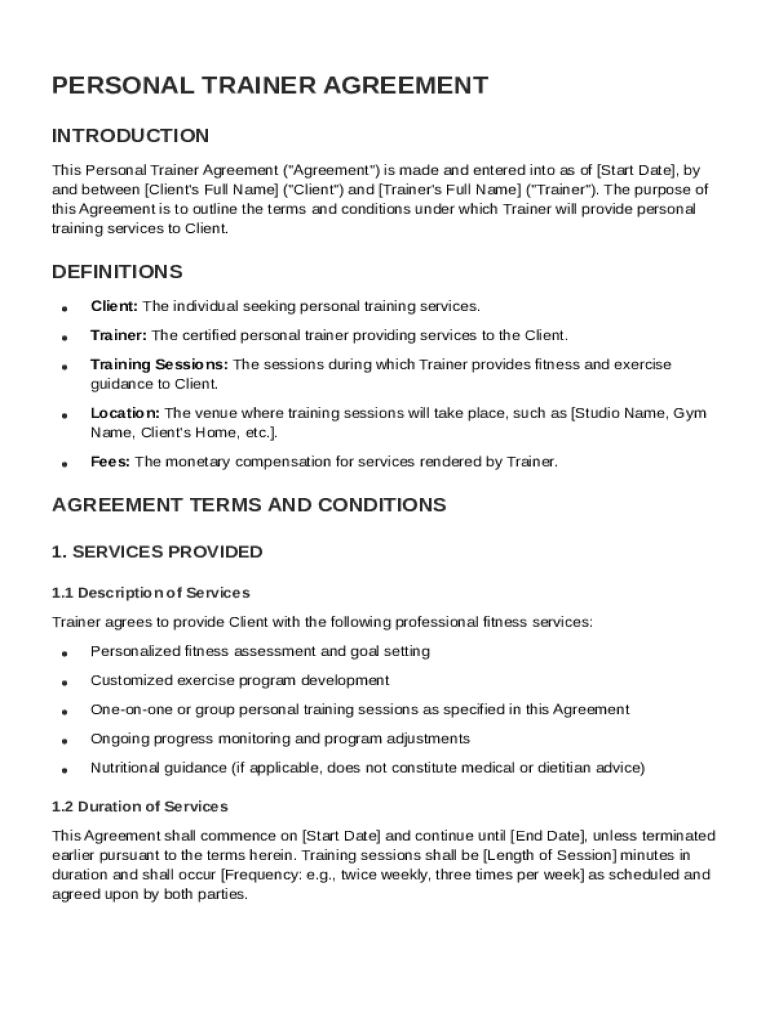
Personal Trainer Agreement Form
Use a Personal Trainer Agreement Template template to make your document workflow more streamlined.
What a personal trainer agreement does
A Personal Trainer Agreement Form is a written contract between a trainer or fitness business and a client covering training services, payment, scheduling, cancellation terms, responsibilities, and relevant acknowledgments. The parties complete the specific business terms, review any health or consent language, and sign to record their intent. With signNow, upload the agreement, allow automatic field detection, correct or add fields, send it to the client, and retain the signed PDF with its audit trail. ESIGN and applicable state electronic-transactions law may recognize the signature, subject to required consent and document exclusions.
Who uses personal trainer agreements
Independent trainers
Independent personal trainers use the agreement to document services, fees, scheduling, cancellation terms, client responsibilities, and informed consent before training begins.
Fitness businesses
Gyms and fitness studios use standardized agreements to onboard clients, assign trainers, document health disclosures, and maintain consistent records across locations.
Businesses that use these agreements
The agreement fits independent trainers, fitness studios, and structured wellness programs with different client-volume and administration needs.
A solo personal trainer can reuse one agreement template for new clients, documenting session fees, cancellation rules, service boundaries, and client acknowledgments without rebuilding the contract each time. A multi-trainer fitness studio can standardize onboarding across locations, route agreements to assigned trainers, and preserve signed client records with consistent audit trails. A corporate wellness provider can send agreements to employee participants at scale, use delegated sending, and connect completed records to its existing operational systems.
These tasks are executed by both individual contributors and centralized administrators depending on organizational policy and required controls.
How to complete the agreement
Use this sequence to prepare, send, sign, and retain a Personal Trainer Agreement Form through signNow.
Upload the form:
Upload the completed agreement. Check the fields:
Review detected fields and add missing signatures, initials, dates, or acknowledgments. Assign the signer:
Enter the client’s email and assign each required field. Send for signature:
Send the agreement and monitor its status. Store completed records:
Download the signed PDF and audit trail.
 Best ROI. Our customers achieve an average 7x ROI within the first six months.
 Scales with your use cases. From SMBs to mid-market, airSlate SignNow delivers results for businesses of all sizes.
 Intuitive UI and API. Sign and send documents from your apps in minutes.
Ways to send and sign the agreement
- Use the signNow web app when preparing the Personal Trainer Agreement Form, placing fields, assigning the trainer and client, and reviewing the final document before sending.
- Use the signNow mobile app when a trainer or client needs to review and sign the agreement from an iOS or Android device during a scheduled session.
- Use kiosk mode for a staffed gym or studio reception workflow where multiple clients sign agreements on a shared device under controlled supervision.
- Use a shareable signing link when a trainer needs to distribute the same agreement entry point through an approved client onboarding or scheduling process.
Key features for trainer agreements
signNow combines document preparation, signer routing, execution evidence, and record handling for the specific client agreement workflow.
Field detection
Automatic field detection identifies likely signature, initials, date, and text areas, giving trainers a faster starting point while preserving control to correct every field before sending.
Reusable templates
Reusable templates keep service descriptions, payment terms, cancellation provisions, and client acknowledgments consistent for repeated onboarding without recreating the agreement.
Signer roles
Assigned roles show exactly where the trainer and client must sign, initial, or provide information, reducing incomplete agreements and follow-up messages.
Audit trail
The audit trail records signing activity, timestamps, and document history so the completed agreement can be reviewed alongside its execution evidence.
Mobile signing
Mobile apps let trainers and clients review and sign the agreement from supported mobile devices when an in-person desktop workflow is impractical.
Record storage
Completed agreements can be retained as electronic records and connected to business systems, helping teams keep client documentation organized after signature.



Legal standing of the agreement
A Personal Trainer Agreement Form may be admissible when the parties show intent, consent to electronic records, signer attribution, and reliable retention and reproduction under ESIGN, 15 U.S.C. ch. 96, and applicable state law such as UETA. Electronic execution does not replace requirements for wills, certain court orders, or other excluded records.

Security for trainer agreements
AES-256 at rest:
TLS 1.2/1.3 in transit:
SOC 2 Type II certified:
ISO 27001 certified:
ESIGN and UETA compliant:
HIPAA compliant with BAA:
Recommended agreement workflow setup
Configure the Personal Trainer Agreement Form around signer identity, execution evidence, controlled access, and secure record handling.
| Setting | Recommendation |
|---|---|
| Authentication method | Email link with SMS OTP |
| Signature type | Typed or drawn electronic signature |
| Audit trail | Enabled for every completed agreement |
| Document retention | Secure storage with policy-based review |
| Encryption and provisioning | AES-256 storage with role-based access |
Best practices for trainer agreements
Accurate fields, informed consent, controlled access, and preserved execution evidence make the agreement easier to administer and defend.
Review every business term
Record electronic consent
Preserve execution evidence
Limit sensitive information
Privacy challenges to address
Including unnecessary medical details in the Personal Trainer Agreement Form can expose sensitive client information beyond what the training relationship requires. Sending the agreement without recording electronic consent can weaken the evidence that the client agreed to receive and sign records electronically. Leaving completed agreements accessible to every staff member can disclose client information and undermine role-based access controls. Using an outdated agreement template can carry forward incorrect pricing, cancellation terms, trainer details, or consent language into a new client relationship.
Troubleshooting personal trainer agreements
Resolve field, consent, authentication, plan, and recordkeeping issues before sending this agreement to a client.
Upload the original Personal Trainer Agreement Form as a PDF or supported document, then review signNow’s detected fields. If detection misses a signature, date, waiver, or initials field, add it manually in the editor before sending.
The signNow Business plan includes templates, audit trails, mobile apps, and legally binding eSignatures at $8 per user monthly when billed annually. Business Premium adds bulk send at $15 per user monthly annually.
For a consumer-facing Personal Trainer Agreement Form, provide the electronic-record disclosure required by ESIGN, 15 U.S.C. §7001(c). Confirm the client can access the record and explain how electronic consent may be withdrawn.
Use signNow’s SMS code or stronger signer authentication when the agreement contains health information or identity-sensitive disclosures. HIPAA workflows require a business associate agreement with signNow before handling protected health information.
A signed agreement can be evidence when intent, consent, attribution, and reliable record retention are established under ESIGN and applicable state law. Preserve the completed PDF and signNow audit trail together.
If a client needs to sign at the gym, Business Premium includes kiosk mode and quick invite links. For larger deployments, Enterprise adds advanced signer authentication and conditional or formula fields.
Key performance indicators that demonstrate SignNow's proven track record.
BE READY TO GET MORE
Get this form now!

If you believe that this page should be taken down, please follow our DMCA take-down process.