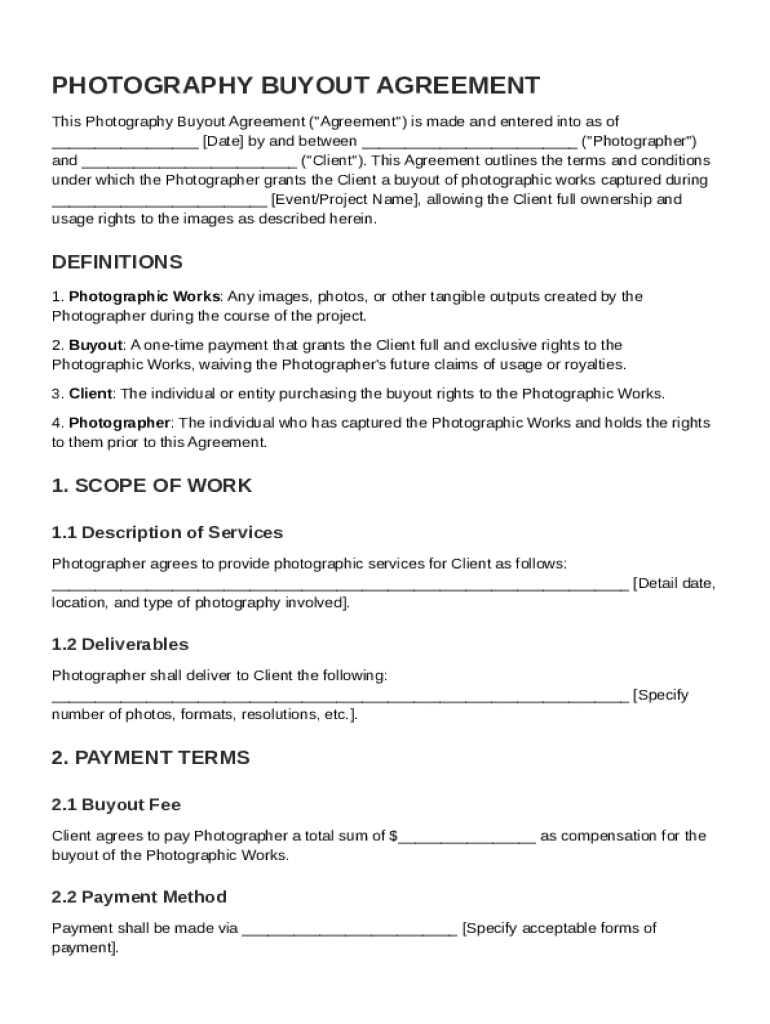
Photography Buyout Agreement Form
Use a Photography Buyout Agreement Template template to make your document workflow more streamlined.
What this photography agreement does
The Photography Buyout Agreement Form records an agreement between a photographer and a client about specified photographs, payment, and permitted use. It identifies the project, deliverables, rights, media, territory, duration, approvals, and restrictions the parties accept. With signNow, upload the form, review detected fillable fields, assign signature fields, send it to the photographer and client, and preserve the completed PDF with its audit trail. Electronic signatures may be recognized under ESIGN and applicable state law when intent, consent, attribution, and record retention requirements are satisfied.
Who benefits from this agreement form
The form helps photography businesses, agencies, and internal marketing teams document image rights and compensation before content is distributed.
Independent photographers use the form to document client assignments, transfer permitted image rights, confirm compensation, and prevent later disputes about advertising, editorial, or portfolio use. Creative agencies use it to coordinate photographers, brands, and production teams while preserving project-specific usage limits, approval terms, payment conditions, and signed evidence. Enterprise marketing departments use repeatable templates to obtain photographer buyouts across campaigns, with controlled access, signing records, and integrations supporting centralized project administration.
These tasks are executed by both individual contributors and centralized administrators depending on organizational policy and required controls.
How the Photography Buyout form works
The signNow workflow turns the Photography Buyout Agreement Form into a controlled record from upload through signature and archival.
Upload form: Upload the Photography Buyout Agreement Form source file. Review fields: Let signNow detect fields, then verify rights and payment fields. Send agreement: Assign signature fields and send the agreement to each signer. Preserve record: Store the signed file with its completion certificate and audit trail.
Prepare and send the agreement
Use this sequence to prepare the Photography Buyout Agreement Form without overlooking rights, compensation, or signer fields.
Upload agreement:
Upload the agreement and confirm the project fields. Check details:
Verify usage rights, compensation, and signer details. Place fields:
Place signature, initials, and date fields. Request signatures:
Send the agreement and monitor completion.
 Best ROI. Our customers achieve an average 7x ROI within the first six months.
 Scales with your use cases. From SMBs to mid-market, airSlate SignNow delivers results for businesses of all sizes.
 Intuitive UI and API. Sign and send documents from your apps in minutes.
Inspect the Photography Buyout audit trail
The signNow audit trail connects each Photography Buyout Agreement Form action with signer identity, timing, document integrity, and retrievable completion evidence.
Authenticate signer:
Capture timestamp:
Hash document:
Seal document:
Log actions:
Export evidence:
Complete and archive the agreement efficiently
A clear signing sequence helps photographers and clients verify rights, compensation, and archival records before production or publication.
Prepare agreement details
Deliver to signers
Review and sign
Archive completed record
Use a careful agreement review process
Review rights, payment, consent, and record handling before sending the Photography Buyout Agreement Form for signature.
Identify the project and deliverables
Define usage rights precisely
Match compensation to project records
Archive the signed agreement
Protect signed photography agreements
Data encryption:
Security certification:
Information security:
U.S. e-signature:
Signer authentication:
Record history:



Protect privacy in signed agreements
Include only personal details necessary for identifying the photographer, client, project, and authorized use of the photographs. Capture explicit consent for electronic records when ESIGN’s consumer disclosure requirements apply to the photographer or client. Restrict template and completed-agreement access to authorized users who handle the project, payment, licensing, or legal review. Check that signed files do not expose private contact, payment, location, or identity information beyond the agreement’s business purpose.
Key performance indicators that demonstrate SignNow's proven track record.
Resolve Photography Buyout signing issues
These answers address signature, plan, consent, compliance, and document-handling questions that arise when preparing Photography Buyout Agreement Form records.
signNow’s Business plan includes templates and audit trails for this agreement. Upload the source file, place signature and date fields, then send the completed Photography Buyout Agreement Form through the signing workflow. The audit trail records actions supporting attribution and document history.
The Business plan costs $8 per user per month with annual billing. It includes 100 signature invites per user per year; additional invitations incur overage fees. Business Premium adds bulk send, while Enterprise adds advanced signer authentication and conditional fields.
For consumer-facing electronic records, ESIGN requires disclosure of the consumer’s right to paper records, electronic access, and consent withdrawal procedures under 15 U.S.C. §7001(c). Apply that disclosure when the photographer or client acts as a consumer.
A basic typed, drawn, or click-to-sign signature can support the agreement when intent, consent, attribution, and record retention are established. ESIGN and applicable state UETA rules generally recognize electronic signatures, but state-specific contract requirements still apply.
If the agreement contains health information, signNow identifies HIPAA compliance as requiring a business associate agreement. Do not place protected health information in a Photography Buyout Agreement Form unless the parties have addressed the applicable HIPAA obligations.
Business Premium includes bulk send for repeated photographer-client agreements. If each contract has different rights, compensation, territory, or usage terms, review every generated document before sending rather than relying on unchanged template fields.
BE READY TO GET MORE
Get this form now!

If you believe that this page should be taken down, please follow our DMCA take-down process.