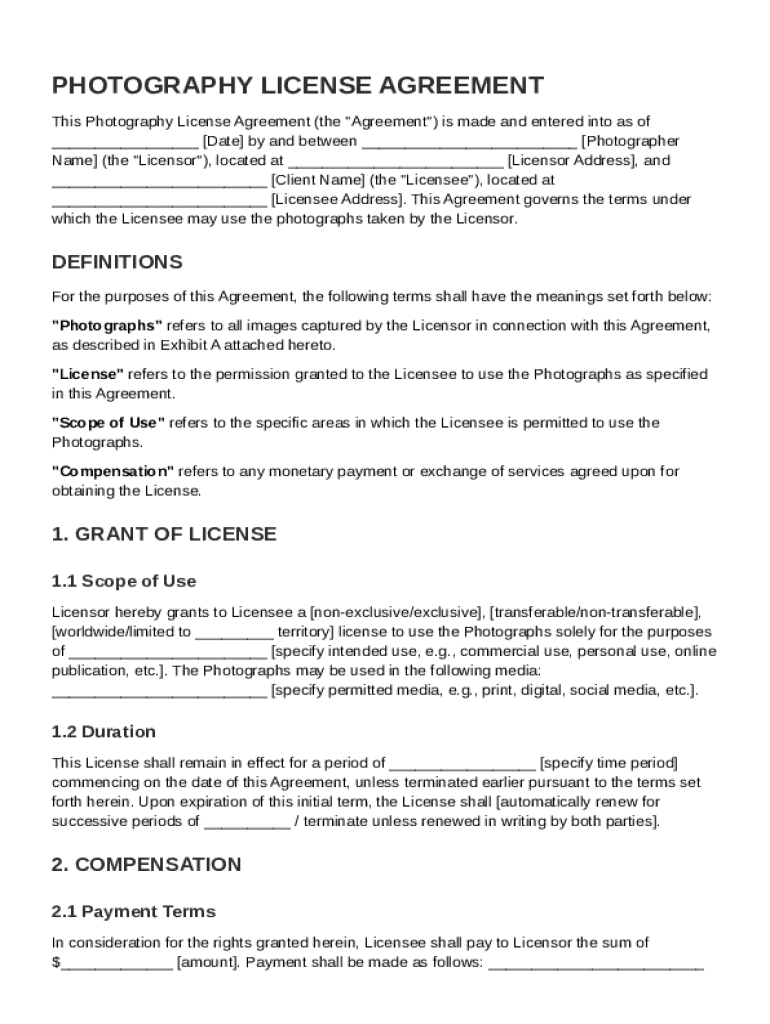
Photography License Agreement Form
Use a Photography License Agreement Template template to make your document workflow more streamlined.
What the photography license agreement does
A Photography License Agreement Form records permission to use specified photographs under agreed conditions. It identifies the photographer and licensee, describes the images, and defines permitted media, territory, duration, exclusivity, compensation, attribution, editing rights, and restrictions. With signNow, upload the agreement, let the platform detect fillable fields, assign signer roles, send it for electronic signature, and retain the completed document with its audit trail. The contract should match the parties’ actual business arrangement and applicable state law; it does not replace legal review for unusual rights, releases, or disputes.
Who benefits from the agreement
The form is useful wherever a photographer grants defined rights to use identified images for a stated business or editorial purpose.
Independent photographers use the form to grant clients defined commercial, editorial, event, or portfolio rights while preserving payment, attribution, and image-specific restrictions in one record. Creative agencies and publishers use it to document approved photographs, campaign channels, territories, terms, and alterations before distributing licensed assets across multiple teams. Enterprise marketing teams use reusable signNow templates to collect photographer and client approvals, route agreements to designated signers, and retain evidence for brand and rights reviews.
These tasks are executed by both individual contributors and centralized administrators depending on organizational policy and required controls.
Features for photography licensing
A structured workflow keeps image rights, licensing limits, signatures, and evidence together from initial draft through final approval.
Rights definition
Record the photographer’s name, client identity, licensed images, permitted media, territory, term, compensation, and attribution requirements in one signable document.
Image details
Use clear fields for image descriptions, file identifiers, campaign names, publication channels, and approval conditions to reduce ambiguity about the licensed work.
Electronic signatures
Capture each party’s electronic signature and signing event so the completed agreement can be reviewed alongside the underlying licensing correspondence.
Audit trail
Keep the signed agreement connected to its audit trail, including signing activity and completion evidence, for later rights verification.
Reusable template
Create a reusable template for recurring client, editorial, commercial, or event photography licenses while preserving fields that change for every assignment.
Mobile signing
Send the agreement from desktop or mobile when a shoot, client review, or rights approval occurs away from the office.
How to complete the agreement
Use this sequence to turn a drafted photography license into a complete, traceable electronic record.
Upload document:
Upload the drafted photography license agreement. Check fields:
Review detected fields and add missing rights terms. Assign signers:
Assign photographer and licensee signing roles. Send agreement:
Send the agreement for electronic signature. Store records:
Download the executed agreement and audit trail.
Recommended agreement workflow setup
A rights-focused configuration keeps signer identity, licensing terms, completion evidence, and the final photography agreement organized for future reference.
| Setting | Recommendation |
|---|---|
| Authentication method | Email verification with SMS OTP |
| Signature type | Typed or drawn electronic signature |
| Audit trail | Retain completion certificate and activity log |
| Document retention | Keep agreement through license term |
| Encryption | TLS 1.2/1.3 and AES-256 protection |
 Best ROI. Our customers achieve an average 7x ROI within the first six months.
 Scales with your use cases. From SMBs to mid-market, airSlate SignNow delivers results for businesses of all sizes.
 Intuitive UI and API. Sign and send documents from your apps in minutes.
Ways to send and sign the agreement
- Use the signNow web app when preparing a detailed agreement with image schedules, licensing terms, and multiple signer roles before sending it for review.
- Use the signNow mobile app when a photographer or client needs to review and sign the agreement during a shoot, event, or client meeting.
- Use kiosk mode when parties sign together on one managed device, such as at a studio, gallery, or organized photography appointment.
- Use a shareable signing link when repeatedly collecting approvals for a controlled template, while limiting access and monitoring the resulting audit trail.
How the agreement audit trail works
The audit trail documents who handled the photography license agreement, what happened, and when each signing action occurred.
Authenticate signer:
Capture timestamps:
Hash document:
Seal history:
Track activity:
Export evidence:
Complete and archive the agreement
The agreement moves from field preparation through signer review, execution, and organized record retention.
Prepare the agreement
Deliver to signers
Review and sign
Archive the record
Record-keeping practices for licenses
Keep the signed rights grant, image schedule, audit evidence, and retention decision together so later publication checks remain defensible.
Define every permitted use
Identify the licensed photographs
Preserve the signing evidence
Set a documented retention rule
Security for signed license records
Transport encryption:
Stored encryption:
Security certification:
Management standard:
Electronic records:
Health information:
Mobile options for photography agreements
Photographers and clients can review Photography License Agreement Form records through signNow mobile apps for iOS and Android, including workflows that support offline signing and camera-based document capture.
Mobile apps iOS and Android apps Offline work Offline signing support Camera capture Camera document capture
Teams should protect managed devices, confirm the latest supported app version, and reconnect before relying on final delivery or audit-trail retrieval. Mobile access is useful for on-location shoots, client approvals, and rights administration, but the executed agreement should still be archived with its image schedule and completion evidence.
Examples of photography license use
These examples show how photographers and clients can document image rights before publication or distribution.
Commercial photography
A commercial photographer sends a campaign-specific license to a client after the shoot, listing approved images, channels, territory, term, and attribution requirements.
- Upload the campaign agreement
- Assign photographer and client
- Retain the signed audit trail
The structured agreement gives both parties a precise record of the permitted campaign use. signNow’s templates can preserve recurring clauses, while the audit trail connects the completed signatures to the final rights documentation without inventing a broader license than the parties approved.
Event photography
A regional event photographer uses a mobile workflow to obtain a venue or organizer’s approval for selected promotional photographs.
- Review image identifiers
- Set publication restrictions
- Sign from a mobile device
Mobile signing helps the photographer complete approval while working away from the office. The agreement still needs clear image identifiers, permitted channels, duration, and restrictions; signNow provides the electronic record and audit evidence, while the parties remain responsible for accurate rights terms.
Limits and state-law considerations
Notarization
Wills
Family law
Real-estate deeds
State law
Privacy and disclosure pitfalls
Leaving image filenames or schedules out of the agreement can create uncertainty about which photographs the license actually covers. A broad phrase such as “all media” may fail to explain territory, duration, edits, sublicensing, or future publication channels. Including a model’s personal information without access controls can expose data beyond the parties who need the licensing record. Sending the agreement before confirming payment, attribution, exclusivity, and termination terms can produce a signed record that does not match the assignment.
Photography agreement troubleshooting
Resolve field, signer, evidence, consent, authentication, and plan questions before the licensed images are distributed.
Check that every required field has been completed and that each signer is assigned to the correct signature or initials field. Business plans include templates and audit trails for repeat photography licensing workflows.
The Business plan includes 100 signature invites per user annually, with overage fees. Business Premium also includes bulk send, which can help distribute recurring photography agreements without manually creating each invitation.
Use signNow’s audit trail and completion certificate to show signer identity, timestamps, and document history. ESIGN and UETA support electronic records when intent, consent, attribution, and retention requirements are satisfied.
For consumer-facing licensing arrangements, provide the ESIGN disclosure when required, confirm the signer can access the electronic record, and explain withdrawal procedures. The disclosure requirement is grounded in 15 U.S.C. §7001(c).
Use SMS OTP or another available authentication control when the licensing parties need stronger attribution than an email link. Advanced signer authentication is available in Enterprise workflows; configure it before sending.
The Business plan provides legally binding eSignatures, audit trails, templates, and mobile apps. Business Premium adds bulk send, while Enterprise adds advanced signer authentication and conditional or formula fields.
Key performance indicators that demonstrate SignNow's proven track record.
BE READY TO GET MORE
Get this form now!

If you believe that this page should be taken down, please follow our DMCA take-down process.