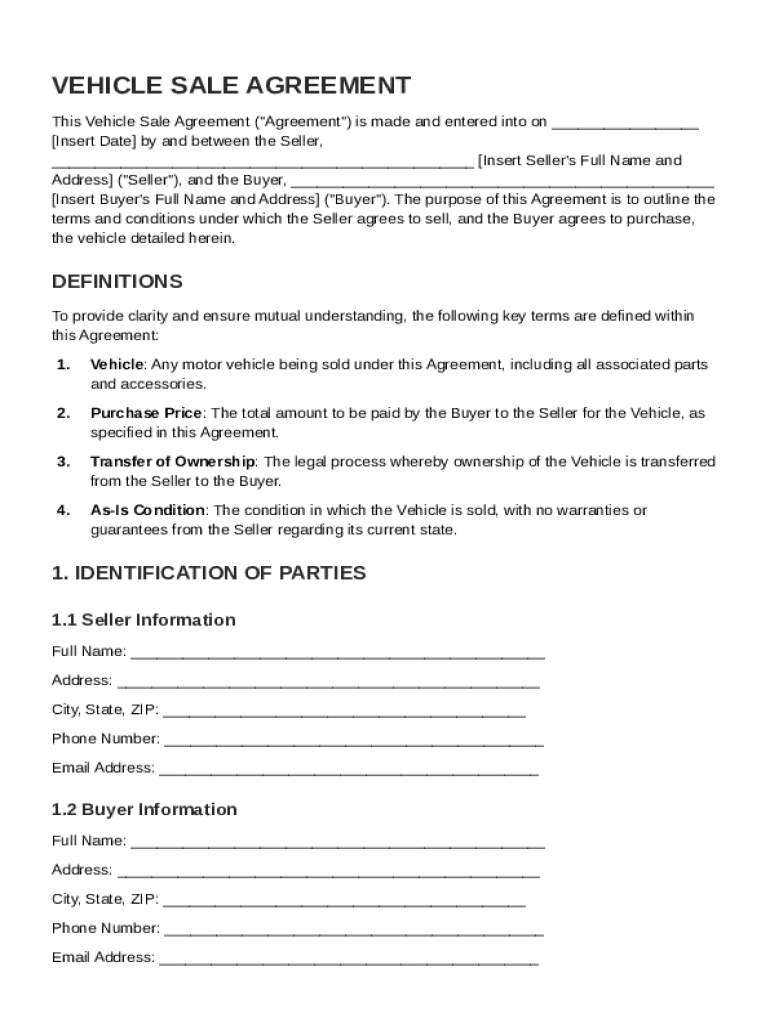
Vehicle Of Sale Agreement Form
Use a Vehicle Of Sale Agreement Template template to make your document workflow more streamlined.
What a vehicle sale agreement does
A Vehicle Of Sale Agreement Form records the parties’ agreement to transfer a specific vehicle for an identified price and set of terms. It normally identifies the seller, buyer, vehicle identification number, make, model, year, odometer reading, payment details, and delivery terms. The buyer and seller review the completed document, sign it, and retain it as evidence of the transaction. In the United States, the agreement does not replace state title, registration, lien-release, tax, or odometer requirements administered by the relevant motor vehicle agency.
Who benefits from vehicle sale agreements
Vehicle sale agreements help individual sellers, dealerships, and organizations document ownership transfers with clear terms and accessible signing records.
Independent vehicle sellers can document the buyer, seller, vehicle identification number, price, and delivery terms in one signed record without coordinating paper copies or repeated in-person meetings. Used-car dealerships can reuse a controlled agreement template, route it to buyers and internal approvers, and preserve the completed document with an audit trail for each vehicle transaction. Fleet and construction companies can record transfers between business entities, capture authorized signatures remotely, and connect completed agreements to storage or operational systems for retrieval during audits.
These tasks are executed by both individual contributors and centralized administrators depending on organizational policy and required controls.
How signNow handles this agreement
The signNow workflow turns a completed vehicle sale agreement into a routed, signed, and auditable electronic record.
Upload agreement: Upload the vehicle sale agreement to signNow and let the platform detect fillable fields. Check fields: Review detected fields and add buyer, seller, date, and signature assignments. Send for signing: Send the agreement by email or signing link in the required signing order. Store records: Download the completed agreement and audit trail for transaction records.
Steps to complete the vehicle agreement
Follow these steps to prepare, route, sign, and preserve a vehicle sale agreement in signNow.
Upload document:
Upload the completed Vehicle Of Sale Agreement Form as a PDF. Review details:
Confirm VIN, price, parties, and signature field placement. Route signatures:
Assign buyer and seller recipients, then send the document. Archive evidence:
Download the signed agreement and audit trail after completion.
 Best ROI. Our customers achieve an average 7x ROI within the first six months.
 Scales with your use cases. From SMBs to mid-market, airSlate SignNow delivers results for businesses of all sizes.
 Intuitive UI and API. Sign and send documents from your apps in minutes.
Best practices for vehicle sale agreements
Accurate vehicle details, clear payment terms, and an exportable signing record reduce disputes between buyers and sellers.
Verify every vehicle and transaction detail
Record payment and delivery terms precisely
Assign buyer and seller fields carefully
Preserve the signed agreement and audit trail
Legal standing of a vehicle sale agreement
A vehicle sale agreement can provide evidence of the parties’ intent, vehicle identity, price, and agreed terms when properly signed and retained. ESIGN, 15 U.S.C. ch. 96, and applicable state electronic-transactions law support electronic records, but title and registration requirements remain governed by the state motor vehicle agency.

Processing a vehicle sale agreement
The transaction schedule depends on vehicle inspection, payment, delivery, and signer availability rather than a federal filing deadline for this private agreement.
Prepare the agreement
Deliver to signers
Complete signer review
Archive the transaction
State rules and document limits
State notarization
Title transfer
Wills excluded
Real-estate deeds
Challenges with vehicle sale agreements
A mismatched VIN or incomplete odometer statement can create title-transfer delays and disputes over which vehicle the agreement identifies. Leaving the purchase price, payment method, or delivery date unclear makes later disagreement more likely, especially when payment occurs in installments. A signed sale agreement does not replace state title, registration, emissions, lien-release, or tax paperwork required by the applicable motor vehicle agency. Sending the document to the wrong buyer or seller email can weaken attribution and expose personal information to an unintended recipient.
Signer authentication for vehicle agreements
Digital certificates:
Two-factor authentication:
SMS verification:
ID verification:
X.509 certificates:
Signer attribution:



Mobile options for vehicle agreements
signNow mobile apps for iOS and Android let buyers, sellers, or dealership staff review and sign a vehicle sale agreement from supported mobile devices. Camera capture can convert a paper copy into a document for upload, while offline signing supports work when connectivity is unavailable.
Mobile apps iOS 15+ and Android 9+ Offline signing Offline signing with later synchronization Camera capture Camera capture for paper agreements
For controlled deployments, administrators can manage signNow users, configure authentication, and connect completed vehicle agreements to storage or business systems. Confirm device management, network access, and retention policies before using mobile signing for transactions involving personal or financial information.
Troubleshooting vehicle sale agreements
These answers address field placement, signer routing, electronic consent, plan selection, and evidence preservation for a signed vehicle sale agreement.
Upload the agreement again as a readable PDF and check that signature fields are not locked or placed outside the document page. signNow Business includes templates and audit trails for repeat vehicle transactions.
Use signNow’s signer routing to assign separate buyer and seller roles, then verify each email address before sending. Sequential routing prevents the second signer from receiving an incomplete transaction.
The Business plan costs $8 per user per month with annual billing and includes audit trails. Business Premium costs $15 and adds bulk send for repeated vehicle agreements.
For consumer-facing transactions, obtain electronic-record consent and ensure the signer can access and reproduce the agreement. ESIGN, 15 U.S.C. §7001(c), governs these disclosure requirements.
If a signer cannot open the invitation, confirm the email address, resend the invite, or generate a signing link. The signNow mobile apps also support signing when the signer changes devices.
Export the completed agreement and its signNow audit trail, including timestamps and action history. ESIGN and UETA support electronic records when intent, attribution, consent, and reproducible retention are demonstrated.
Key performance indicators that demonstrate SignNow's proven track record.
BE READY TO GET MORE
Get this form now!

If you believe that this page should be taken down, please follow our DMCA take-down process.