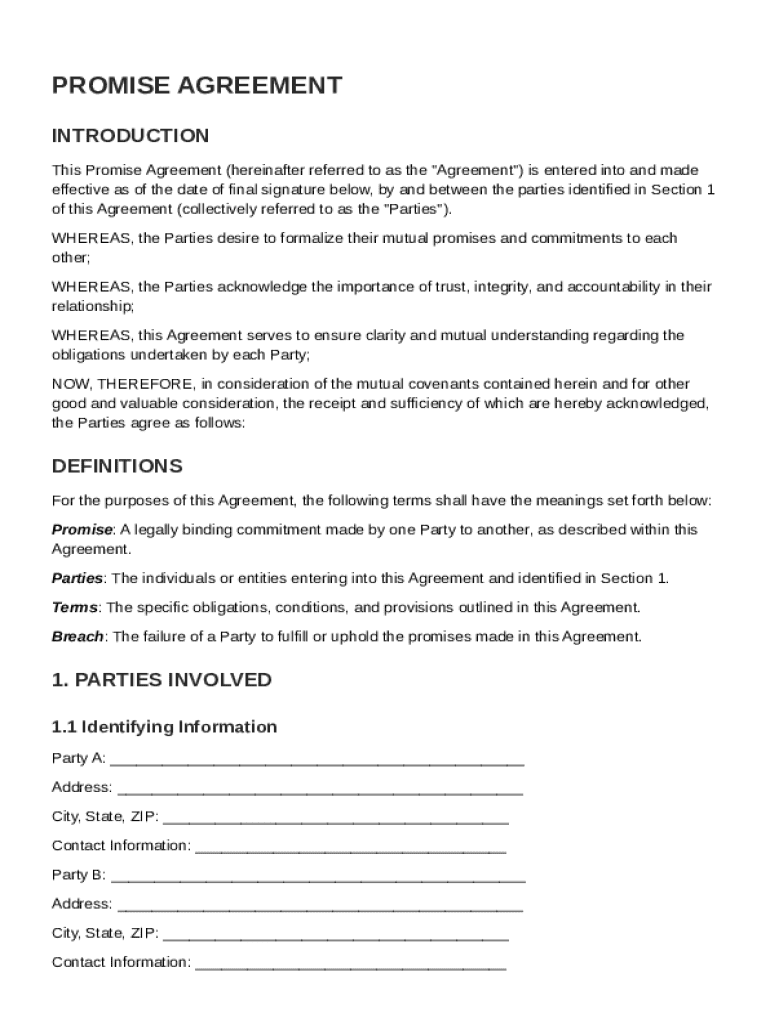
Promise Agreement Form
Use a Promise Agreement Template template to make your document workflow more streamlined.
What a Promise Agreement Form does
A Promise Agreement Form records a party’s commitment to perform a stated action, provide something, or meet agreed terms. It is completed by entering the specific promise, responsible parties, conditions, dates, and signatures. With signNow, the sender uploads the form, signNow detects fillable areas, the sender confirms fields and recipients, and signers review and e-sign. The completed PDF and audit trail preserve the signed terms, timestamps, and document history for business review under applicable U.S. law.
Who uses a Promise Agreement Form
Small businesses
Solo practitioners and small businesses use Promise Agreement Forms for client commitments, service promises, payment terms, and project acknowledgments without arranging paper exchanges.
Professional services
Legal, construction, and financial-services teams use Promise Agreement Forms for negotiated commitments, approvals, and agreements requiring named signers, ordered routing, and retained signing evidence.
Legal standing for a Promise Agreement Form
A Promise Agreement Form may be enforceable when the parties show intent, consent to electronic records, signer attribution, and reliable retention under ESIGN and UETA. The statutes do not cover wills, codicils, testamentary trusts, court orders, official court filings, or family-law decrees; state law may add requirements.

Key features for completing a Promise Agreement Form
signNow connects document preparation, signer routing, electronic signatures, and audit evidence around the Promise Agreement Form workflow.
Field detection
Upload the Promise Agreement Form, let signNow detect fillable areas, and prepare signature fields without recreating the document from scratch.
Signer routing
Route the Promise Agreement Form to named signers in order, helping each person complete only the fields assigned to them.
Audit trail
Capture timestamps, signer actions, and document history in an audit trail that supports later review of the completed Promise Agreement Form.
Reusable templates
Use reusable Promise Agreement Form templates to preserve field placement, signer roles, and required information across repeated transactions.
Mobile signing
Send the Promise Agreement Form from desktop or mobile workflows, allowing signers to review and sign without coordinating paper exchanges.
Record storage
Keep the completed Promise Agreement Form and its signing evidence together for retrieval, internal review, and documented business records.
 Best ROI. Our customers achieve an average 7x ROI within the first six months.
 Scales with your use cases. From SMBs to mid-market, airSlate SignNow delivers results for businesses of all sizes.
 Intuitive UI and API. Sign and send documents from your apps in minutes.
How to complete the Promise Agreement Form
Follow this signNow workflow to prepare, route, complete, and preserve the Promise Agreement Form as an electronic record.
Upload form:
Upload the Promise Agreement Form PDF. Check fields:
Review detected fields and add missing signature, date, or text fields. Assign signers:
Assign fields to each named signer and set the signing order. Complete signing:
Send the form, collect signatures, and download the completed PDF with its audit trail.
Recommended Promise Agreement Form setup
Use controlled access, clear signer intent, preserved audit evidence, and a retention period tied to the Promise Agreement Form’s business purpose.
| Setting | Recommendation |
|---|---|
| Authentication and provisioning | Admin-controlled access with SMS OTP |
| Signature type | Intent-based electronic signature |
| Audit trail | Retain timestamps and document history |
| Document retention | Three years for tax records |
| Encryption controls | AES-256 at rest, TLS 1.2/1.3 in transit |
Security controls for signed forms
Transport encryption:
Stored encryption:
Security reporting:
Security certification:
U.S. eSignature:
Health information:
Best practices for Promise Agreement Form completion
Use controlled templates, accurate signer assignments, documented consent, and preserved audit evidence when completing a Promise Agreement Form.
Verify every field before sending
Map fields to named signers
Capture electronic consent clearly
Preserve the signed record and trail
Retention periods for signed Promise Agreement Forms
Select the retention period by record class and governing authority; the Promise Agreement Form itself does not create one universal federal period.
Three years for tax records
Six years for major understatements
Six years for HIPAA records
Six years for broker-dealer records
Thirty years for exposure records
Risks from incomplete form execution
Weak signer intent
Missing audit trail
Poor access control
Unmet formalities
Pricing considerations for Promise Agreement Form
signNow’s verified plan details are shown first; competitor prices and capabilities are marked Not verified where the supplied vendor data provides no confirmation.
| Features | signNow | DocuSign | Adobe Sign | PandaDoc | Dropbox Sign |
|---|---|---|---|---|---|
| Starting annual price | $8/user/month | Not verified | Not verified | Not verified | Not verified |
| Free trial availability | 7 days, no card | Not verified | Not verified | Not verified | Not verified |
| Bulk sending | Business Premium | Not verified | Not verified | Not verified | Not verified |
| Audit trail availability | Business included | Not verified | Not verified | Not verified | Not verified |
| HIPAA availability | Compliant, BAA required | Not verified | Not verified | Not verified | Not verified |
Troubleshooting Promise Agreement Form workflows
Resolve upload, signer-authentication, plan, and evidentiary questions before relying on a completed Promise Agreement Form.
Upload the original Promise Agreement Form again and check whether its PDF permissions block editing. signNow Business includes templates and audit trails, while field placement can be reviewed before sending.
Confirm that the signer email is correct, then resend the Promise Agreement Form from the document status page. A signNow Business workflow can use email delivery or a generated signing link.
Use SMS OTP or another available authentication control when stronger attribution is needed. signNow Enterprise adds advanced signer authentication; ESIGN and UETA focus on intent, consent, attribution, and record retention.
The Promise Agreement Form can be electronically signed when the parties demonstrate intent and consent and the record remains reproducible. ESIGN and UETA do not make wills, court orders, or family-law decrees eligible.
Check the selected signNow plan before sending repeated copies. Business is listed at $8/user/month annually, while Business Premium is listed at $15/user/month annually and includes bulk send.
Review the completed document and audit trail before treating the Promise Agreement Form as final. signNow records timestamps and document history, but business records must still follow applicable tax, contract, and state requirements.
Key performance indicators that demonstrate SignNow's proven track record.
BE READY TO GET MORE
Get this form now!

If you believe that this page should be taken down, please follow our DMCA take-down process.