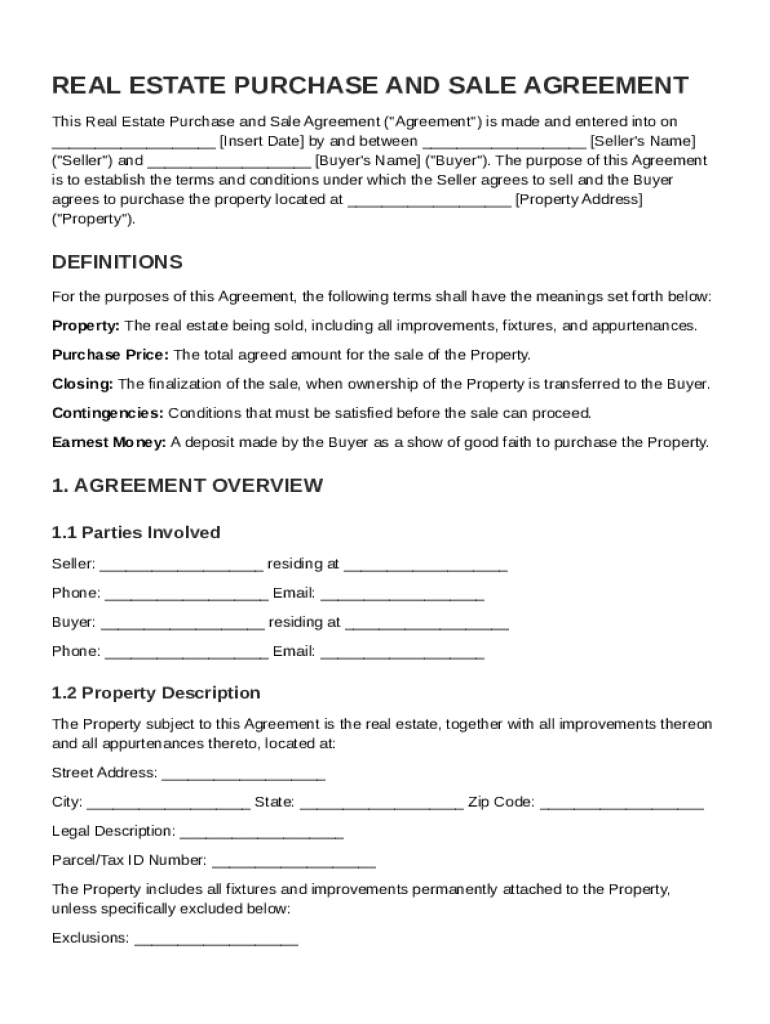
Real Estate Purchase And Sale Agreement Form
Use a Real Estate Purchase And Sale Agreement Template template to make your document workflow more streamlined.
What this purchase agreement does
A Real Estate Purchase And Sale Agreement Form records the buyer’s offer and the seller’s acceptance of defined property and transaction terms. It typically identifies the parties and property, states the purchase price, addresses deposits, financing, inspections, contingencies, title, closing, possession, and remedies, and provides signature lines. With signNow, a sender uploads the agreement, reviews detected fillable fields, assigns each field to the correct buyer, seller, or representative, sends it for signing, and retains the signed document with an audit trail. State-specific contract and real-estate rules still govern enforceability.
Who uses this purchase agreement
Real estate teams
Real estate brokers and transaction coordinators use the agreement to capture buyer and seller signatures, preserve negotiated terms, and organize completed transaction records without scheduling every signer for an office meeting.
Transaction participants
Independent buyers, sellers, attorneys, and property investors use the form to document price, contingencies, closing conditions, and signature intent before transferring the signed record to their transaction file.
Key features for purchase agreements
signNow connects the agreement’s negotiated terms, signer assignments, electronic signatures, and transaction records in one controlled workflow.
Deal terms
Complete price, property, financing, inspection, title, closing, and possession fields before sending the agreement to its signers.
Signer routing
Assign separate fields to buyers, sellers, agents, attorneys, or witnesses so each participant signs the intended section.
Shared templates
Use reusable agreement templates for recurring property transactions while preserving deal-specific terms and contingencies.
Audit trail
Capture timestamps, signer actions, and completion history alongside the executed agreement for transaction-file review.
Remote signing
Send the agreement through email or a signing link when parties are working from different locations.
Secure records
Keep the completed PDF and certificate available for later review, subject to applicable retention policies.
How this agreement works online
A purchase and sale agreement moves from completed deal terms to assigned signatures, recorded consent, and an accessible final record.
Prepare agreement: Upload the agreement, then review detected fields and add missing purchase terms. Assign signers: Assign buyer, seller, agent, and other signers in the required signing order. Send for signing: Send the completed agreement by email or a shareable signing link. Store records: Collect signatures and retain the completed PDF with its audit trail.
 Best ROI. Our customers achieve an average 7x ROI within the first six months.
 Scales with your use cases. From SMBs to mid-market, airSlate SignNow delivers results for businesses of all sizes.
 Intuitive UI and API. Sign and send documents from your apps in minutes.
How to complete the agreement
Follow these steps to prepare the transaction document, route it to the correct parties, and preserve execution evidence.
Upload document:
Upload the purchase and sale agreement PDF. Check fields:
Review detected fields and add missing terms. Assign signers:
Assign each signature and date field. Send agreement:
Send the agreement for electronic signatures. Archive record:
Download the signed record and audit trail.
Recommended agreement workflow setup
Configure the agreement around signer identity, transaction evidence, secure storage, and the state rules governing the property.
| Setting | Recommendation |
|---|---|
| Authentication method | Email verification with SMS OTP |
| Signature type | Typed or drawn electronic signature |
| Audit trail | Enable completion certificate and action history |
| Document retention | Retain through applicable state limitations period |
| Encryption | TLS 1.2/1.3 and AES-256 protection |
Security for agreement records
Data at rest:
Data in transit:
Service assurance:
Security management:
Signer verification:
U.S. eSignatures:
Risks from incomplete agreements
Contract dispute
Enforceability challenge
Term mismatch
Identification dispute
Privacy exposure
Best practices for signed agreements
Accurate terms, controlled versions, signer evidence, and a documented retention decision make the completed agreement easier to administer and defend.
Export the signed record and audit trail
Document the applicable retention schedule
Review every material transaction term
Control versions and transaction access



Purchase agreement troubleshooting
Use these answers to resolve signing, field, legal-effect, and record-management questions before treating the agreement as complete.
On the Business plan, upload the agreement and use the editor to inspect automatically detected fields. Add or correct buyer, seller, date, initials, and signature fields before sending. Detection does not determine whether the contract’s legal terms satisfy state law, so review the completed document separately.
Business includes legally binding eSignatures, templates, mobile apps, and audit trails at $8/user/month with annual billing. Business Premium is $15/user/month annually and adds bulk send. Select the plan based on sending volume and workflow requirements, not on the agreement’s legal validity.
Use signNow’s signer authentication options, including SMS OTP where appropriate, and confirm each recipient’s email address before sending. ESIGN and UETA focus on intent, consent, attribution, and record retention; an authentication method strengthens evidence but does not replace required state-law formalities.
A purchase agreement is generally an electronic business record when the parties intend to sign, consent to electronic records, can access the document, and the record remains accurate and reproducible. ESIGN, 15 U.S.C. ch. 96, and UETA provide the federal and state framework, subject to exceptions and state requirements.
Business Premium includes bulk send, while Business does not include that plan feature. For one negotiated agreement, assign the specific buyer, seller, and representatives individually. Bulk send is more suitable for repeated standardized documents and should not be used to distribute mismatched property terms.
The agreement itself does not establish a universal retention period. Apply the transaction file policy and the governing state’s rules, preserve the signed PDF and audit trail together, and ask counsel about limitation periods, recording requirements, and any lender or brokerage retention policy.
Key performance indicators that demonstrate SignNow's proven track record.
BE READY TO GET MORE
Get this form now!

If you believe that this page should be taken down, please follow our DMCA take-down process.