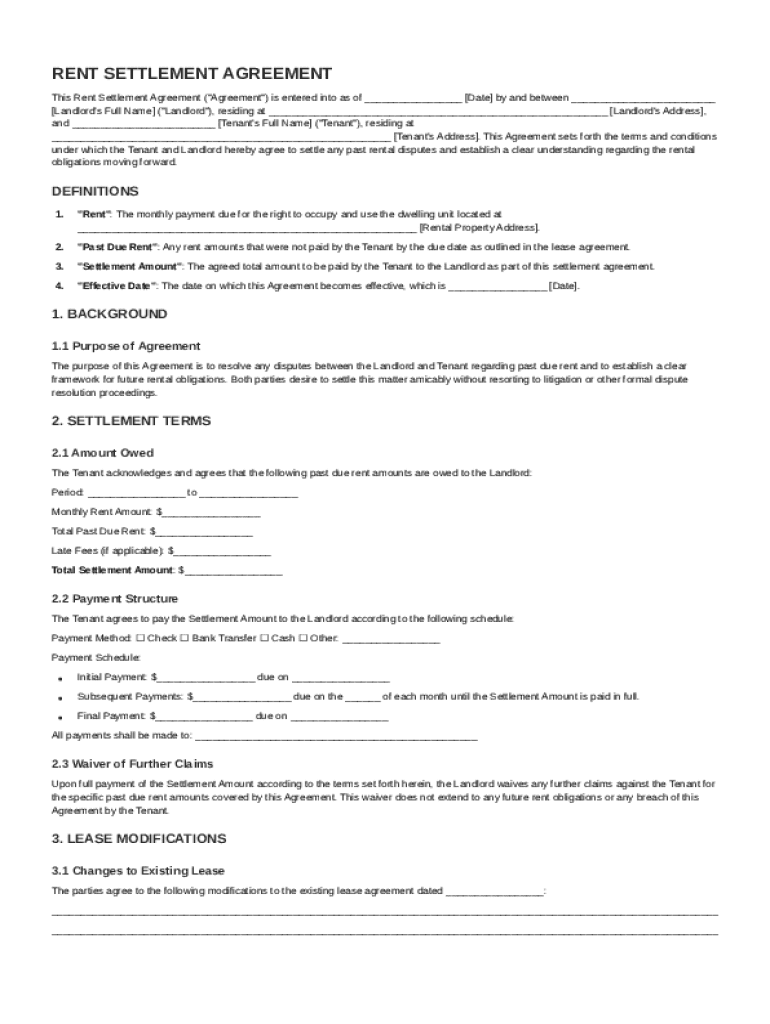
Rent Settlement Agreement Form
Use a Rent Settlement Agreement Template template to make your document workflow more streamlined.
What the Rent Settlement Agreement Form does
A Rent Settlement Agreement Form records how a landlord and tenant resolve a rental dispute or outstanding balance. It can identify the parties, rental property, amount owed or credited, payment schedule, settlement conditions, release language, effective date, and signatures. The document helps convert an oral arrangement into a written record that each party can review and retain. State landlord-tenant law governs enforceability, required notices, and any limits on waivers. signNow can turn the completed document into a routed electronic signing workflow with signer authentication, timestamps, and an audit trail.
Business types that use rent settlements
The form supports negotiated rental resolutions for individual owners, property operators, and legal teams managing documented housing agreements.
Independent landlords can document negotiated rent credits, arrears repayment terms, move-out dates, and mutual releases without coordinating paper copies across multiple parties. Property management companies can standardize settlement terms across buildings, route agreements to authorized signers, and preserve completed records with an audit trail. Legal departments and housing counsel can review settlement language, obtain signatures in sequence, and retain evidence showing consent, signer identity, and document history.
These tasks are executed by both individual contributors and centralized administrators depending on organizational policy and required controls.
Who uses the Rent Settlement Agreement Form
Property managers
Property managers use the Rent Settlement Agreement Form to document agreed rent amounts, payment dates, credits, and release terms before closing a tenant dispute.
Landlords and tenants
Tenants and landlords use the form to record a negotiated resolution, confirm mutual obligations, and preserve a signed copy for future reference.
How to complete the settlement form
Prepare the agreed rental terms first, then use signNow to route the document and preserve the completed record.
Upload document:
Upload the prepared settlement document to signNow. Check fields:
Review detected fields and add missing amount, date, and signature fields. Assign signers:
Assign landlord and tenant roles, then send the agreement. Store record:
Review the signed PDF and audit trail before storing it.
 Best ROI. Our customers achieve an average 7x ROI within the first six months.
 Scales with your use cases. From SMBs to mid-market, airSlate SignNow delivers results for businesses of all sizes.
 Intuitive UI and API. Sign and send documents from your apps in minutes.
Recommended settlement workflow setup
Configure the rental settlement workflow around verified signers, an accessible final record, and the state law governing the property.
| Setting | Recommendation |
|---|---|
| Authentication method | Email link with SMS OTP |
| Signature type | Typed or drawn eSignature |
| Audit trail | Enable completion history |
| Document retention | Follow applicable state law |
| Encryption | TLS 1.2/1.3 and AES-256 |
Security for rental settlement records
Encryption:
Security report:
Information security:
Electronic signatures:
Protected information:
Privacy controls:



Processing the settlement agreement
Processing time depends on document readiness and signer response; signNow records each delivery, signing, and completion event.
Prepare document
Deliver to signers
Signer turnaround
Complete and archive
Pitfalls in rental settlement records
Settlement language omits the exact rent balance, credits, due dates, or property address, leaving the parties to interpret essential terms later. A tenant signs an agreement without receiving the final version that includes every negotiated payment, release, and move-out condition. Access permissions expose the tenant’s address, financial details, or dispute history to staff who do not need the information. Electronic consent is not documented for a consumer-facing record, weakening proof that the tenant agreed to transact electronically.
Best practices for rental settlements
Accurate terms, verified signers, controlled routing, and organized records reduce uncertainty when a rental settlement is later reviewed.
Identify every settlement term
Verify signer authority before sending
Route one final version
Preserve the signed evidence
What the rental audit trail records
A signNow audit trail shows the events surrounding this settlement agreement, helping connect the final document to its signing process.
Authenticate signer:
Capture timestamps:
Record document history:
Track actions:
Seal completion:
Export audit trail:
Key performance indicators that demonstrate SignNow's proven track record.
Rent settlement form troubleshooting
Resolve field, signer, consent, and legal-effect questions before relying on a completed rental settlement agreement.
Upload the final Rent Settlement Agreement Form again and confirm that the PDF is not password-protected or damaged. signNow’s field detection can then identify fillable areas; manually add amount, date, and signature fields when detection misses them.
Check whether the signer’s email address is correct and resend the invitation from the document workflow. A shareable signing link can provide another route, while SMS authentication can add a verification step when enabled by the account configuration.
Confirm that the payment amount, credits, dates, and release language are correct before completion. After signing, edits require a new document version and fresh signatures because changing a signed agreement can undermine its evidentiary value.
Electronic signatures for a rental settlement may be recognized under ESIGN and applicable state law when intent, consent, attribution, and record retention are established. State landlord-tenant requirements still control notices, disclosures, and any prohibited waiver.
The signNow Business plan includes legally binding eSignatures, templates, audit trails, and mobile apps at $8/user/month when billed annually. Business Premium is $15/user/month annually and adds bulk send and kiosk mode.
For consumer-facing electronic records, ESIGN, 15 U.S.C. §7001(c), requires disclosure of the right to paper, access to the electronic record, and procedures for withdrawing consent. Capture that consent before routing the settlement agreement.
BE READY TO GET MORE
Get this form now!

If you believe that this page should be taken down, please follow our DMCA take-down process.