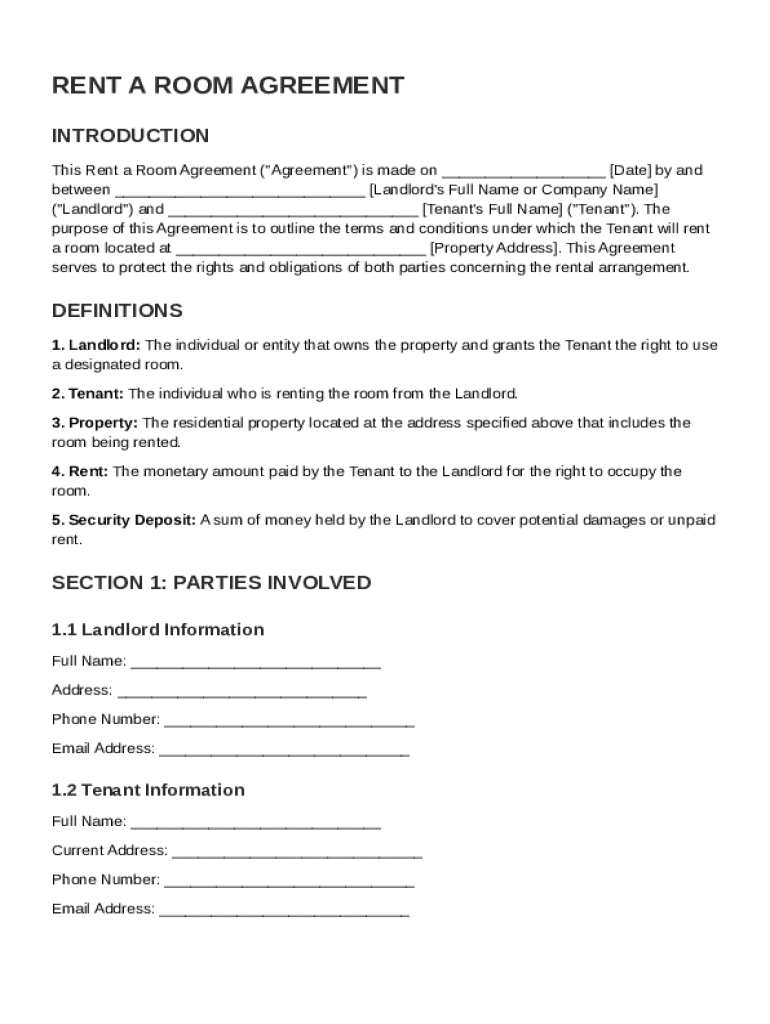
Rent A Room Agreement Form
Use a Rent A Room Agreement Template template to make your document workflow more streamlined.
What a rent a room agreement does
A Rent A Room Agreement Form is a written contract for renting a bedroom or other defined space in a U.S. home. It identifies the homeowner or landlord and occupant, describes the room and shared areas, states rent, deposit, payment timing, term, utilities, house rules, maintenance duties, and ending procedures. The parties review the terms, provide required disclosures, and sign. State and local landlord-tenant laws control issues such as deposits, notice, habitability, occupancy, and required disclosures, so the completed agreement should be checked against the property’s jurisdiction.
Who uses a room rental agreement
Homeowners
Homeowners can document a room rental to an occupant, including shared-space rules, payment obligations, guest limits, utilities, and notice terms.
Property managers
Property managers can standardize room agreements for individual bedrooms while preserving property-specific disclosures, approval records, and signer evidence.
Who benefits from a room agreement
Room agreements help homeowners and property teams document occupancy terms without losing the property-specific details that distinguish a bedroom rental from a whole-unit lease.
A homeowner renting one bedroom can use the form to separate the occupant’s private room from shared areas, state house rules, and document rent, utilities, deposit, and notice terms. A small property manager can reuse a room-specific template while changing the address, bedroom description, pricing, disclosures, and signer assignments for each occupancy. A housing operator with several properties can route agreements through controlled signNow workflows, preserving signer evidence and consistent records while allowing property-specific terms and disclosures.
These tasks are executed by both individual contributors and centralized administrators depending on organizational policy and required controls.
How a room agreement works
A clear room-rental workflow connects property details, required disclosures, signatures, and retained evidence.
Define the arrangement: Describe the room, shared areas, occupants, rent, deposit, utilities, and house rules. Check local rules: Review state and local requirements, then add disclosures and lawful notice terms. Collect signatures: Send the completed agreement to each required signer through signNow. Preserve records: Store the signed agreement and audit trail with controlled access.
 Best ROI. Our customers achieve an average 7x ROI within the first six months.
 Scales with your use cases. From SMBs to mid-market, airSlate SignNow delivers results for businesses of all sizes.
 Intuitive UI and API. Sign and send documents from your apps in minutes.
Complete the room agreement accurately
Use these steps to prepare a room-specific agreement before sending it for electronic signature.
Identify parties:
Enter the parties’ legal names and contact details. Describe premises:
Describe the bedroom, shared spaces, furnishings, and permitted use. Set financial terms:
Add rent, deposit, utilities, due dates, and payment method. Add obligations:
State house rules, maintenance duties, notices, and termination conditions. Complete signing:
Send through signNow and confirm every required signature.
Privacy safeguards for room agreements
The signed agreement may expose the tenant’s address, identification details, emergency contacts, or payment information to unauthorized recipients. Collecting electronic consent without explaining the records, signing process, and paper-copy rights can weaken evidence of informed agreement. Granting every property manager access to completed agreements can disclose private tenancy terms beyond the people who need them. Sending a room agreement to the wrong email address can reveal personal data and create a preventable disclosure incident.
Risks of an incomplete room agreement
Disputed obligations
Weak execution evidence
Unenforceable agreement
State-law compliance gap
Protect signed room agreements
Data in transit:
Data at rest:
Independent controls:
Security certification:
Signing evidence:
Privacy controls:
What the audit trail records
The audit trail preserves evidence about who accessed, reviewed, and signed the room agreement, separate from the agreement’s substantive rental terms.
Signer access:
Timestamp capture:
Action history:
Document linkage:
Completion sealing:
Trail export:
Best practices for room rental agreements
Accuracy, lawful disclosures, and preserved signing evidence make a room agreement easier to administer and evaluate later.
Describe the room and shared spaces precisely
Separate rent deposit and utility obligations
Write specific lawful house rules
Retain the signed record and audit trail



Legal value of a room agreement
A signed Rent A Room Agreement Form records the parties’ consent to defined occupancy and payment terms, helping address disputes about what was agreed. Electronic execution may be recognized under ESIGN, 15 U.S.C. ch. 96, and applicable state law such as UETA, but state-specific landlord-tenant rules still control enforceability.

Troubleshooting room agreement signing
These answers address field assignment, electronic-signature validity, privacy controls, and signer access for Rent A Room Agreement Form workflows.
Upload the completed Rent A Room Agreement Form as a PDF or reusable template, then place required signature, date, and initials fields manually if automatic field detection does not identify them. Confirm each field is assigned to the correct homeowner or occupant before sending.
The signNow Business plan is listed at $8 per user per month with annual billing and includes templates and audit trails. Business Premium is $15 per user per month annually and adds bulk send, which may help repeated room agreements.
Electronic execution can support a room agreement when the parties show intent, consent to electronic records, signer attribution, and record retention under ESIGN and applicable state law. Review consumer-disclosure requirements under 15 U.S.C. §7001(c) when the arrangement involves a consumer transaction.
SignNow encrypts data in transit with TLS 1.2/1.3 and at rest with AES-256, and its compliance materials list SOC 2 Type II and ISO 27001. These controls do not replace state-required rental disclosures or lawful lease terms.
A room agreement does not replace a state-required notarization, witness requirement, government filing, or deed procedure. Wills, court orders, family-law decrees, and other ESIGN exceptions require separate handling under the applicable authority.
If a signer cannot open the invitation, verify the email address, resend the request, or provide a controlled signing link. Check that the document is still pending and that the recipient was assigned the required signature fields.
Key performance indicators that demonstrate SignNow's proven track record.
BE READY TO GET MORE
Get this form now!

If you believe that this page should be taken down, please follow our DMCA take-down process.