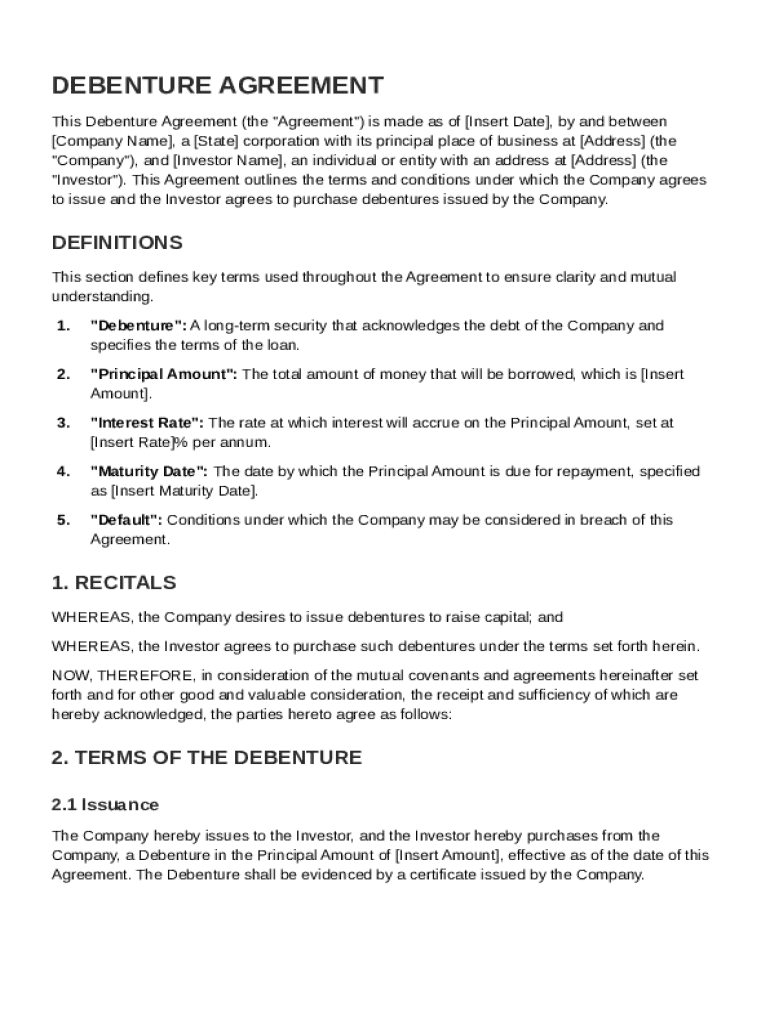
Debenture Agreement Form
Use a Debenture Agreement Template template to make your document workflow more streamlined.
What a debenture agreement form records
A Debenture Agreement Form is a written financing agreement in which a borrower documents debt obligations secured by specified assets or repayment promises. In the United States, it generally identifies the issuer and lender, principal amount, interest, maturity, payment terms, covenants, events of default, and signatures. The completed agreement establishes the parties’ agreed terms and creates a record for enforcement or review. State contract law governs many provisions, while ESIGN and UETA can support electronic execution when the parties demonstrate intent, consent, attribution, and reliable record retention.
Who uses a debenture agreement form
Corporate finance
Corporate finance teams use debenture agreements to document borrowing terms, lender protections, repayment obligations, covenants, and authorized signatories before funding or amendments.
Lenders and counsel
Lenders and legal advisers review the principal, security terms, defaults, notices, and signature authority before storing the executed agreement with its completion evidence.
Key features for debenture agreements
signNow organizes the prepared agreement, assigns party responsibilities, records execution activity, and keeps the final financing document connected to its signing evidence.
Field detection
Upload the prepared financing agreement and review automatically detected fields before adding missing signature, initials, date, or text fields.
Role assignment
Assign borrower, lender, witness, and reviewer fields to specific recipients so each person completes only the obligations intended for them.
Remote signing
Route the agreement by email or signing link, allowing authorized parties to review and sign without coordinating an in-person meeting.
Audit trail
Capture timestamps, signer actions, and completion history in an audit trail that accompanies the executed agreement for later review.
Record storage
Save the signed PDF and completion evidence in a controlled workflow, preserving the final financing record for finance and legal teams.
Reusable templates
Use templates for approved recurring debenture structures while keeping variable commercial terms clearly separated for each transaction.
How the debenture workflow works
The signNow workflow turns a prepared debenture agreement into a controlled signing package with assigned fields and completion evidence.
Upload: Upload the completed debenture agreement PDF. Prepare: Review or add fields for parties and terms. Send: Route the agreement to authorized signers. Archive: Store the signed PDF and audit trail.
Complete the debenture agreement in signNow
Prepare the agreement’s commercial terms first, then use signNow to organize fields, route signatures, and preserve completion evidence.
Upload document:
Upload the finalized debenture agreement PDF to signNow. Check fields:
Review detected fields and add missing amount, dates, and signature fields. Assign parties:
Assign each field to the borrower, lender, or authorized representative. Send agreement:
Send the agreement for electronic signatures and required review. Store records:
Download the completed PDF and preserve its audit trail.
 Best ROI. Our customers achieve an average 7x ROI within the first six months.
 Scales with your use cases. From SMBs to mid-market, airSlate SignNow delivers results for businesses of all sizes.
 Intuitive UI and API. Sign and send documents from your apps in minutes.
Recommended debenture workflow setup
Configure the signing flow around verified parties, controlled agreement versions, and durable evidence of execution.
| Setting | Recommendation |
|---|---|
| Signer authentication | Email verification with SMS code |
| Signature type | Typed or drawn eSignature |
| Audit trail | Retain completion certificate and history |
| Document retention | Follow applicable contract policy |
| Encryption | TLS 1.2 or 1.3 and AES-256 |
What the debenture audit trail records
A signNow audit trail documents the signing event separately from the agreement’s commercial terms, helping reviewers evaluate how the parties executed the record.
Authenticate signer:
Capture timestamp:
Track actions:
Seal evidence:
Create certificate:
Export history:
Security for signed financing records
Transit encryption:
Stored data:
Control assurance:
Security certification:
Electronic records:
Sensitive information:



Best practices for debenture agreements
Accurate party details, controlled versions, and complete signing evidence make the executed agreement easier to review and administer.
Reconcile terms before sending
Verify each signer’s authority
Control approved agreement versions
Preserve the executed record
Privacy and disclosure pitfalls
Including unnecessary taxpayer, bank, or personal information in the debenture agreement increases exposure if the executed PDF is forwarded beyond authorized finance and legal recipients. Failing to capture electronic consent or provide required consumer disclosures can weaken the record’s enforceability under the ESIGN Act for covered consumer transactions. Assigning lender and borrower fields to the wrong recipients can produce an executed document that does not accurately show each party’s assent. Leaving shared templates editable without role controls can allow an unauthorized user to change repayment, collateral, or default language before signature.
Debenture agreement signing questions
Resolve field, plan, electronic-signature, security, and invite issues before circulating the completed financing agreement.
Upload the original PDF again, then inspect detected fields before sending. On the Business plan, templates and audit trails are available; manually add fields when the document contains scanned pages or nonstandard layouts.
Use signNow’s recipient assignment to separate borrower, lender, and witness fields. Check every signature, date, and initials field before sending so one party cannot complete another party’s obligations accidentally.
Business includes legally binding eSignatures and audit trails, while Business Premium adds bulk send. Select Enterprise when advanced signer authentication or formula and conditional fields are needed for the agreement workflow.
For consumer-facing transactions, provide the ESIGN Act electronic-record disclosure and confirm access to the electronic format. UETA or New York ESRA may also apply depending on transaction location and parties.
signNow encrypts data in transit with TLS 1.2 or 1.3 and at rest with AES-256. SOC 2 Type II and ISO 27001 controls support platform security, but parties remain responsible for accurate terms and access permissions.
The Business plan is listed at $8 per user per month with annual billing and includes 100 signature invites per user per year. Additional invite charges may apply; the Site License uses $1.50 per signature invite.
Risks from incomplete agreement records
Missing signer intent
Ambiguous repayment terms
Unclear default remedies
Unverified signing authority
Why teams look for DocuSign alternatives
Organizations seek alternatives when they need different pricing models, stronger native automation, simpler bulk affidavit workflows, or more flexible identity-verification options than those available in a legacy envelope-based vendor.

Key performance indicators that demonstrate SignNow's proven track record.
BE READY TO GET MORE
Get this form now!

If you believe that this page should be taken down, please follow our DMCA take-down process.