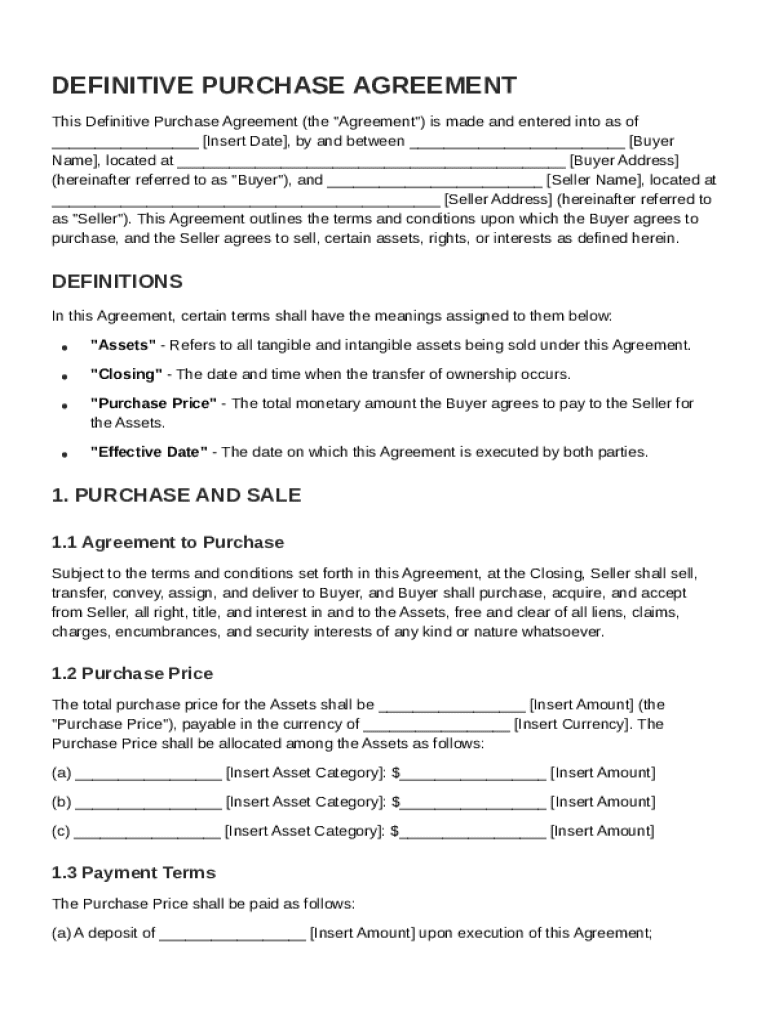
Definitive Purchase Agreement Form
Use a Definitive Purchase Agreement Template template to make your document workflow more streamlined.
What a definitive purchase agreement does
A Definitive Purchase Agreement Form records the final terms under which a buyer acquires identified assets, property, or business interests from a seller. It normally states the parties, purchase price, payment structure, closing conditions, representations, warranties, covenants, indemnities, and signatures. In signNow, upload the agreement, review auto-detected fillable fields, assign each field to the buyer or seller, send the document, and retain the executed PDF with its audit trail. Electronic signing may be recognized under ESIGN and applicable state law when intent, consent, attribution, and record retention are established.
Who benefits from purchase agreements
The form is useful wherever a negotiated purchase transaction requires several parties to review, approve, sign, and retain the final agreement.
Real estate brokerages use definitive purchase agreements to coordinate buyer, seller, broker, lender, and attorney signatures while keeping transaction terms organized before closing. Acquisition teams at operating companies use the form to document asset or business purchases, route executive approvals, and preserve signed terms for finance and legal review. Solo business owners and law firms use the form to collect counterparty signatures on negotiated purchase terms without scheduling every signer for an in-person meeting.
These tasks are executed by both individual contributors and centralized administrators depending on organizational policy and required controls.
Features for definitive purchase agreements
signNow combines document preparation, controlled signing, audit evidence, mobile access, and connected storage for negotiated purchase transactions.
Field detection
Upload the final purchase agreement and review automatically detected fields before assigning buyer, seller, attorney, or representative responsibilities.
Guided completion
Place signature, initials, date, and acknowledgment fields directly on the negotiated agreement without rebuilding its commercial terms.
Signer routing
Route the agreement to multiple parties by email or signing link while preserving the order selected by the sender.
Audit trail
Capture signing activity in an audit trail that accompanies the completed agreement for later transaction review.
Mobile signing
Use mobile apps to review and sign purchase agreements when authorized parties are away from a desktop.
Business integrations
Connect transaction records with Salesforce, NetSuite, Google Drive, Box, or other named signNow integrations where supported.
How the agreement workflow works
A controlled signNow workflow keeps the negotiated agreement intact while moving each assigned party through review, signature, and record storage.
Upload agreement: Upload the final definitive purchase agreement. Assign fields: Review detected fields and assign recipients. Send for signature: Send invitations or create a signing link. Store evidence: Download the executed PDF and audit trail.
Steps to complete the agreement
Prepare the negotiated agreement first, then use signNow to place fields, route signatures, and preserve the completed transaction record.
Upload document:
Upload the completed definitive purchase agreement. Check fields:
Review auto-detected fields for every party. Set recipients:
Assign recipients and signing order. Send document:
Send the agreement through signNow. Archive files:
Download the signed record and audit trail.
 Best ROI. Our customers achieve an average 7x ROI within the first six months.
 Scales with your use cases. From SMBs to mid-market, airSlate SignNow delivers results for businesses of all sizes.
 Intuitive UI and API. Sign and send documents from your apps in minutes.
Recommended agreement workflow setup
Configure the signing process around verified recipients, clear intent, complete audit evidence, and the organization’s transaction-record policy.
| Setting | Recommendation |
|---|---|
| Authentication method | Email verification with SMS OTP |
| Signature type | Electronic signature with signer intent |
| Audit trail | Enabled for every transaction |
| Document retention | Follow transaction policy and state law |
| Encryption | TLS 1.2 or 1.3 and AES-256 |
Technical requirements for signing
To complete a Definitive Purchase Agreement Form in signNow, use a current Chrome, Firefox, Safari, or Edge browser over TLS 1.2 or TLS 1.3. Desktop signing works on Windows and macOS, while signNow mobile apps support iOS and Android devices.
Browsers Chrome, Firefox, Safari, and Edge Desktop systems Windows and macOS computers Mobile devices iOS and Android mobile apps
Organizations should manage access through approved devices, account permissions, and documented retention procedures. Teams requiring automated routing can evaluate signNow API access, integrations, SSO, and certificate or long-term validation requirements against their transaction controls before deployment.



Security for purchase agreements
Data in transit:
Stored document security:
Independent controls:
Information security:
Electronic signatures:
Protected health information:
How the audit trail records signing
The audit trail connects each definitive purchase agreement action to the signer, event time, document, and retained completion record.
Authenticate signer:
Capture timestamps:
Seal document record:
Export evidence:
Review activity:
Archive securely:
Best practices for purchase agreements
Accurate fields, controlled routing, and complete records make a signed definitive purchase agreement easier to review and administer.
Confirm every commercial term
Review detected fields manually
Match fields to signers
Preserve the executed record
Purchase agreement processing timeline
A definitive purchase agreement moves from controlled preparation through signer review and documented archival without relying on paper routing.
Prepare the agreement
Deliver to signers
Complete signer review
Archive the transaction
Privacy and disclosure pitfalls
Buyer and seller personal information may remain visible in every signed copy, email attachment, and downloaded audit record unless access permissions are deliberately controlled. Consumer-facing parties need clear consent to electronic records and access to the agreement in an electronic format under ESIGN’s disclosure requirements. Sending a definitive purchase agreement to an unverified email address can expose purchase price, financing terms, and representations to the wrong recipient. Shared folders or broad administrator permissions can allow unauthorized users to view, download, or alter transaction documents after signing.
Definitive purchase agreement use cases
Real estate and enterprise teams can use signNow workflows to route definitive purchase agreements, capture signatures, and preserve transaction records.
Real estate transactions
Martin Properties can use signNow to prepare definitive purchase agreements for buyers, sellers, brokers, and attorneys before closing.
- Upload the agreement and place signature fields
- Route signatures in the required order
- Store the completed agreement with its audit trail
Tim Martin, founder of Martin Properties, says his company processes and executes documents online with compliance and built-in security. A definitive purchase agreement workflow can similarly keep transaction parties aligned, support mobile signing, and preserve a searchable record for later review.
Enterprise procurement
Xerox teams managing NetSuite operations can coordinate definitive purchase agreements across commercial stakeholders and preserve the transaction record.
- Connect document workflows with NetSuite
- Assign the right signers and formats
- Retain completed agreements for contract administration
Kodi-Marie Evans, director of NetSuite Operations at Xerox, describes using airSlate SignNow to obtain the right signatures on the right documents in the right formats through NetSuite integration. That approach can reduce routing errors when purchase agreements involve multiple departments.
Legal value of the agreement
A signed Definitive Purchase Agreement Form can provide evidence of the parties’ intent, consent, attribution, and agreed transaction terms under ESIGN, 15 U.S.C. ch. 96, and applicable UETA or New York ESRA rules. Wills, court orders, family law decrees, and other statutory exceptions require separate legal treatment.

Purchase agreement troubleshooting
Use these answers to resolve field, consent, plan, evidence, and document-scope questions before circulating the agreement.
Business includes legally binding eSignatures, templates, audit trails, mobile apps, ISO 27001, and SOC 2 Type II. Upload the definitive purchase agreement, verify fields, and assign every required signer before sending.
The Business plan includes 100 signature invites per user per year, with overage fees. Review your account usage or consider Business Premium, Enterprise, or Site License for a different sending model.
For consumer-facing transactions, ESIGN requires disclosure of the right to receive paper records, electronic access capability, and procedures for withdrawing consent under 15 U.S.C. §7001(c).
signNow supports audit trails that document signing activity. Preserve the completed PDF and audit trail together; admissibility still depends on intent, consent, attribution, and reliable reproduction under ESIGN and applicable state law.
Business Premium adds bulk send, kiosk mode, request payments, and quick invite links. For a single negotiated purchase agreement, verify signer assignments and order rather than using bulk delivery.
A definitive purchase agreement is not a will, codicil, testamentary trust, family law decree, or court filing. Those exclusions remain outside ESIGN’s general coverage and may require separate formalities.
Key performance indicators that demonstrate SignNow's proven track record.
BE READY TO GET MORE
Get this form now!

If you believe that this page should be taken down, please follow our DMCA take-down process.