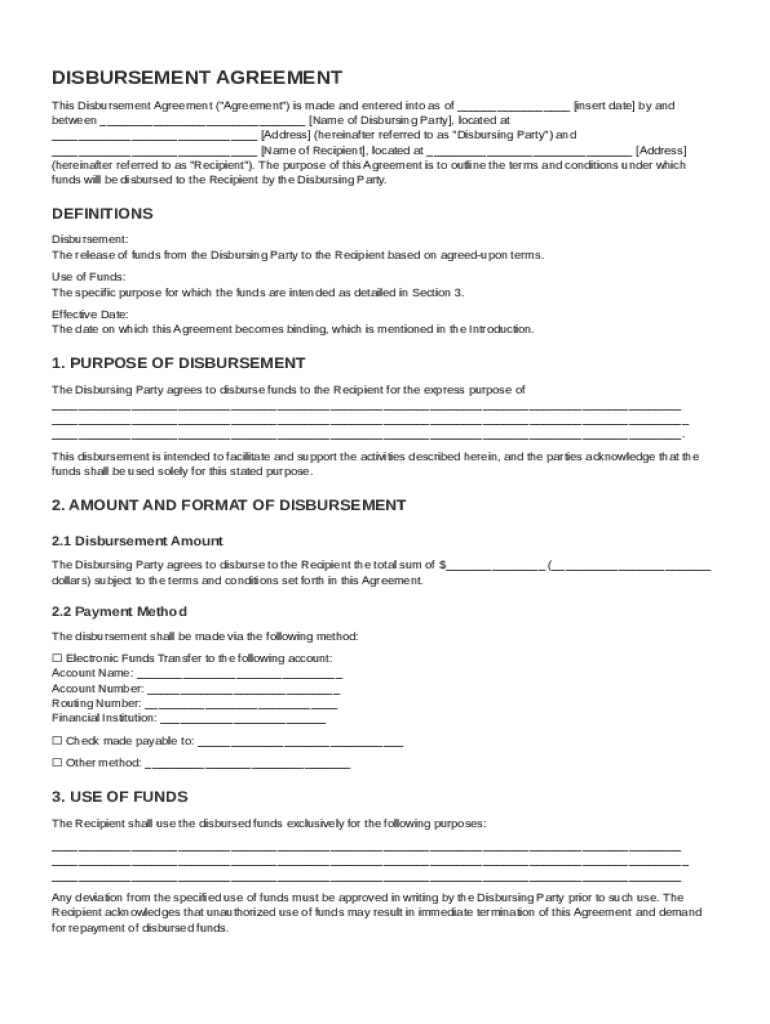
Disbursement Agreement Form
Use a Disbursement Agreement Template template to make your document workflow more streamlined.
What the Disbursement Agreement Form does
The Disbursement Agreement Form records who authorizes a payment, which disbursement terms apply, and how the parties confirm those terms. It is used when an organization needs a signed record connecting approval to payment instructions or release conditions. In signNow, upload the agreement, review detected fillable fields, add signer and date fields, send it for signature, and preserve the completed document with its audit trail. The legal effect depends on the transaction, applicable state law, and evidence of intent, consent, attribution, and record retention under ESIGN and UETA.
Who uses the Disbursement Agreement Form
Accounts payable
Accounts-payable teams use the Disbursement Agreement Form to document payment authorization, approval routing, and signer accountability before funds are released.
Financial operations
Financial operations teams connect signed agreements with invoices, payment instructions, and audit records for reconciliation and review.
Who benefits from this agreement
The Disbursement Agreement Form is most useful where payment authorization, signer identity, and a reproducible record must stay connected.
Small businesses use the Disbursement Agreement Form to document who may authorize funds, which payment instructions apply, and when the agreement becomes effective, reducing email-based ambiguity during reconciliation. Financial-services teams use controlled templates and delegated sending to route payment authorizations through designated reviewers, preserving signer identity and the completed agreement for transaction records. Enterprise operations teams use signNow administration, shared templates, and integrations such as NetSuite or Salesforce to coordinate agreement intake, approvals, signatures, and downstream record storage.
These tasks are executed by both individual contributors and centralized administrators depending on organizational policy and required controls.
Recommended setup for the agreement workflow
Use controlled authentication, documented signer intent, linked audit records, and encryption when preparing a Disbursement Agreement Form in signNow.
| Setting | Recommendation |
|---|---|
| Authentication method | Email link with SMS OTP |
| Signature type | Electronic signature with signer intent |
| Audit trail | Export with completed agreement |
| Document retention | Apply transaction-specific records schedule |
| Encryption | TLS 1.2/1.3 and AES-256 |
 Best ROI. Our customers achieve an average 7x ROI within the first six months.
 Scales with your use cases. From SMBs to mid-market, airSlate SignNow delivers results for businesses of all sizes.
 Intuitive UI and API. Sign and send documents from your apps in minutes.
How the signNow audit trail works
The audit trail connects signer activity to the exact Disbursement Agreement Form that was completed and archived.
Authenticate signer:
Capture timestamps:
Hash document:
Seal document:
Build audit trail:
Retrieve record:
Platform requirements for Disbursement Agreement Form
Complete the Disbursement Agreement Form through a current browser using TLS-secured access on Windows, macOS, iOS, or Android.
Desktop browsers Chrome and Edge on Windows 10 or Windows 11 Apple computers Safari on macOS 12 or later Mobile devices Safari on iOS 15 or later; Chrome on Android 11 or later
Organizations using the Disbursement Agreement Form should manage supported browsers through device policies, verify signer access before sending, and confirm that mobile users can open the completed document. Enterprise teams can connect signNow through its API, configure SSO where available, and preserve the signed file and audit trail under their records policy.



Security controls for the agreement
Transport encryption:
Stored data encryption:
Independent assurance:
Security management:
Health data controls:
Electronic signature law:
Retention periods for signed agreements
A Disbursement Agreement Form has no single universal retention period; apply the rule tied to its transaction, industry, and information.
3 years from filing
6 years for understatement
6 years for HIPAA records
6 years for broker records
7 years for audit records
Record-keeping practices for signed agreements
Retention depends on the transaction and information involved, so connect the signed agreement to the governing records schedule before archiving.
Apply the correct tax-record period
Export the audit trail with the agreement
Restrict access to payment information
Document HIPAA retention when applicable
Privacy pitfalls when preparing the agreement
Including bank-account or taxpayer information in every copy can expose personal data to recipients who only need signature access. Sending the agreement before recording electronic consent may weaken evidence that each signer agreed to transact electronically. Giving every workspace member editing access can allow unauthorized changes to payment instructions or signer assignments. Failing to verify the completed document and audit trail can make later reconciliation difficult when a disbursement is disputed.
Troubleshooting Disbursement Agreement Form workflows
Resolve upload, signer, compliance, plan, and record-keeping questions before the agreement is released for disbursement.
Upload the original Disbursement Agreement Form as a readable PDF and use signNow’s field tools to check every required signature, date, and payment field before sending. Business includes templates and audit trails; it does not automatically determine whether the agreement’s financial terms are legally complete.
The Business plan is listed at $8 per user per month with annual billing and includes 100 signature invites per user per year. If the agreement volume exceeds that allowance, review the applicable overage terms or consider Site License pricing for 1,000 or more documents annually.
signNow’s HIPAA compliance requires a business associate agreement when protected health information is involved. A Disbursement Agreement Form containing payment data alone is not automatically a HIPAA record; classify the information and apply the organization’s privacy controls before sending.
ESIGN and UETA recognize electronic signatures when intent, consent, attribution, and record retention are established. For consumer-facing transactions, provide the ESIGN disclosure and confirm access to electronic records before requesting a signature.
Business Premium includes bulk send, while Enterprise adds advanced signer authentication. If one agreement is sent to multiple recipients, confirm that each recipient receives the correct payment terms rather than reusing a template without reviewing its fields.
The audit trail records signing activity, including timestamps and action history, while the completed document preserves the signed record. Export both from signNow and store them together under the organization’s retention and access policy.
Key performance indicators that demonstrate SignNow's proven track record.
BE READY TO GET MORE
Get this form now!

If you believe that this page should be taken down, please follow our DMCA take-down process.