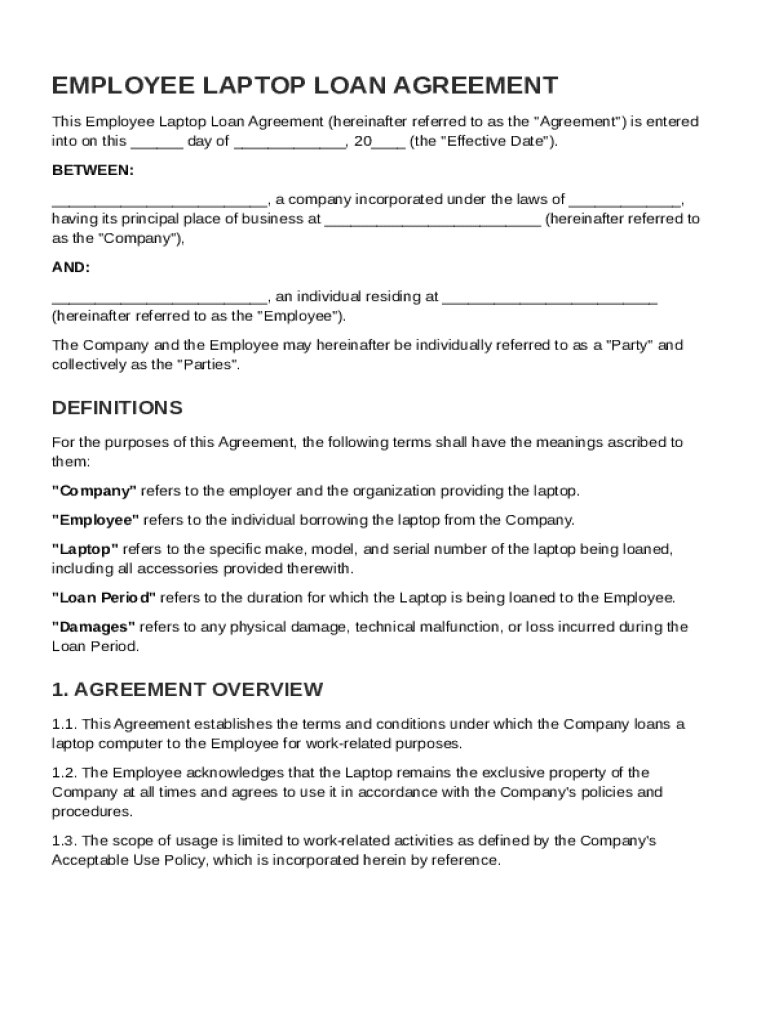
Employee Laptop Loan Agreement Form
Use a Employee Laptop Loan Agreement Template template to make your document workflow more streamlined.
What this laptop loan agreement does
The Employee Laptop Loan Agreement Form records an employer’s temporary or ongoing assignment of a laptop to a named employee. It identifies the device, accessories, condition, issue date, acceptable-use expectations, care obligations, and return requirements, then captures the employee’s acknowledgment and the organization’s approval. HR or IT can upload the form to signNow, place or confirm fillable fields, send it to the designated signers, and retain the completed document with its audit trail. ESIGN and UETA may support electronic execution when intent, consent, attribution, and record access are established.
Who benefits from this laptop agreement
IT asset coordinators in distributed technology companies use the agreement to document laptop serial numbers, accessories, custody dates, acceptable use obligations, and return expectations before equipment reaches remote employees. Operations teams in construction and field-service companies use it when issuing laptops to traveling staff, creating a signed record of equipment condition, responsibility, replacement terms, and return requirements.
Who uses this agreement and why
Human resources
Human resources teams use the form for employee equipment issuance, remote-work records, acceptable-use acknowledgments, and signed return obligations. The agreement can accompany employment paperwork while preserving device identifiers, condition notes, custody dates, and approval evidence in one record.
IT asset management
IT asset teams use the form for laptops, chargers, monitors, and accessories assigned to staff. A completed agreement records who received each asset, its condition, replacement responsibility, and expected return process, helping reconcile signed paperwork with inventory records.
How the laptop loan agreement works
The workflow converts a completed equipment record into a traceable agreement between the employer and employee.
Upload the form: Upload the completed laptop loan agreement and let signNow detect fillable fields. Check agreement fields: Review employee, device, custody, and return fields before sending. Assign signers: Assign the employee and administrator signature fields, then send securely. Archive the record: Store the signed agreement with its audit trail for asset records.
 Best ROI. Our customers achieve an average 7x ROI within the first six months.
 Scales with your use cases. From SMBs to mid-market, airSlate SignNow delivers results for businesses of all sizes.
 Intuitive UI and API. Sign and send documents from your apps in minutes.
Complete the agreement in five steps
Use this sequence to turn laptop assignment details into a signed, auditable equipment record.
Upload form:
Upload the blank or completed agreement. Add fields:
Add employee, device, and return fields. Assign signers:
Assign employer and employee signers. Send agreement:
Send the agreement through signNow. Archive record:
Store the signed copy and audit trail.
Key features for laptop custody records
The Employee Laptop Loan Agreement Form combines equipment identification, employee acceptance, return obligations, and signed evidence in one repeatable workflow.
Asset details
Record the laptop serial number, model, accessories, and condition before the employee accepts custody, giving IT and HR a shared reference for later reconciliation.
Clear acceptance
Capture employee and employer signatures on the same agreement, connecting acceptance of the device with responsibility for care, use, and return.
Remote signing
Send the agreement by email or signing link, allowing remote employees and field staff to complete the record without an in-person paperwork exchange.
Reusable template
Use a reusable template for recurring equipment assignments while updating employee, device, and date fields for each individual transaction.
Audit evidence
Retain the completed agreement with signNow’s audit trail, including signing events and timestamps that help demonstrate how the record was executed.
Connected records
Connect signed records with Google Drive, Box, Egnyte, Microsoft 365, or an asset workflow so completed agreements remain accessible to authorized teams.
Recommended agreement setup
Configure the laptop agreement around clear device identification, attributable signatures, audit evidence, and the organization’s records policy.
| Setting | Recommendation |
|---|---|
| Authentication method | Email link with SMS OTP |
| Signature type | Typed or drawn eSignature |
| Audit trail | Enable completion evidence |
| Document retention | Follow documented asset policy |
| Encryption | TLS 1.2 or 1.3 and AES-256 |
Security for laptop agreements
Stored data:
Data in transit:
Security assurance:
Information security:
Signer verification:
Regulated workflows:
Platform requirements for signing
Complete the Employee Laptop Loan Agreement Form in Chrome, Firefox, Safari, or Edge on Windows, macOS, iOS, or Android. signNow protects web connections with TLS 1.2 or TLS 1.3, and its mobile apps support signing from iPhone and Android devices.
Browser support Chrome, Firefox, Safari, and Edge Operating systems Windows 11, macOS, iOS, and Android Supported devices Desktop, laptop, iPhone, and Android phone
Organizations issuing laptops through managed Windows or macOS devices should confirm browser access, identity policies, and storage permissions before rollout. Teams requiring centralized provisioning can connect signNow with SSO or API-based workflows available through applicable plans, while maintaining their own asset-management and retention policies.



Best practices for equipment agreements
Accurate asset data, clear obligations, attributable signatures, and controlled records make this agreement more useful during employment changes and equipment returns.
Verify device details before sending
Define custody and return terms
Assign the correct signers
Archive signed evidence securely
Challenges this agreement helps prevent
Missing serial numbers or accessory details can make the signed agreement difficult to reconcile with the company’s inventory records. Unclear return dates and condition standards can create disputes when an employee leaves or changes equipment. Sending the agreement to the wrong employee email can expose device assignments and personal employment information. Failing to retain the completed agreement and audit trail can weaken evidence of custody, consent, and delivery.
Employee laptop agreement troubleshooting
These answers address field accuracy, signer identity, plan selection, legal evidence, and storage for this equipment agreement.
The Business plan provides templates, audit trails, mobile apps, and legally binding eSignatures at $8 per user per month when billed annually. It supports routine employee equipment agreements without requiring an enterprise deployment.
Business Premium costs $15 per user per month annually and adds bulk send. That feature is useful when one laptop agreement must be prepared for many employees, although each document should still receive the correct device and signer details.
Business includes audit trails for completed agreements. Preserve the signed PDF and completion evidence together with the organization’s asset record, then apply the employer’s documented retention policy because signNow does not determine the legally required period.
A laptop loan agreement generally falls within ordinary commercial employment documentation. ESIGN, 15 U.S.C. chapter 96, and UETA recognize qualifying electronic records and signatures, but enforceability still depends on intent, consent, attribution, and accessible retained records.
Use two-factor authentication or SMS OTP when device custody requires stronger signer attribution. Advanced signer authentication is available through Enterprise, while the organization should match controls to its security policy and employee data handled.
For a single employee, upload the agreement, place fields, assign the employee and employer, and send it. For repeated assignments, save a template and connect signNow with systems such as NetSuite, Microsoft 365, or Google Drive.
Key performance indicators that demonstrate SignNow's proven track record.
BE READY TO GET MORE
Get this form now!

If you believe that this page should be taken down, please follow our DMCA take-down process.