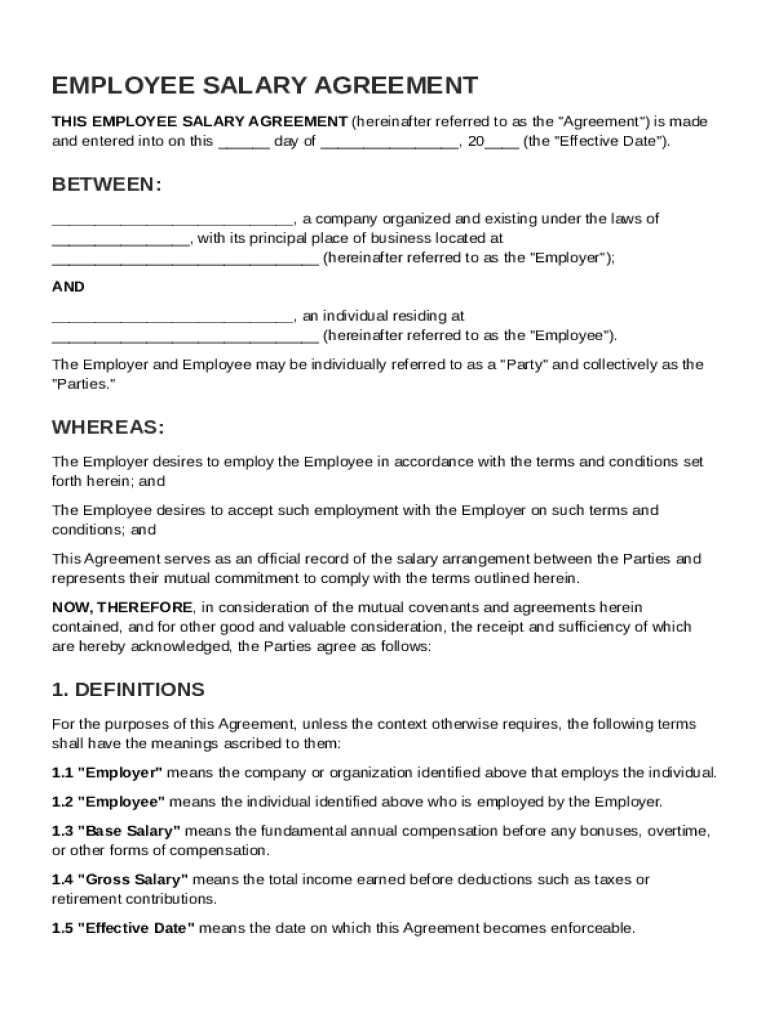
Employee Salary Agreement Form
Use a Employee Salary Agreement Template template to make your document workflow more streamlined.
What an employee salary agreement does
An Employee Salary Agreement Form records the pay terms an employer and employee approve for a defined role and effective date. It generally identifies the parties, salary or hourly rate, pay frequency, position, start or effective date, and signatures. In signNow, the sender uploads the agreement, reviews detected fillable fields, adds employee and employer signature fields, sends it to the named recipients, and stores the completed PDF with an audit trail. ESIGN and applicable state law can recognize the electronic record when intent, consent, attribution, and reliable retention are established.
Who uses employee salary agreements
Human resources
Human resources teams use Employee Salary Agreement Form to document base pay, pay frequency, position, effective date, and approvals during hiring or compensation changes. They can send the agreement to the employee and authorized employer representative, preserve the signed PDF, and connect it with restricted personnel records.
Small employers
Small businesses and professional-services employers use the form to replace informal salary emails with a signed record. The workflow supports employee onboarding, promotions, and pay adjustments while keeping the approved compensation terms, signer identities, timestamps, and audit history together for payroll review.
Who benefits from salary agreement forms
A growing construction company can use the form for hiring and compensation changes across field and office staff. Managers send approved terms from mobile devices, while payroll retains signed agreements and audit trails without passing salary details through unsecured email threads. A regional healthcare employer can document salary terms for clinical and administrative employees through controlled signNow workflows. If an agreement contains protected health information, the organization must address HIPAA requirements and maintain a business associate agreement with signNow.
How the salary agreement workflow works
The signNow workflow moves the approved Employee Salary Agreement Form from preparation to signed, auditable personnel record.
Upload: Upload the approved salary agreement Check fields: Review automatically detected compensation fields Route: Assign employee and employer signers Archive: Store the signed PDF and audit trail
Complete an employee salary agreement
Follow these steps to prepare, route, sign, and retain an Employee Salary Agreement Form in signNow.
Upload:
Upload the approved agreement PDF. Review:
Check detected fields and salary terms. Assign:
Add employee and employer signers. Complete:
Send, sign, and download the record.
 Best ROI. Our customers achieve an average 7x ROI within the first six months.
 Scales with your use cases. From SMBs to mid-market, airSlate SignNow delivers results for businesses of all sizes.
 Intuitive UI and API. Sign and send documents from your apps in minutes.
Configure the salary agreement workflow
Use controlled access, deliberate signer authentication, and documented retention when handling employee compensation information.
| Setting | Recommendation |
|---|---|
| Authentication and provisioning | Verified email with admin-controlled user access |
| Signature type | Typed or drawn electronic signature |
| Audit trail | Capture timestamps, IP address, and action history |
| Document retention | Three years for FLSA payroll records under 29 CFR §516.5 |
| Encryption | TLS 1.2/1.3 in transit and AES-256 at rest |
Choose a salary agreement signing method
- Use the signNow web app to upload the employer-approved Employee Salary Agreement Form, inspect detected salary fields, and assign employee and employer signature roles before sending.
- Use the signNow mobile app when an employee or authorized manager must review and sign the salary agreement from an iOS or Android device.
- Use kiosk mode for supervised, in-person completion when the organization controls the device and must collect signatures during an onboarding appointment.
- Generate a shareable signing link when many employees must access the same approved agreement template, while preserving individualized salary fields and recipient controls.
Features for employee salary agreements
signNow connects document preparation, signer routing, electronic execution, and audit evidence around the specific pay terms recorded in an Employee Salary Agreement Form.
Field detection
Upload the approved agreement and review signNow’s automatically detected fields before adding employee and employer signatures, dates, initials, or acknowledgments.
Signer assignment
Assign each signature field to the correct employee or authorized employer representative, reducing misdirected salary disclosures and incomplete approvals.
Audit trail
Capture timestamps, signer activity, delivery events, and related actions in an audit trail that accompanies the completed salary agreement.
Reusable templates
Reuse an approved salary agreement template while keeping employee name, compensation, effective date, and position fields individualized for every recipient.
Mobile signing
Let employees review and sign from a desktop or mobile device, supporting onboarding and compensation changes without requiring simultaneous in-person meetings.
Secure records
Store the completed PDF and audit evidence in controlled systems, supporting payroll review and the applicable federal and state retention rules.



Security for salary agreement records
Data in transit:
Data at rest:
Security reporting:
Security management:
Electronic signatures:
Protected health information:
Privacy challenges with salary agreements
Salary amounts, pay frequency, effective dates, or job titles may be inconsistent with the approved compensation record, creating payroll corrections and employee disputes. Sending a completed agreement to the wrong email address can disclose private compensation information and weaken evidence that the intended employee received it. A missing electronic-consent record can make it harder to show that the employee agreed to receive and sign the agreement electronically. Broad folder permissions can expose signed salary agreements to coworkers who do not need access for payroll, human resources, or legal review.
Employee salary agreement retention periods
Keep signed salary agreements with payroll and tax records for the applicable federal period, then apply any longer state requirement.
Payroll records: three years
Tax records: three years
Tax records: six years
I-9 records: later date
State records: verify longer period
Best practices for salary agreements
Accurate fields, controlled access, and documented retention make an Employee Salary Agreement Form easier to review and defend.
Confirm every compensation field
Control fields and recipients
Export the audit evidence
Apply the correct retention rule
Pricing for salary agreement workflows
This comparison separates verified signNow plan facts from competitor details that are not verified in the available vendor data.
| Features | signNow | DocuSign | Adobe Sign | PandaDoc | Dropbox Sign |
|---|---|---|---|---|---|
| Starting price | $8/user/month annually | Not verified | Not verified | Not verified | Not verified |
| Free trial | 7 days, no card required | Not verified | Not verified | Not verified | Not verified |
| Bulk send | Business Premium includes bulk send | Not verified | Not verified | Not verified | Not verified |
| Audit trail | Included with Business plan | Not verified | Not verified | Not verified | Not verified |
| HIPAA support | HIPAA compliant; BAA required | Not verified | Not verified | Not verified | Not verified |
| Signature invites | 100 per user annually | Not verified | Not verified | Not verified | Not verified |
Platform requirements for salary agreements
Complete an Employee Salary Agreement Form through signNow using a current Chrome, Firefox, Safari, or Edge browser on Windows or macOS. Mobile access is available through iOS and Android devices over TLS-secured connections.
Browser support Chrome, Firefox, Safari, and Edge Desktop systems Windows and macOS desktop access Mobile systems iOS and Android mobile access
Payroll administrators should use managed Windows or macOS devices when salary data requires controlled access. Teams can connect signNow with HR, payroll, or storage systems through available integrations and configure administrator permissions before distributing agreements.
Troubleshooting salary agreement workflows
These answers address field detection, electronic-signature validity, plan limits, authentication, retention, and bulk distribution for Employee Salary Agreement Form.
The signNow Business plan includes templates and audit trails for recurring salary agreements. Upload the approved agreement, inspect automatically detected fields, then save a reusable template only after confirming employee-specific compensation fields remain editable and protected.
signNow supports legally binding electronic signatures and states ESIGN and UETA compliance. For a salary agreement, preserve signer intent, electronic consent, attribution, and a reproducible signed record; consult applicable state employment law for additional requirements.
Business pricing is $8 per user per month when billed annually, with a $20 monthly price. The plan includes 100 signature invites per user annually; overage terms should be reviewed before high-volume employee onboarding.
Use signNow authentication appropriate to the compensation data, including verified email or stronger options available on qualifying plans. If the agreement contains health information, signNow identifies HIPAA compliance as requiring a business associate agreement.
Export the signed PDF and audit trail from signNow after completion. Keep the records with payroll documentation for three years under 29 CFR §516.5, unless a longer tax, state, or litigation-related period applies.
Business Premium adds bulk send and costs $15 per user per month when billed annually. It can distribute individualized salary agreements at scale, but each recipient’s pay fields and signer assignment still require review.
Key performance indicators that demonstrate SignNow's proven track record.
BE READY TO GET MORE
Get this form now!

If you believe that this page should be taken down, please follow our DMCA take-down process.