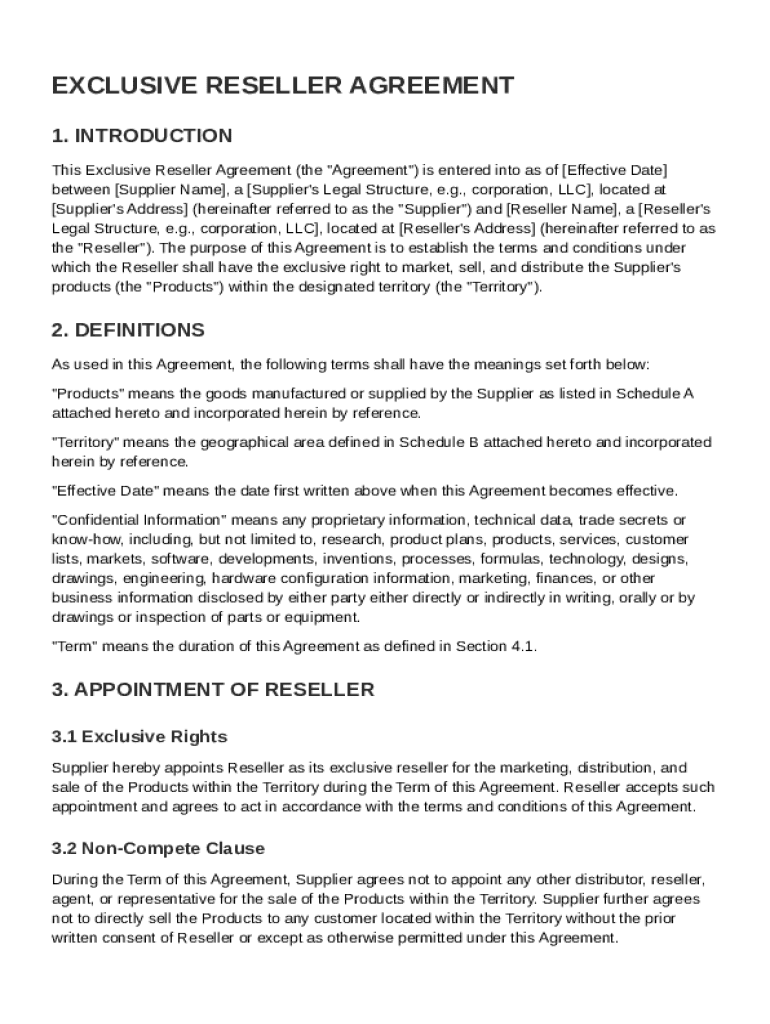
Exclusive Reseller Agreement Form
Use a Exclusive Reseller Agreement Template template to make your document workflow more streamlined.
What the reseller agreement does
An Exclusive Reseller Agreement Form records the commercial relationship in which a supplier authorizes one reseller to represent or sell specified products within an agreed scope. The parties typically identify their legal names, territory, products, exclusivity, pricing or commission rules, performance duties, term, renewal, termination, confidentiality, and signatures. With signNow, the sender uploads the agreement, checks detected fields, assigns supplier and reseller signers, sends it for electronic signature, and stores the completed PDF with its Audit Trail. State contract law governs interpretation and enforceability.
Who uses an exclusive reseller agreement
Manufacturers and suppliers
Channel managers and supplier-side sales teams use the form to define one reseller’s territory, exclusivity, authorization limits, commission terms, reporting duties, and termination rights before distribution begins.
Distributors and resellers
Regional distributors and authorized resellers use the signed agreement to document obligations, approved products, pricing boundaries, customer ownership, renewal terms, and the process for changing the commercial relationship.
Key features for reseller agreements
signNow organizes the fields, approvals, signatures, and records needed to complete an Exclusive Reseller Agreement Form without paper routing.
Defined terms
Capture the reseller’s legal name, territory, products, exclusivity scope, commission terms, and obligations in one structured agreement for review and signature.
Signer routing
Route the Exclusive Reseller Agreement Form to supplier and reseller signers in the required order, reducing follow-up and preserving approval history.
Reusable template
Convert the uploaded agreement into a reusable signNow template, so future reseller appointments use consistent fields and contract language.
Audit evidence
Maintain a completion record that connects the signed PDF with signer actions, timestamps, and authentication events for later review.
Mobile signing
Complete the agreement from supported signNow mobile apps when channel managers or resellers work away from an office or meeting room.
Business integrations
Connect signed reseller documents with Salesforce, NetSuite, Google Drive, Box, or Microsoft 365 for controlled downstream processing.
 Best ROI. Our customers achieve an average 7x ROI within the first six months.
 Scales with your use cases. From SMBs to mid-market, airSlate SignNow delivers results for businesses of all sizes.
 Intuitive UI and API. Sign and send documents from your apps in minutes.
Complete the reseller agreement online
Follow this signNow workflow to prepare, route, sign, and preserve the Exclusive Reseller Agreement Form.
Upload document:
Upload the Exclusive Reseller Agreement Form. Check fields:
Let signNow detect fields, then verify them. Assign signers:
Add supplier and reseller signers. Send agreement:
Send the agreement for signature. Archive records:
Store the signed PDF and Audit Trail.
Recommended reseller agreement setup
Configure authentication, signatures, evidence, retention, and encryption before sending an Exclusive Reseller Agreement Form.
| Setting | Recommendation |
|---|---|
| Authentication method | Email verification with SMS MFA |
| Signature type | Legally binding electronic signature |
| Audit trail | Export with every completed agreement |
| Document retention | Three years from filing under IRC §6501(a) |
| Encryption | TLS 1.2/1.3 and AES-256 at rest |
How the reseller audit trail works
The signNow audit trail records the events that connect each signer to the final Exclusive Reseller Agreement Form.
Authenticate signer:
Capture timestamp:
Record document hash:
Seal document:
Log signer actions:
Export evidence:
Retention periods for agreement records
Retention depends on the record attached to the reseller relationship; apply the controlling rule rather than assigning one universal period.
Three years from filing
Six years for major understatement
Six years for HIPAA records
Three years for payroll records
Five years for injury records
Security for reseller agreement records
Transport encryption:
Storage encryption:
Security certification:
Information security:
Electronic signatures:
Privacy controls:



Troubleshooting reseller agreement signing
Resolve field, authentication, plan, and evidence issues before the Exclusive Reseller Agreement Form reaches final approval.
Upload the original PDF again and confirm required fields are detectable. signNow Business supports templates and audit trails; if auto-detection misses a territory or commission field, place that field manually before sending the agreement.
Business is priced at $8 per user per month annually and includes legally binding eSignatures, templates, and audit trails. Business Premium is $15 annually and adds bulk send, while Enterprise is $30 and adds advanced signer authentication.
A completed agreement can be supported by an audit trail showing intent, attribution, timestamps, and record retention. ESIGN, 15 U.S.C. chapter 96, and applicable UETA laws provide electronic-signature validity when their requirements are satisfied.
Use signNow SMS authentication or stronger controls when the reseller relationship requires additional identity assurance. Enterprise adds advanced signer authentication; the selected method should match the contract value and internal approval policy.
Business and Business Premium include 100 signature invites per user annually, with overage fees. The Site License uses $1.50 per signature invite and is designed for usage-based volume, so choose the plan after estimating reseller agreement volume.
Export the completed agreement and Audit Trail immediately after all parties sign. Store both files together, preserve the original PDF, and limit deletion access so the signing sequence remains reproducible during a contract dispute.
Key performance indicators that demonstrate SignNow's proven track record.
BE READY TO GET MORE
Get this form now!

If you believe that this page should be taken down, please follow our DMCA take-down process.