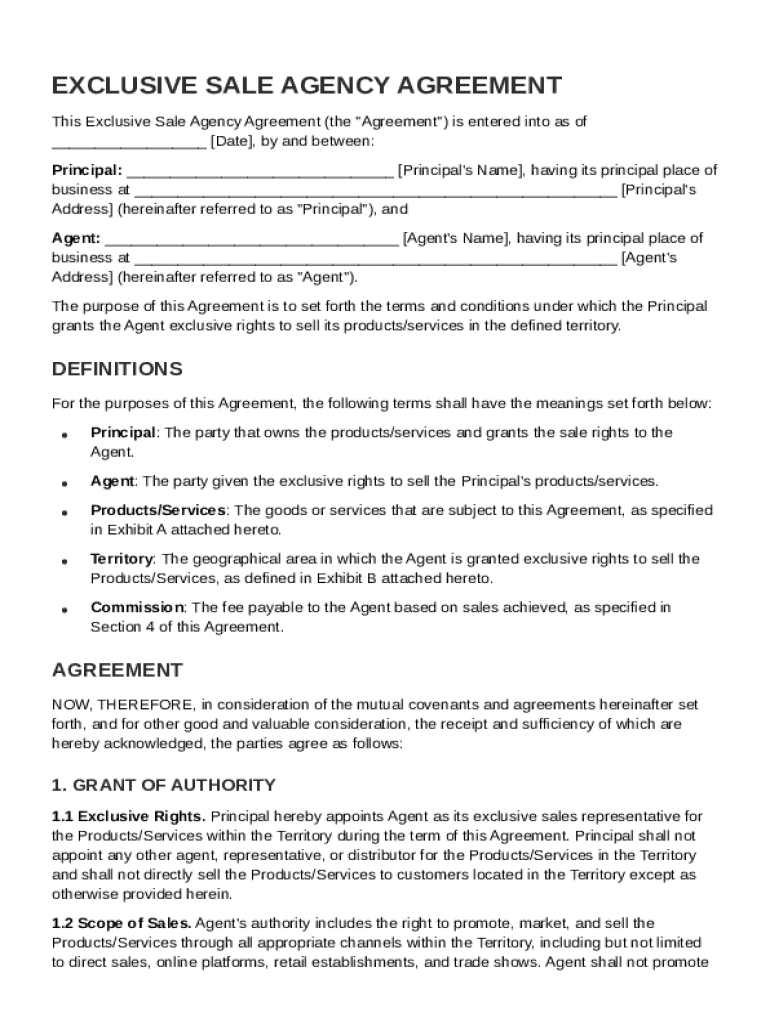
Exclusive Sale Agency Agreement Form
Use a Exclusive Sale Agency Agreement Template template to make your document workflow more streamlined.
What this agency agreement does
An Exclusive Sale Agency Agreement Form is a contract in which a client appoints one agent or agency to represent the client in a defined sale transaction or related service. The form records the parties, property or subject matter, agency authority, exclusivity period, compensation, duties, signatures, and dates. In the United States, an electronic version may be enforceable when the parties demonstrate intent, consent, attribution, and reliable record retention under ESIGN, 15 U.S.C. ch. 96, and applicable state law, including UETA or New York ESRA. State-specific real-estate and brokerage rules still control.
Who uses this agency agreement
Real estate brokers
Real estate brokers use the agreement to document exclusive representation, define the property or service scope, set compensation terms, and obtain signatures from the broker and client.
Agency operators
Agency owners and independent agents use it for repeatable client onboarding, clear authority records, and organized signed copies linked to each transaction.
Features for this agency agreement
signNow helps agencies prepare, route, sign, and retain the Exclusive Sale Agency Agreement Form while preserving the terms and evidence associated with each transaction.
Reusable fields
Upload the Exclusive Sale Agency Agreement Form and place fields for the agent, client, dates, compensation, initials, and signatures without recreating the document.
Signing order
Route the agreement to the client and agent in a defined signing order, helping each party review the same terms before completion.
Audit trail
Capture timestamps, signer actions, and document history in an audit trail that supports later review of the executed agency agreement.
Approved template
Use templates to preserve approved exclusivity, authority, compensation, and termination language across agency transactions while allowing transaction-specific details to be completed.
Completed records
Send a completed copy to each participant and retain the signed agreement with its certificate of completion for organized transaction records.
Signer verification
Apply SMS authentication or stronger signer verification when the agency’s risk assessment requires more than an email signing link.
Business types using the form
The Exclusive Sale Agency Agreement Form is most useful when a business must document exclusive authority, transaction terms, and signed approval across one or more participants.
Solo real-estate practitioners can use the form to document one client relationship, define exclusivity and compensation, and collect signatures without coordinating paper copies or repeated office visits. Regional brokerage teams can standardize approved agency language, route agreements to agents and clients, and retain transaction-specific signed records with audit trails for internal review. Enterprise property and sales organizations can connect agency agreements to CRM or cloud-storage workflows, control templates centrally, and apply role-based access across multiple offices.
These tasks are executed by both individual contributors and centralized administrators depending on organizational policy and required controls.
 Best ROI. Our customers achieve an average 7x ROI within the first six months.
 Scales with your use cases. From SMBs to mid-market, airSlate SignNow delivers results for businesses of all sizes.
 Intuitive UI and API. Sign and send documents from your apps in minutes.
How the agreement moves through signNow
Use this flow to move the Exclusive Sale Agency Agreement Form from an approved draft to an organized executed record.
Upload document: Upload the approved agreement PDF. Review fields: Auto-detect fields and verify placement. Route for signing: Add the agent and client signers. Archive record: Store the signed agreement and audit trail.
What the audit trail records
The audit trail connects the Exclusive Sale Agency Agreement Form to signer identity, document integrity, and each recorded signing event.
Authenticate signer:
Capture timestamps:
Hash document:
Seal record:
Log actions:
Export history:
Recommended agreement workflow setup
Configure the signing flow around signer identity, approved agency terms, audit evidence, and controlled access to completed transaction records.
| Setting | Recommendation |
|---|---|
| Authentication method | Email verification with SMS OTP |
| Signature type | Typed or drawn electronic signature |
| Audit trail | Enabled with completion certificate |
| Document retention | Retain under state and contract policy |
| Encryption and provisioning | TLS 1.2 or 1.3 with administrator access controls |
Platform requirements for signing
Complete the Exclusive Sale Agency Agreement Form through Chrome, Firefox, Safari, or Edge on Windows, macOS, ChromeOS, iOS, or Android. TLS 1.2 or TLS 1.3 protects browser connections, and signNow mobile apps support signing away from a desk.
Browsers Chrome, Firefox, Safari, and Edge on Windows 10, Windows 11, macOS, and ChromeOS. Mobile access Safari on iOS 15 or later; Chrome on Android 10 or later. Transport security TLS 1.2 or TLS 1.3 supports encrypted browser connections during signing.
Organizations should manage supported browsers, mobile operating systems, and document access through their own security policies. Teams using Salesforce, Microsoft 365, Google Drive, or other connected systems should verify administrator permissions, retention rules, and any required SSO or API configuration before routing this agreement.
Security for signed agreements
Data encryption:
SOC 2 Type II:
ISO 27001:
ESIGN and UETA:
HIPAA:
2FA and timestamps:
Challenges when completing the form
Including an incorrect property description or party name can create ambiguity about the exclusive authority granted under the agreement. Leaving the exclusivity period, compensation, termination terms, or permitted sale activities incomplete can invite later contract disputes. Sending the agreement without assigning every signature, initial, or date field can produce an incomplete execution record. Sharing the completed agreement beyond authorized participants can expose personal, property, compensation, or transaction information.
State rules and exclusions
Notarization
Wills
Family law
Real-estate deeds
Best practices for completed agreements
Accurate transaction details, controlled templates, deliberate signer routing, and reproducible records reduce disputes about the agency relationship.
Review every transaction term
Control the approved template
Assign fields to signers
Preserve the executed record
Troubleshooting the agency agreement
These answers address signing, consent, plan, and legal-scope questions that arise when completing this agency agreement electronically.
signNow Business includes legally binding eSignatures, templates, audit trails, and mobile apps at $8 per user per month with annual billing. The account includes 100 signature invites per user per year; additional invite charges may apply.
Yes. ESIGN and UETA generally recognize electronic signatures when intent, consent, attribution, and record retention are established. The agreement must still satisfy applicable state brokerage, contract, and real-estate requirements.
A consumer-facing transaction may require an ESIGN disclosure explaining the right to paper records, electronic access, and withdrawal procedures under 15 U.S.C. §7001(c). Obtain consent before relying on electronic delivery.
Use an ordered workflow that identifies the agent and client separately, assigns each required field, and prevents completion before all required signatures are supplied. The audit trail records the resulting actions and timestamps.
Business Premium costs $15 per user per month with annual billing and adds bulk send, kiosk mode, request payments, and quick invite links. Use those features only when the agency’s workflow requires them.
An exclusive agency agreement involving a deed, notarization, family-law order, or another excluded record may require separate state-law steps. ESIGN does not override exclusions for wills, court orders, or family-law decrees.
Key performance indicators that demonstrate SignNow's proven track record.
BE READY TO GET MORE
Get this form now!

If you believe that this page should be taken down, please follow our DMCA take-down process.