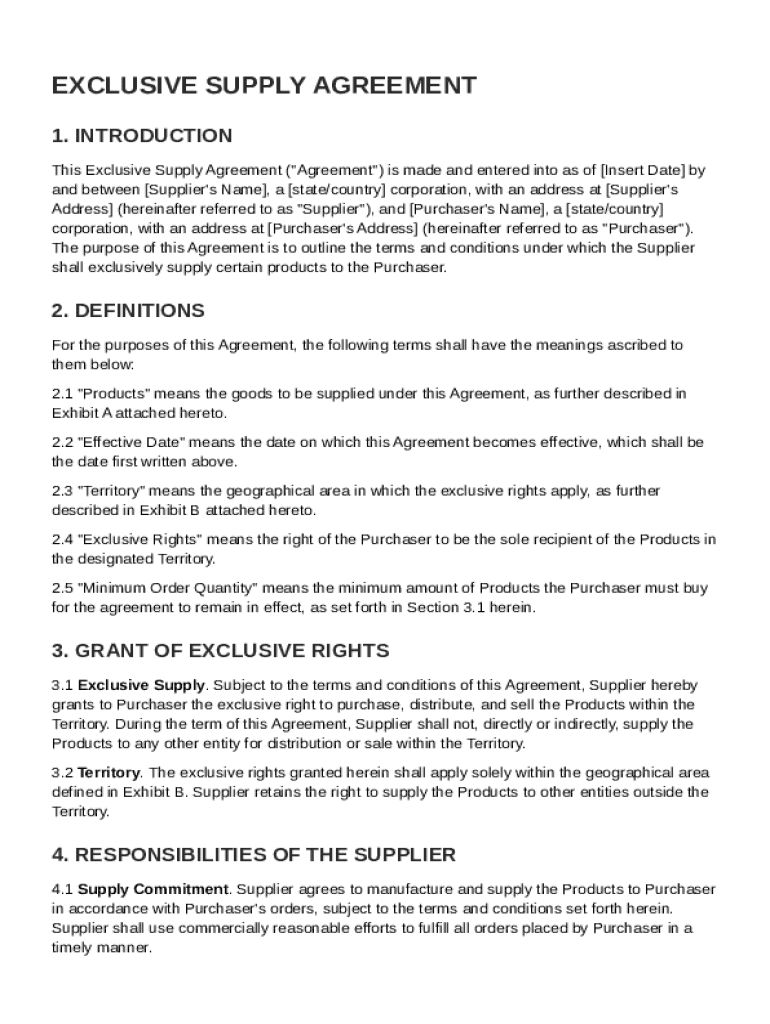
Exclusive Supply Agreement Form
Use a Exclusive Supply Agreement Template template to make your document workflow more streamlined.
What the Exclusive Supply Agreement Form does
The Exclusive Supply Agreement Form is a business contract used to record when a buyer and supplier agree that specified products, territories, or purchasing activity will be handled exclusively under defined terms. It identifies the contracting parties, describes the covered supply relationship, and records commercial conditions such as pricing, duration, delivery duties, renewal, and termination. The form is not a government filing and has no universal federal deadline. Its enforceability depends on contract formation, party authority, clear terms, consideration, intent, and applicable state law. ESIGN and UETA can support electronic execution when their requirements are met.
Businesses that use supply agreements
The form is useful wherever a buyer and supplier need a signed record defining exclusive commercial rights and responsibilities.
Small distributors can use the form to document exclusive territory, product scope, pricing, delivery duties, and renewal terms with a supplier before accepting purchase commitments. Manufacturers can route negotiated supply agreements to authorized buyer representatives, preserving signed versions and audit evidence while managing multiple distributor relationships across defined territories. Enterprise procurement departments can standardize supplier onboarding, connect completed agreements to business systems, and apply role-based review before granting exclusivity or approving purchasing obligations.
These tasks are executed by both individual contributors and centralized administrators depending on organizational policy and required controls.
Who uses this agreement form
Procurement teams
Procurement teams use the form for supplier contracts that define products, territories, purchase commitments, prices, delivery obligations, and exclusivity limits.
Commercial parties
Suppliers, distributors, and legal departments use it to document negotiated commercial rights, route authorized signatures, and preserve the final agreement.
Features that support supply agreements
The Exclusive Supply Agreement Form works best when its commercial terms, signer responsibilities, evidence, and completed record remain connected throughout execution.
Structured terms
A structured agreement keeps supplier identity, products, territories, purchase commitments, exclusivity limits, pricing, renewal terms, and termination conditions together for review.
Assigned fields
Fillable fields let the buyer and supplier complete only their assigned information, reducing omissions in dates, legal names, addresses, and commercial schedules.
Signer routing
Sequential routing sends the agreement to the right authorized representatives, preserving signing order when both parties must approve negotiated supply obligations.
Audit evidence
A completion certificate and audit trail document signer actions, timestamps, and delivery events, creating an organized record for contract administration and dispute review.
Mobile signing
Mobile apps and browser access let procurement and supplier contacts review or sign the agreement without coordinating a shared physical meeting.
Connected records
Connected storage and business systems can retain executed agreements alongside supplier records, reducing manual copying after the contract is completed.
How the agreement workflow works
Complete the Exclusive Supply Agreement Form by preparing its commercial terms, routing it to both parties, and preserving the executed record.
Upload agreement: Upload the agreement and review its supplier, territory, term, and exclusivity clauses. Check fields: Auto-detect fillable fields, then verify parties, dates, pricing, and signature placement. Send for signature: Send the completed agreement to authorized supplier and buyer signers. Archive record: Store the executed agreement with its completion certificate and audit trail.
 Best ROI. Our customers achieve an average 7x ROI within the first six months.
 Scales with your use cases. From SMBs to mid-market, airSlate SignNow delivers results for businesses of all sizes.
 Intuitive UI and API. Sign and send documents from your apps in minutes.
How to complete the form
Prepare the commercial terms first, then use signNow to route, sign, and preserve the completed Exclusive Supply Agreement Form.
Upload document:
Upload the agreement file to signNow. Prepare fields:
Review detected fields and add missing ones. Assign parties:
Assign buyer and supplier signers. Route signatures:
Send the agreement and monitor completion. Store evidence:
Download the executed file and audit trail.
What the audit trail records
For an Exclusive Supply Agreement Form, the audit trail connects signer activity and document integrity evidence to the final executed supply contract.
Authenticate signer:
Capture timestamp:
Hash document:
Seal record:
Log activity:
Retrieve evidence:
Platform requirements for signing
Open the Exclusive Supply Agreement Form through Chrome, Firefox, Safari, or Edge on Windows or macOS. signNow also provides mobile apps for iOS and Android, allowing authorized buyer and supplier representatives to review assigned fields and sign from supported mobile devices.
Operating systems Windows, macOS, iOS, and Android Supported browsers Chrome, Firefox, Safari, and Edge Mobile apps signNow mobile apps for iOS and Android
Procurement teams should manage signing devices, browser updates, and account access through organizational policy. Confirm that each signer can receive the invitation, access the agreement, review the full document, complete assigned fields, and retain the resulting signed copy and audit trail.
Ways to send and sign the agreement
- Use the web app when procurement staff prepare the agreement, assign buyer and supplier fields, and need a full desktop review before sending it for signature.
- Use the mobile app when an authorized representative must review or sign the Exclusive Supply Agreement Form away from the office or during supplier discussions.
- Use kiosk mode when multiple participants sign on a controlled device during an in-person procurement or supplier onboarding session.
- Use a shareable signing link when a verified recipient needs direct access without receiving a separate email invitation, subject to access-control procedures.
Processing stages for the agreement
Processing time depends on document readiness, signer availability, negotiated changes, and the number of required representatives.
Prepare document
Deliver to signers
Collect signatures
Archive completed record
Best practices for contract records
Accurate terms, controlled access, and complete evidence help procurement teams administer the Exclusive Supply Agreement Form after signing.
Preserve the complete executed agreement
Track dates and renewal obligations
Restrict sensitive commercial information
Export evidence after completion
Privacy and disclosure pitfalls
Supplier banking details, personal contact information, or pricing schedules may remain visible to recipients who do not need access to them. A consumer-facing workflow may require ESIGN consent disclosures before electronic delivery and signing can proceed lawfully. Unclear ownership of shared templates can expose negotiated exclusivity terms to unauthorized senders or external recipients. Missing territory, product scope, or termination language can create disputes about how far the supplier’s exclusivity obligation extends.
Security for executed agreements
TLS 1.2/1.3 in transit:
AES-256 at rest:
SOC 2 Type II certified:
ISO 27001 certified:
ESIGN and UETA compliant:
GDPR and CCPA compliant:



State rules and document limits
State rule
Excluded document
Excluded document
Recording requirement
Excluded document
Exclusive Supply Agreement Form troubleshooting
Resolve field, signer, evidence, and compliance questions before sending an Exclusive Supply Agreement Form for execution.
Upload the source agreement as a PDF or supported document, then confirm that signNow detected fields for both the buyer and supplier. Add missing signature, date, initials, or text fields manually before sending.
The Business plan includes legally binding eSignatures, templates, mobile apps, audit trails, ISO 27001, SOC 2, and GDPR support. Business Premium adds bulk send, while Enterprise adds advanced signer authentication and conditional fields.
For a consumer-facing agreement, provide the electronic-record disclosure required by ESIGN, including paper-record rights, electronic-access capability, and withdrawal procedures. Business-to-business workflows should still document consent and preserve reproducible records.
Use signNow’s audit trail and completion certificate to connect signer identity, timestamps, document history, and delivery events. Under ESIGN and UETA, the agreement must remain accessible and reproducible for later reference.
Check the final document for the exact supplier legal name, product scope, territory, exclusivity period, pricing, renewal, and termination language. signNow preserves the executed version, but it does not determine whether negotiated terms are legally sufficient.
If the workflow requires stronger identity proofing, Enterprise adds advanced signer authentication. For regulated records, confirm whether HIPAA, 21 CFR Part 11, or another sector rule applies before selecting a plan or relying on a signature.
Key performance indicators that demonstrate SignNow's proven track record.
BE READY TO GET MORE
Get this form now!

If you believe that this page should be taken down, please follow our DMCA take-down process.