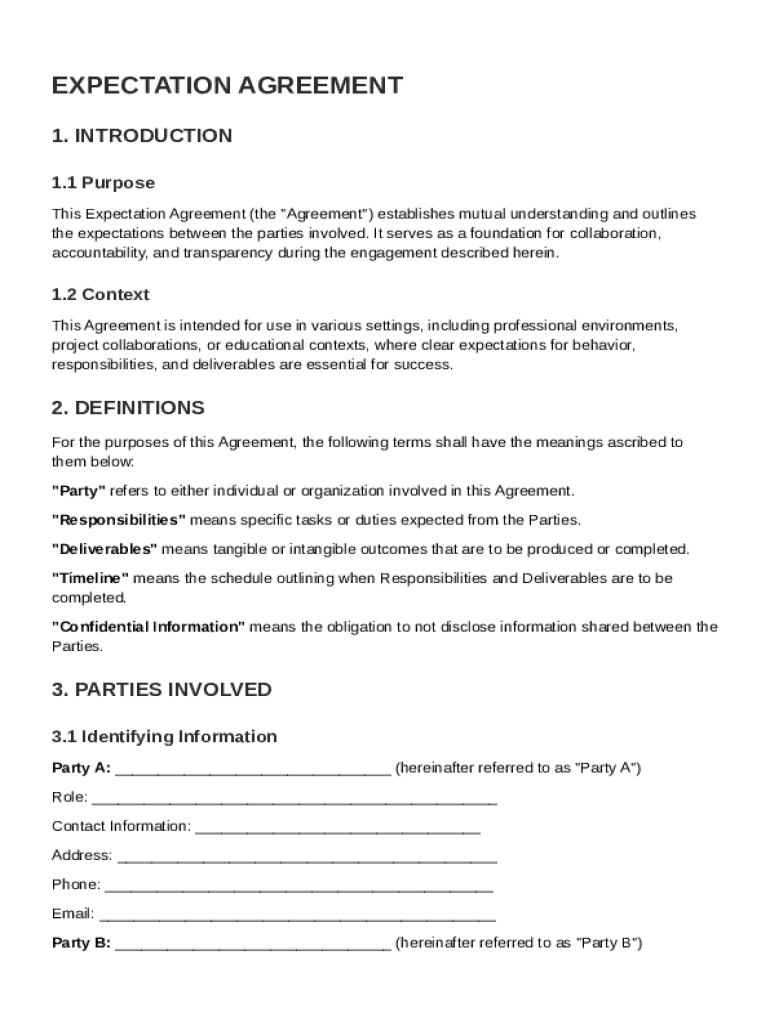
Expectation Agreement Form
Use a Expectation Agreement Template template to make your document workflow more streamlined.
What Expectation Agreement Form does
Expectation Agreement Form records what participants expect from a defined relationship, service, project, or transaction. It typically identifies the parties, describes responsibilities or deliverables, and captures acknowledgment or signatures. In signNow, upload the form, review auto-detected fillable fields, assign each signer, send the document, collect signatures, and retain the completed PDF with its audit trail. ESIGN and UETA can support electronic execution when intent, consent, attribution, and reproducible records are established; specific exclusions and state requirements still apply.
Business types that benefit from the form
Expectation Agreement Form is most useful when several parties must acknowledge defined responsibilities, deliverables, or service conditions in a traceable record.
Solo consultants can use Expectation Agreement Form to confirm project expectations, approval responsibilities, and deliverables before work begins, then retain the signed record with related client documents and correspondence for a consistent project file. Healthcare practices can collect expectation acknowledgments connected with patient services, provided the workflow addresses PHI, HIPAA safeguards, and any required consumer electronic-record disclosure before sending the form for signature. Enterprise operations teams can standardize expectation agreements across departments through shared templates, delegated sending, role-based permissions, and audit trails that identify each signer and completed version.
These tasks are executed by both individual contributors and centralized administrators depending on organizational policy and required controls.
Who uses Expectation Agreement Form
Real estate and legal
Real estate teams use expectation agreements alongside lease agreements, rental applications, and transaction documents, while legal teams coordinate contract review and approvals. signNow templates, signing order, and audit trails help identify who accepted each stated expectation.
Regulated service teams
Healthcare, education, and financial-services teams use expectation agreements for patient, student, client, or vendor acknowledgments. Review whether the record contains PHI or consumer information, then apply HIPAA, FERPA, privacy, and retention controls relevant to that workflow.
How Expectation Agreement Form works
signNow turns the completed Expectation Agreement Form into a controlled signing workflow with assigned fields, signer tracking, and an auditable final record.
Upload form: Upload the completed Expectation Agreement Form to signNow. Review fields: Auto-detect fillable fields and review their placement. Add signers: Assign signers, order, and authentication requirements. Complete and store: Send, collect signatures, and store the audit trail.
 Best ROI. Our customers achieve an average 7x ROI within the first six months.
 Scales with your use cases. From SMBs to mid-market, airSlate SignNow delivers results for businesses of all sizes.
 Intuitive UI and API. Sign and send documents from your apps in minutes.
What the audit trail records
The Expectation Agreement Form audit trail preserves signer activity and document evidence separately from the form’s business content, supporting later review.
Authenticate signer:
Capture timestamp:
Hash document:
Seal record:
Track activity:
Export audit trail:
Security controls for Expectation Agreement Form
Encrypted storage:
Secure transmission:
SOC 2 Type II:
ISO 27001:
Privacy compliance:
Signature compliance:
Platform requirements for signing
Complete Expectation Agreement Form in Chrome, Firefox, Safari, or Edge on Windows or macOS. signNow also provides mobile apps for iOS and Android, with encrypted TLS connections protecting the session.
Supported browsers Chrome, Firefox, Safari, and Edge Desktop systems Windows and macOS desktops Mobile systems iOS and Android mobile apps
Organizations should manage supported browsers, mobile operating systems, and access permissions through their IT policy. Regulated teams should also confirm SSO, API, certificate, and long-term storage requirements before deploying Expectation Agreement Form across departments or external signers.



Recordkeeping practices for completed forms
Retain the completed form, signing evidence, and governing retention rule together so the record remains accessible, attributable, and reviewable.
Export the signed form and audit trail
Apply six-year HIPAA retention when PHI appears
Archive signed records with controlled access
Preserve reproducible records for later review
Retention schedule for signed agreements
Retention depends on the information and transaction connected to Expectation Agreement Form; apply the governing authority rather than a platform default.
6 years for PHI records
3 years for tax records
6 years for major understatement
7 years for SOX records
Longer period when required
State rules and document exclusions
State notarization
Wills and codicils
Court documents
Real-estate deeds
Legal standing and evidentiary value
Expectation Agreement Form may be enforceable when the signer demonstrates intent, consents to electronic records, can be attributed to the signature, and the record remains reproducible. ESIGN and applicable UETA laws support electronic records, but wills, codicils, certain court orders, and family-law decrees are excluded.

Troubleshooting Expectation Agreement Form
Use these answers to resolve field, signer, compliance, and retention questions without changing the form’s substantive expectations or legal terms.
On the Business plan, upload the Expectation Agreement Form, review signNow’s detected fields, and manually correct placements before sending. Auto-detection assists field preparation but does not replace a page-by-page review of names, dates, acknowledgments, and signature locations.
Business includes legally binding eSignatures, templates, audit trails, and mobile apps. Business Premium adds bulk send, while Enterprise adds advanced signer authentication. Select the plan based on the number of recipients and the controls this form requires.
signNow supports ESIGN and UETA compliance, but enforceability still depends on intent, electronic consent, attribution, and record retention. For consumer-facing records, provide the disclosure and access procedures required by ESIGN 15 U.S.C. §7001(c).
If the agreement includes PHI, use a HIPAA-compliant workflow and confirm that a business associate agreement is required. signNow identifies HIPAA compliance as requiring a BAA; apply the organization’s privacy and retention policies as well.
Export the completed PDF, certificate of completion, and audit trail from the finished transaction. Store them together in controlled archival storage, because the signed form without its activity evidence may provide less context during a dispute or review.
If signers cannot open the request, verify the recipient address, signing link, browser, and mobile connection. signNow supports Chrome, Firefox, Safari, Edge, iOS, and Android; resend only after confirming the intended signer and access route.
Key performance indicators that demonstrate SignNow's proven track record.
BE READY TO GET MORE
Get this form now!

If you believe that this page should be taken down, please follow our DMCA take-down process.