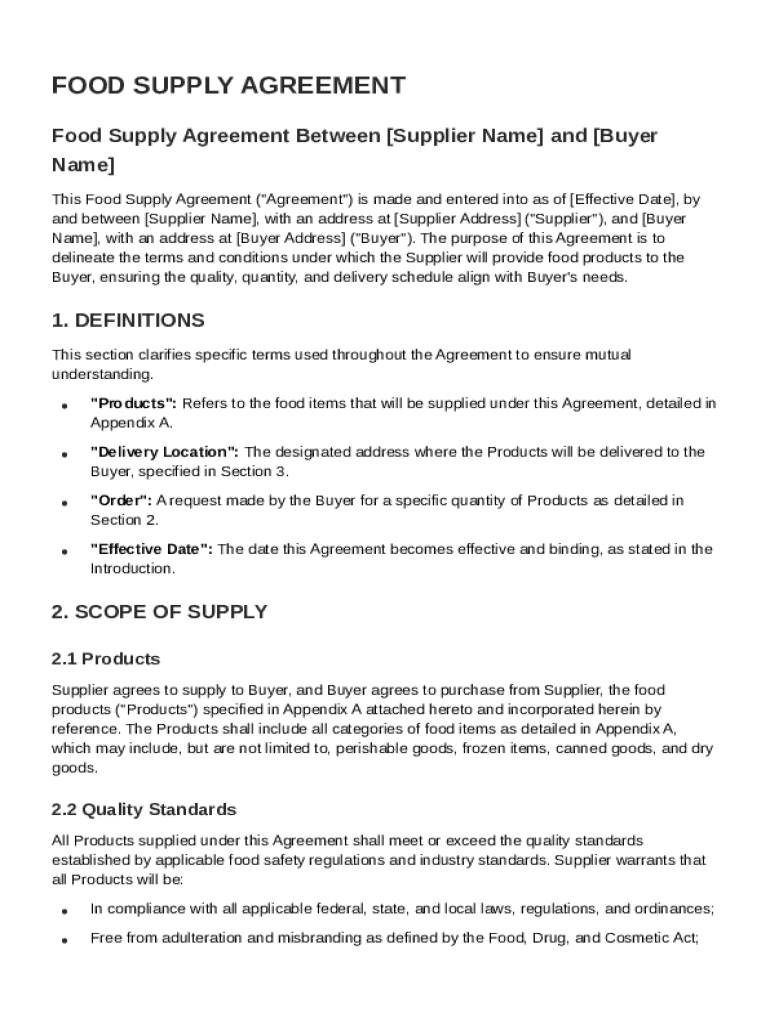
Food Supply Agreement Form
Use a Food Supply Agreement Template template to make your document workflow more streamlined.
What is a food supply agreement?
A Food Supply Agreement Form records the commercial terms between a food buyer and supplier, including the products covered, quantities, prices, delivery arrangements, quality requirements, payment terms, and authorized signatures. It is not an IRS or federal filing form; its legal effect depends on the contract language, party intent, consent, attribution, and applicable state law. With signNow, upload the agreement, review or add fillable fields, assign buyer and supplier signers, send it electronically, and retain the completed document with its audit trail.
Businesses that use these agreements
Food buyers and suppliers use the form to document commercial obligations before products move through the supply chain.
A regional produce distributor can use the form to confirm growers, products, pricing, delivery windows, quality requirements, and payment terms before recurring shipments begin. A restaurant group can standardize agreements across locations, route supplier terms through procurement and legal, and retain signed amendments when menus, volumes, or delivery schedules change. A national food manufacturer can connect supplier agreements to ERP and storage systems, apply role-based review, and preserve audit evidence for purchasing, quality, finance, and legal teams.
These tasks are executed by both individual contributors and centralized administrators depending on organizational policy and required controls.
Features for food supply agreements
signNow supports the document controls food businesses need to prepare, route, sign, verify, and retain supplier agreements with a clear execution record.
Field detection
Upload a supplier contract and let signNow detect fillable areas before you review, correct, and assign fields for the buyer and supplier representatives.
Reusable templates
Reuse approved food supply agreement templates with consistent products, pricing schedules, delivery terms, and signature assignments across supplier relationships.
Signer routing
Route agreements to buyer, supplier, quality, and legal participants in the required order before execution and archival.
Audit evidence
Capture timestamps, signer activity, IP details, and completion history alongside the executed agreement for procurement review.
Mobile signing
Complete supplier agreements from desktop or mobile apps when procurement staff work across offices, warehouses, and production locations.
Operational integrations
Connect completed agreements to systems such as NetSuite, Salesforce, Google Drive, Box, or Procore through named signNow integrations.
Complete the agreement in signNow
Prepare the supplier terms, verify every field, obtain signatures, and retain the completed agreement with its execution evidence.
Upload agreement:
Upload the food supply agreement PDF or document. Check fields:
Review detected fields and add missing terms. Assign signers:
Assign buyer and supplier signature fields. Send document:
Send the agreement through signNow. Archive evidence:
Store the signed copy and audit trail.
 Best ROI. Our customers achieve an average 7x ROI within the first six months.
 Scales with your use cases. From SMBs to mid-market, airSlate SignNow delivers results for businesses of all sizes.
 Intuitive UI and API. Sign and send documents from your apps in minutes.
Configure the agreement workflow
Set authentication, signing, evidence, retention, encryption, and access controls before sending supplier agreements for execution.
| Setting | Recommendation |
|---|---|
| Authentication method | Email verification with SMS OTP |
| Signature type | Legally binding electronic signature |
| Audit trail | Capture timestamps, IP address, and actions |
| Document retention | Retain under the transaction’s applicable rule |
| Encryption | TLS 1.2/1.3 and AES-256 |
Trace every signed agreement event
A signNow audit trail records who handled the food supply agreement, what happened, and when, creating reviewable evidence alongside the final document.
Authenticate signer:
Capture timestamps:
Hash document:
Seal record:
Build audit trail:
Retrieve evidence:
Protect agreement data and identity
Transport encryption:
Stored data encryption:
Security certification:
Information security:
Health data controls:
Signer authentication:



Keep signed food agreements audit-ready
Retain the agreement, amendments, and completion evidence together, using the underlying transaction’s applicable federal and state recordkeeping rules.
Classify records by transaction
Export completion evidence
Archive signed agreements securely
Track amendments and superseded versions
Avoid privacy and disclosure mistakes
Leaving supplier bank details, personal contacts, or tax information visible to every recipient can create unnecessary disclosure and access-control exposure. Sending a food supply agreement before confirming electronic consent may weaken the record of authorization, especially when an individual signs on behalf of a business. Using an unrestricted signing link can make it difficult to attribute the completed agreement to the intended supplier representative. Saving the signed contract without its audit trail can leave procurement unable to show the sequence of review, signature, and completion.
Troubleshoot food supply agreement signing
Resolve field, access, consent, plan, and enforceability questions before a supplier agreement becomes part of the purchasing record.
Upload the original agreement in a supported document format, then inspect every detected field before sending. If a field is missing, add it manually and confirm that supplier, buyer, date, price, delivery, and signature fields are assigned correctly.
Business includes legally binding eSignatures, templates, audit trails, and mobile apps at $8/user/month with annual billing. Business Premium is $15/user/month annually and adds bulk send, which can help with repeated supplier agreements.
For consumer-facing electronic records, provide the ESIGN Act disclosure required by 15 U.S.C. §7001(c), confirm access to electronic records, and explain withdrawal procedures. Document consent before the supplier signs the agreement.
ESIGN and UETA generally recognize electronic signatures when intent, consent, attribution, and record retention are established. Food supply agreements remain subject to contract terms, applicable state law, and any required industry-specific documentation.
Use signNow’s audit trail and certificate of completion to preserve signer actions, timestamps, and document history. Export the completed evidence with the final agreement and store it under the transaction’s applicable retention policy.
If a supplier cannot access the signing link, verify the recipient email, resend the invitation, or generate a controlled signing link. Confirm identity before accepting the completed agreement and avoid forwarding unrestricted links publicly.
Key performance indicators that demonstrate SignNow's proven track record.
BE READY TO GET MORE
Get this form now!

If you believe that this page should be taken down, please follow our DMCA take-down process.