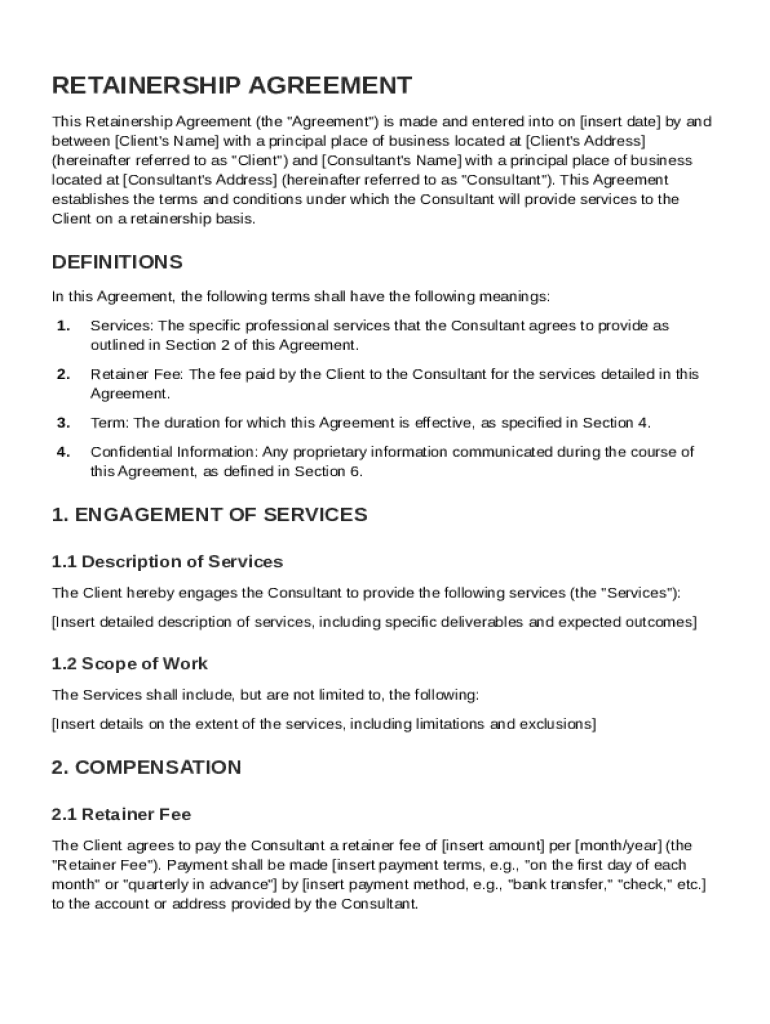
Retainership Agreement Form
Use a Retainership Agreement Template template to make your document workflow more streamlined.
What a retainership agreement form does
A Retainership Agreement Form records the terms under which a client engages a professional for continuing services. It identifies the parties, describes the scope of work, establishes fees and payment timing, and may address confidentiality, communications, termination, expenses, and unused balances. After both sides review the document, signNow can accept an uploaded PDF, detect or add fillable fields, route the agreement to designated signers, capture signatures and timestamps, and preserve the completed document with an audit trail. ESIGN and UETA generally recognize qualifying electronic signatures, while state law and excluded document categories require separate review.
Who benefits from the form
The form is most useful when recurring services, payment expectations, and client approval must be documented before work begins.
Solo attorneys and consultants can use the form to define recurring advice, availability, billing terms, and client responsibilities before accepting ongoing work. Small professional-services firms can standardize retainership terms in a reusable template, route agreements to clients, and preserve signed copies for billing and administration. Enterprise legal, advisory, and healthcare organizations can coordinate approved templates, delegated sending, signer authentication, and controlled records across multiple departments.
These tasks are executed by both individual contributors and centralized administrators depending on organizational policy and required controls.
How the retainership workflow works
A Retainership Agreement Form moves from document preparation to field placement, signer routing, electronic execution, and controlled record storage.
Prepare document: Upload the completed Retainership Agreement Form. Place fields: Add fields for each required participant. Route signatures: Send the agreement for ordered signing. Preserve record: Store the signed agreement and audit trail.
How to complete the form
Use this workflow to prepare, route, sign, and preserve a Retainership Agreement Form with a clear completion record.
Upload form:
Upload the Retainership Agreement Form PDF. Check fields:
Review detected fields and add missing signature, date, or text fields. Add signers:
Enter each signer’s email and define the signing order. Send agreement:
Send the agreement through signNow’s signing workflow. Archive records:
Confirm completion and retain the signed PDF with its audit trail.
 Best ROI. Our customers achieve an average 7x ROI within the first six months.
 Scales with your use cases. From SMBs to mid-market, airSlate SignNow delivers results for businesses of all sizes.
 Intuitive UI and API. Sign and send documents from your apps in minutes.
Features that support retainership agreements
signNow combines document preparation, signer routing, electronic execution, and audit evidence for organizations managing recurring professional-service retainership agreements.
Field placement
Place signature, initials, date, and text fields directly on the retainership agreement so each participant sees exactly what must be completed before submission.
Signer routing
Route the agreement to a client, attorney, consultant, or business representative in a defined order, reducing uncertainty about who signs first.
Audit trail
Capture timestamps, signer actions, and document history with the completed retainership agreement, creating an organized record for later review.
Reusable template
Reuse an approved Retainership Agreement Form template while preserving consistent scope, payment, termination, and confidentiality language across engagements.
Mobile signing
Allow authorized parties to review and sign from signNow mobile apps, helping professional services teams complete agreements when participants are away from desks.
Integrations
Connect signed agreements with systems such as Salesforce, Microsoft 365, Google Drive, or NetSuite when the organization needs coordinated records and workflows.
Recommended form workflow settings
Configure the Retainership Agreement Form around signer identity, document integrity, repeatable routing, and controlled access to completed client records.
| Setting | Recommendation |
|---|---|
| Authentication and encryption | Use signer verification with TLS 1.2/1.3 and AES-256 |
| Signature type | Use an electronic signature showing clear signing intent |
| Audit trail | Enable timestamps, action history, and completion evidence |
| Document retention | Follow the engagement and applicable state records policy |
| User provisioning | Assign authorized senders through managed team access |
Best practices for retainership agreements
Accurate scope, payment terms, signer controls, and records management make a Retainership Agreement Form easier to administer and defend.
Define the service scope clearly
Record payment terms precisely
Map every required signature
Control access and retention
Security for signed agreements
Data encryption:
Transport security:
Security certification:
Information security:
Healthcare safeguards:
Electronic signature law:
Risks of incomplete agreements
Scope dispute
Evidence gap
Privacy exposure
Payment dispute
Where retainership agreements fit
Retainership Agreement Forms help organizations document ongoing professional services before work starts and responsibilities are accepted.
Real estate
Martin Properties uses signNow to manage real-estate documents that require timely signatures from property owners, tenants, and other transaction participants.
- Mobile document execution
- Offline signing support
Tim Martin, founder of Martin Properties, says his company processes and executes documents online with compliance and built-in security. The workflow supports mobile and offline work, helping property teams return retainership agreements and related documents to the necessary parties without relying on in-person meetings.
Healthcare services
Healthcare practices can use a retainership agreement to document ongoing administrative or advisory services before work begins and signatures are collected.
- Patient-facing workflows
- Protected health information controls
Fertility Centers of Illinois selected airSlate SignNow and cited responsive support, a capable API, and confidence in the platform. For a healthcare organization using retainership agreements, those capabilities can support structured signing workflows while HIPAA-related obligations remain part of the organization’s own compliance program.
Questions about completing the form
These answers address signing, field setup, authentication, retention, and compliance questions that arise when preparing a Retainership Agreement Form.
Upload the Retainership Agreement Form as a PDF, then use signNow’s field detection and document editor to inspect every required entry. Add signature, date, text, and initials fields manually when detection misses a field. Save the document as a template before sending repeated agreements.
signNow Business includes legally binding eSignatures, templates, audit trails, and mobile apps at $8/user/month when billed annually. Business Premium is $15/user/month and adds bulk send, while Enterprise is $30/user/month and adds advanced signer authentication and conditional fields.
Under ESIGN and UETA, an electronic signature may have legal effect when intent, consent, attribution, and record retention are demonstrated. For consumer-facing transactions, provide the ESIGN disclosure and confirm electronic access. State law and the agreement’s subject matter can add requirements.
A signing link can route the agreement without requiring the recipient to create an account, but stronger authentication may be appropriate for sensitive legal or financial engagements. signNow Enterprise adds advanced signer authentication; choose controls based on the parties and information involved.
Keep the completed PDF, certificate of completion, and audit trail together under a defined records policy. signNow records signing events and document history; export those records when your organization’s legal, tax, or professional obligations require an independent archive.
HIPAA applies when the workflow handles protected health information on behalf of a covered entity or business associate. signNow states that HIPAA compliance requires a BAA. Configure access, disclosure, and retention practices separately to meet the healthcare organization’s obligations.
Key performance indicators that demonstrate SignNow's proven track record.
BE READY TO GET MORE
Get this form now!

If you believe that this page should be taken down, please follow our DMCA take-down process.