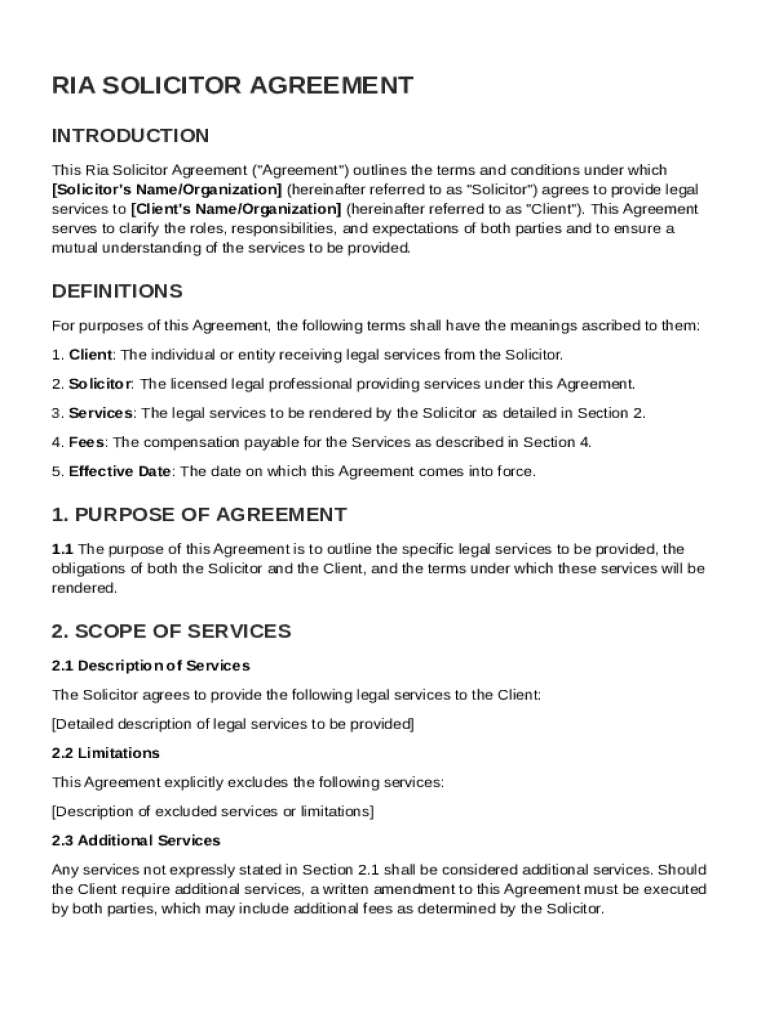
Ria Solicitor Agreement Form
Use a Ria Solicitor Agreement Template template to make your document workflow more streamlined.
What the Ria Solicitor Agreement Form does
The Ria Solicitor Agreement Form is a solicitor-focused agreement used to document terms between identified parties and obtain the required signatures. In signNow, upload the form, review automatically detected fillable areas, add or correct signature and date fields, assign each field to the appropriate signer, and send the document for completion. Signers review the agreement and sign electronically, while signNow preserves the completed document and audit trail. The agreement’s legal effect still depends on its terms, signer authority, consent, and applicable U.S. law.
Who uses the Ria Solicitor Agreement Form
Legal services
A solicitor or legal-services team can use the Ria Solicitor Agreement Form for an agreement requiring identified parties, defined obligations, signature fields, dates, and an accessible final record. Review every clause before sending because signNow provides the signing workflow, not legal advice about the agreement’s terms.
Business operations
A business operations or client-intake team can route the Ria Solicitor Agreement Form to customers, counterparties, or internal approvers. Templates, assigned fields, and an audit trail help preserve the completed document, while counsel should confirm signer authority and any state-specific execution requirements.
Legal standing of the Ria agreement
For a U.S. business transaction, the Ria Solicitor Agreement Form can carry an electronic signature when the signer intends to sign, consents to electronic records, can be identified, and the completed record remains accessible and reproducible. ESIGN and UETA support electronic-record validity, but wills, codicils, testamentary trusts, court orders, and family law decrees are excluded under 15 U.S.C. §7003.

How to complete the Ria agreement
Use this sequence to prepare the Ria Solicitor Agreement Form, route it to the correct parties, and preserve evidence of completion.
Upload form:
Upload the Ria Solicitor Agreement Form PDF. Check fields:
Review detected fields and add missing ones. Assign signers:
Assign each signature and date field. Send request:
Send the agreement through signNow. Retain records:
Store the signed PDF and audit trail.
Recommended Ria agreement setup
Configure the Ria Solicitor Agreement Form around signer identity, signature evidence, controlled retention, encryption, and authorized workspace access.
| Setting | Recommendation |
|---|---|
| Authentication method | Email link with SMS OTP |
| Signature type | Typed or drawn electronic signature |
| Audit trail | Enable certificate of completion |
| Document retention | Retain under governing policy |
| Encryption | TLS 1.2 or 1.3 and AES-256 |
 Best ROI. Our customers achieve an average 7x ROI within the first six months.
 Scales with your use cases. From SMBs to mid-market, airSlate SignNow delivers results for businesses of all sizes.
 Intuitive UI and API. Sign and send documents from your apps in minutes.
What the Ria audit trail records
For the Ria Solicitor Agreement Form, signNow records signer identity events, document integrity details, timestamps, and the completed agreement history.
Authenticate signer:
Capture timestamp:
Hash document:
Seal record:
Track actions:
Export trail:
Features for completing Ria agreements
signNow organizes the Ria Solicitor Agreement Form from upload through signature, evidence capture, storage, and connected document workflows.
Field placement
Upload the Ria Solicitor Agreement Form and place signature, initials, date, and text fields without recreating the document from scratch.
Signer routing
Assign every required field to a named signer so each party completes only the Ria agreement sections intended for them.
Reusable template
Save the prepared Ria agreement as a reusable signNow template when the same solicitor workflow repeats across matters.
Audit trail
Capture signer actions, timestamps, and document history with an audit trail attached to the completed agreement record.
Mobile signing
Allow parties to review and sign the Ria agreement through signNow web or mobile workflows when their devices meet platform requirements.
Document integrations
Connect agreement records to approved systems such as Microsoft 365, Google Drive, Box, or NetSuite where the organization’s workflow requires it.
Security controls for Ria agreements
Transport encryption:
Stored encryption:
Security report:
Security standard:
Health information:
Signer verification:
Platform requirements for this form
Complete the Ria Solicitor Agreement Form through a current Chrome, Firefox, Safari, or Edge browser on Windows or macOS. signNow mobile apps support iOS and Android, while encrypted connections use TLS 1.2 or TLS 1.3 for data in transit.
Browser support Chrome, Firefox, Safari, and Edge Desktop systems Windows and macOS computers Mobile apps iOS and Android signNow apps
Organizations should manage signNow access through approved Windows, macOS, iOS, or Android devices. Enterprise deployments can connect signNow through API access and SSO provisioning; regulated workflows should also configure signer authentication, audit-trail access, and retention according to the applicable agreement, industry rule, and state requirements.
Record-keeping practices for Ria agreements
Preserve the signed Ria Solicitor Agreement Form with its audit evidence, access controls, and retention rule documented for later review.
Keep the agreement and audit evidence together
Export the signed record promptly
Limit access and protect stored records
Apply the correct regulated retention rule
Risks of incomplete agreement records
Weaker enforceability
Authority dispute
Limited evidence
Contract dispute
Privacy and disclosure pitfalls
Sending the Ria agreement to the wrong recipient can expose confidential legal terms and weaken evidence of authorized acceptance. Leaving required signer, date, or initials fields optional can produce an incomplete Ria agreement that does not show every intended approval. Failing to obtain electronic-record consent may create a disclosure problem for consumer-facing transactions under 15 U.S.C. §7001(c). Giving broad workspace access can allow unauthorized users to view, resend, or export the Ria agreement and its audit trail.
Pricing and plan features for Ria workflows
For the Ria Solicitor Agreement Form, signNow pricing and included workflow features are verified below; competitor figures are marked when the available source does not verify them.
| Features | signNow | DocuSign | Adobe Sign | PandaDoc | Dropbox Sign |
|---|---|---|---|---|---|
| Starting annual price | $8/user/month, Business plan | Not verified | Not verified | Not verified | Not verified |
| Free trial availability | 7 days, no credit card | Not verified | Not verified | Not verified | Not verified |
| Bulk send availability | Business Premium, $15/user/month | Not verified | Not verified | Not verified | Not verified |
| Audit trail availability | Included with Business plan | Not verified | Not verified | Not verified | Not verified |
| HIPAA availability | Compliant; BAA required | Not verified | Not verified | Not verified | Not verified |
Ria agreement troubleshooting questions
Resolve field, signer, evidence, plan, and legal-scope questions before sending the Ria Solicitor Agreement Form for signature.
Upload the original Ria Solicitor Agreement Form again, then check whether the PDF contains selectable text. signNow’s field-detection workflow works from the uploaded document; manually place signature, date, and required text fields when detection does not identify them correctly.
The signNow Business plan includes templates and audit trails, while Business Premium adds bulk send. For one Ria Solicitor Agreement Form, create a reusable template and send an individual signing request rather than using bulk send unnecessarily.
A typed or drawn signature can satisfy ESIGN and UETA when the signer shows intent, consents electronically, and the record remains accessible. For consumer-facing transactions, review the electronic-record disclosure requirements in 15 U.S.C. §7001(c).
Require a stronger authentication method when the agreement contains sensitive information or the parties require identity assurance. signNow supports two-factor authentication and SMS OTP options; the contract owner should select controls that match the parties’ risk and applicable state law.
Use signNow’s audit trail and certificate of completion to preserve signer actions, timestamps, and document history. ESIGN and UETA focus on intent, attribution, consent, and reproducible records; retain the completed agreement and related evidence under the governing business policy.
Do not use this workflow for wills, codicils, testamentary trusts, court orders, or family law decrees. The ESIGN Act excludes those categories under 15 U.S.C. §7003, so legal counsel should confirm whether the Ria agreement falls within an excluded document type.
Key performance indicators that demonstrate SignNow's proven track record.
BE READY TO GET MORE
Get this form now!

If you believe that this page should be taken down, please follow our DMCA take-down process.