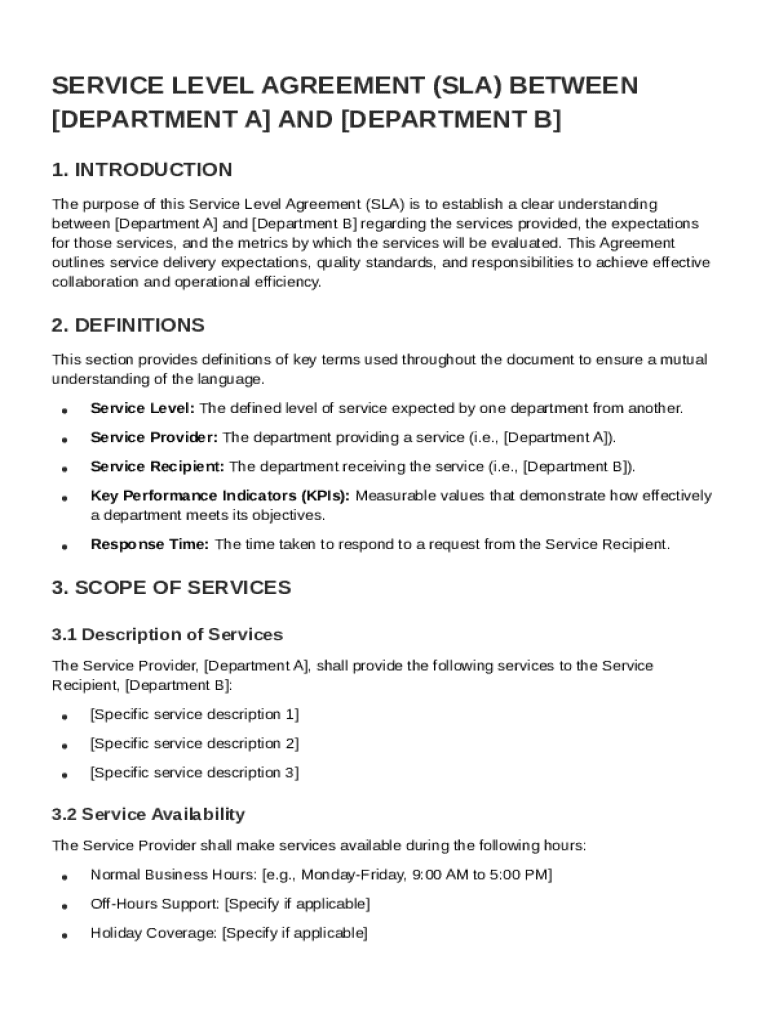
Service Level Between Departments Agreement Form
Use a Service Level Between Departments Agreement Template template to make your document workflow more streamlined.
What this department agreement does
The Service Level Between Departments Agreement Form is a written record of how two or more internal departments will deliver, receive, measure, and escalate services. It identifies responsibilities, service expectations, communication points, approval duties, and review terms for the participating teams. In signNow, a sender uploads the agreement, confirms or adds fillable fields, assigns department representatives, and sends it for review and electronic signature. The completed form and audit trail preserve who acted, when, and how the agreement was finalized.
Who uses this department agreement
Operations teams
Operations departments use the form to document internal service responsibilities, response expectations, escalation contacts, approval ownership, and review dates between teams.
IT and finance
IT and finance departments use it to define support boundaries, request handling, reporting duties, and approval paths before recurring work begins.
How the department agreement works
The form records responsibilities, service expectations, approvals, and signatures between departments in one traceable workflow.
Upload form: Upload the Service Level Between Departments Agreement Form and confirm its agreement sections. Assign participants: Add department representatives and assign each person’s approval or signature fields. Send agreement: Send the agreement through signNow for review, signing, and completion tracking. Store records: Store the completed agreement with its audit trail for departmental reference.
How to complete the agreement
Use this sequence to prepare, route, sign, and preserve the Service Level Between Departments Agreement Form in signNow.
Upload form:
Upload the completed agreement template. Check fields:
Confirm detected fields and add missing ones. Assign roles:
Assign signers and department reviewers. Send request:
Send the form through signNow. Archive evidence:
Review the signed copy and audit trail.
 Best ROI. Our customers achieve an average 7x ROI within the first six months.
 Scales with your use cases. From SMBs to mid-market, airSlate SignNow delivers results for businesses of all sizes.
 Intuitive UI and API. Sign and send documents from your apps in minutes.
What the audit trail records
signNow records technical evidence around each department agreement, helping authorized users review signing events and preserve document integrity.
Authenticate signer:
Capture timestamp:
Hash document:
Seal record:
Log activity:
Export trail:
Recommended agreement setup
Configure the agreement around identifiable signers, traceable approvals, protected records, and controlled access between participating departments.
| Setting | Recommended configuration |
|---|---|
| Authentication method | Email verification with SMS OTP |
| Signature type | Typed or drawn electronic signature |
| Audit and encryption controls | Audit trail with TLS and AES-256 |
| Document retention | Retain under departmental policy |
| User provisioning | Role-based access through administrators |
Signer authentication and certificates
PKI support:
X.509 certificates:
Two-factor authentication:
SMS OTP:
ID verification:
Completion evidence:



Platform requirements for signing
The Service Level Between Departments Agreement Form can be prepared in supported browsers including Chrome, Firefox, Safari, and Edge on Windows or macOS. signNow also provides mobile apps for iOS and Android, allowing department representatives to review and sign from supported mobile devices.
Browsers Chrome, Firefox, Safari, Edge Operating systems Windows, macOS, iOS, Android Devices Desktop and mobile access
Organizations should manage access through approved devices and current browser versions. Enterprise deployments may also require API access, SSO provisioning, or additional certificate and long-term validation controls. Confirm those requirements with the administrator responsible for the agreement workflow before sending documents to external or regulated participants.
Record-keeping practices for agreements
A reliable record process keeps the signed agreement, audit evidence, approvals, and retention decision together for future departmental review.
Apply the correct retention period
Export the audit trail
Restrict departmental access
Archive superseded versions
Troubleshooting the department agreement
Resolve signing, plan, authentication, and compliance questions before the Service Level Between Departments Agreement Form reaches final approval.
Business includes templates, audit trails, and legally binding eSignatures, while Business Premium adds bulk send. For a single departmental agreement, verify required fields, signer order, and recipient email addresses before sending.
Business includes templates and audit trails, but bulk send is listed for Business Premium. If multiple departments need separate copies, confirm the subscription includes bulk send or prepare individual signing requests.
signNow supports ESIGN and UETA compliance, but legal effectiveness still depends on intent, consent, attribution, and record retention. For consumer-facing records, provide the electronic-record disclosure required by 15 U.S.C. §7001(c).
Business Premium lists kiosk mode, while Business lists mobile apps. If representatives sign the agreement on one shared device, confirm the plan supports kiosk mode and apply appropriate signer authentication.
Business lists audit trails, templates, and mobile apps at $8 per user per month when billed annually. Business Premium is $15 per user per month annually and adds bulk send and kiosk mode.
For protected health information, signNow identifies HIPAA compliance as requiring a BAA. Confirm the BAA and configure access, retention, and authentication controls before placing PHI in the agreement.
Key performance indicators that demonstrate SignNow's proven track record.
BE READY TO GET MORE
Get this form now!

If you believe that this page should be taken down, please follow our DMCA take-down process.