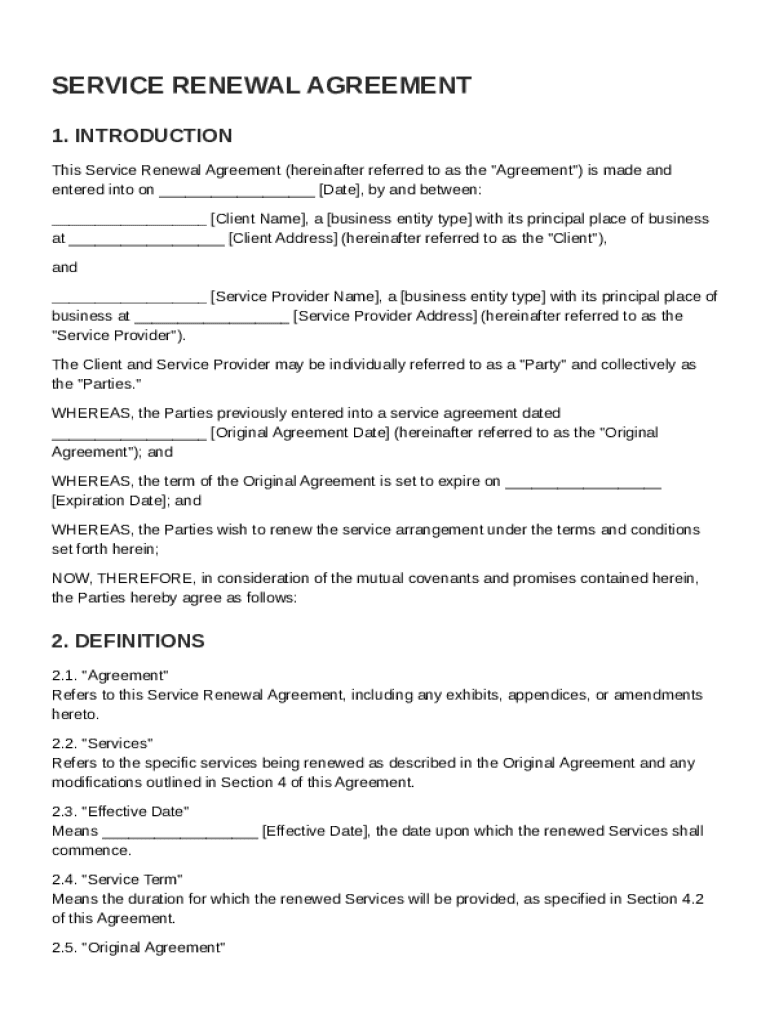
Service Renewal Agreement Form
Use a Service Renewal Agreement Template template to make your document workflow more streamlined.
What the service renewal agreement does
The Service Renewal Agreement Form records a customer’s decision to continue services under identified renewal terms. It gives the parties a written record of the renewed service scope, commercial conditions, effective dates, and approvals. The form itself does not create a universal statutory deadline because renewal requirements depend on the underlying contract and applicable state law. In signNow, a sender uploads the agreement, places or confirms fillable fields, sends it to the required signers, and stores the completed document with its audit trail. Review the underlying agreement before signing.
Who uses this renewal agreement form
Service providers
Service providers use the form to document recurring service terms, renewal dates, pricing changes, and approval responsibilities before continuing work.
Customers and procurement
Customers and procurement teams review renewal conditions, confirm service scope, and preserve signed records for contract administration.
Complete the renewal agreement in signNow
Follow these steps to prepare, route, sign, and preserve the Service Renewal Agreement Form.
Upload document:
Upload the current Service Renewal Agreement Form. Review fields:
Confirm renewal terms and fillable fields. Assign signers:
Assign each field to the correct signer. Send agreement:
Send the agreement through signNow. Store record:
Review completion and save the signed record.
Choose a signing method for renewal
- Use the signNow web app when preparing the Service Renewal Agreement Form, checking renewal terms, assigning fields, and sending the agreement from a desktop workflow.
- Use the signNow mobile app when a customer or service representative must review and sign the renewal agreement away from an office.
- Use kiosk mode when one device is shared at a service location and successive customers need to sign their own renewal agreements.
- Use a shareable signing link when the same renewal agreement must be distributed through an approved customer portal or controlled communication channel.
 Best ROI. Our customers achieve an average 7x ROI within the first six months.
 Scales with your use cases. From SMBs to mid-market, airSlate SignNow delivers results for businesses of all sizes.
 Intuitive UI and API. Sign and send documents from your apps in minutes.
How the renewal audit trail works
The signNow audit trail records signer identity, timestamps, actions, and document history for the completed Service Renewal Agreement Form.
Authenticate signer:
Capture timestamp:
Hash document:
Seal record:
Log activity:
Export trail:



Platform requirements for renewal signing
The Service Renewal Agreement Form can be prepared in signNow using Chrome, Firefox, Safari, or Edge on Windows and macOS. Signers can use the signNow apps for iOS and Android. Use a current browser and a reliable internet connection when uploading, routing, or completing the agreement.
Browsers Chrome, Firefox, Safari, Edge Operating systems Windows, macOS, iOS, Android Mobile apps signNow mobile apps for iOS and Android
Organizations can connect renewal workflows through signNow integrations and API options where their plan supports them. Administrators should manage access through approved devices, assign permissions deliberately, and preserve the completed agreement with its audit trail. Confirm any SSO, certificate, or regulated-workflow requirement before deployment.
Best practices for service renewals
Accurate terms, controlled routing, and complete records make the Service Renewal Agreement Form easier to administer and review.
State renewal terms precisely
Review fields before sending
Route approvals deliberately
Preserve the signed record
Security controls for renewal records
Encryption:
Transport security:
Security report:
Security standard:
Health information:
Electronic signatures:
Features that support service renewals
signNow provides document preparation, signer routing, electronic signing, audit trails, templates, and integrations for managing Service Renewal Agreement Form workflows.
Document preparation
Upload the approved Service Renewal Agreement Form and confirm fields before routing it to the customer or service provider.
Signer routing
Assign renewal fields to named recipients and control the signing sequence when internal approval precedes customer acceptance.
Online signing
Let recipients review and sign from a browser or signNow mobile app without exchanging printed renewal copies.
Audit trail
Capture timestamps, signer actions, and completion history alongside the finalized renewal agreement for later review.
Reusable templates
Use templates for recurring renewal language while preserving the ability to update customer-specific dates, pricing, and service scope.
Business integrations
Connect signed renewal records with supported business systems, including Salesforce, NetSuite, Google Drive, Box, and Procore.
Troubleshoot the renewal workflow
Use these answers to resolve field, routing, plan, and electronic-signature questions for the Service Renewal Agreement Form.
Upload the current agreement again and confirm that the file opens correctly before placing fields. If auto-detection does not identify fields, add the required text, date, initials, and signature fields manually, then preview the recipient experience.
Open the document settings and verify each recipient’s email address, role, and field assignments. Send a revised request only after confirming that the Service Renewal Agreement Form contains the correct renewal terms and effective date.
Business includes legally binding eSignatures, templates, audit trails, and mobile apps at $8 per user per month with annual billing. Confirm current plan limits before sending large renewal batches.
Business Premium costs $15 per user per month with annual billing and includes bulk send. It is relevant when the same Service Renewal Agreement Form must be sent to multiple customers with individualized recipient details.
signNow states that its service is ESIGN and UETA compliant. Legal validity still depends on intent, consent, attribution, and retention or reproduction of the signed record under 15 U.S.C. §7001 and applicable state law.
For consumer-facing electronic records, provide the ESIGN disclosure, confirm the consumer can access the electronic format, and explain consent withdrawal procedures under 15 U.S.C. §7001(c). Retain the completed agreement and audit trail.
Key performance indicators that demonstrate SignNow's proven track record.
BE READY TO GET MORE
Get this form now!

If you believe that this page should be taken down, please follow our DMCA take-down process.