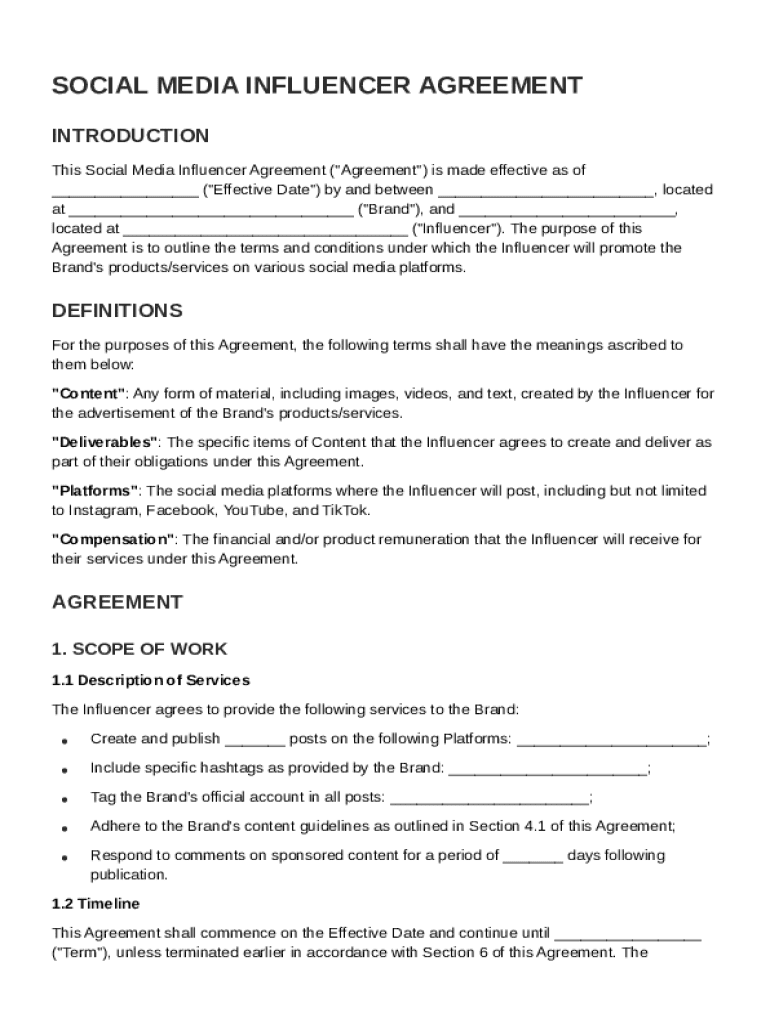
Social Media Influencer Agreement Form
Use a Social Media Influencer Agreement Template template to make your document workflow more streamlined.
What the influencer agreement form does
A Social Media Influencer Agreement Form is a written contract between a brand or agency and an influencer that records campaign deliverables, compensation, content approvals, disclosure duties, usage rights, deadlines, and signatures. In signNow, the sender uploads the agreement, reviews detected fillable fields, assigns fields to each signer, and sends it electronically. The influencer and brand sign through the configured workflow, while signNow preserves the completed document and audit trail. Contract terms should be reviewed for applicable state law and campaign-specific requirements before execution.
Businesses that use influencer agreements
The form fits creator partnerships ranging from one sponsored post to recurring campaigns managed by distributed marketing teams.
Independent creators use the form to document campaign deliverables, posting dates, compensation, disclosure duties, and permissions before accepting sponsored work. Marketing agencies use reusable agreements to coordinate multiple influencers, assign approval responsibilities, and preserve signed campaign records for clients. Consumer brands and enterprise marketing teams use controlled templates, delegated sending, and audit trails for repeat influencer campaigns across departments.
These tasks are executed by both individual contributors and centralized administrators depending on organizational policy and required controls.
How the influencer agreement works
The Social Media Influencer Agreement Form moves from uploaded draft to assigned signatures, then preserves the completed agreement and signing history.
Upload the form: Upload the Social Media Influencer Agreement Form and let signNow identify fillable fields. Review fields: Review detected fields, then add missing signer, date, payment, and usage terms. Assign signers: Assign each field to the brand or influencer before sending the agreement. Complete and store: Signers complete assigned fields; signNow stores the executed agreement with its audit trail.
What the agreement audit trail records
The audit trail preserves evidence that the influencer received, reviewed, signed, and completed this specific agreement.
Authenticate signer:
Capture timestamps:
Hash document:
Seal record:
Link events:
Export trail:
Ways to send and sign the agreement
- Use the signNow web app when marketing staff need to upload, configure, review, and send the Social Media Influencer Agreement Form from a desktop browser.
- Use the signNow mobile app when a brand representative or influencer must review and sign campaign terms from an iOS or Android device.
- Use kiosk mode for supervised, in-person completion when multiple campaign participants share a controlled device and need sequential signing.
- Generate a shareable signing link when a campaign team needs to distribute the same approved agreement through a controlled channel.
 Best ROI. Our customers achieve an average 7x ROI within the first six months.
 Scales with your use cases. From SMBs to mid-market, airSlate SignNow delivers results for businesses of all sizes.
 Intuitive UI and API. Sign and send documents from your apps in minutes.
Recommended agreement workflow setup
Use a controlled configuration that verifies signers, preserves campaign terms, and keeps the completed Social Media Influencer Agreement Form retrievable.
| Setting | Recommendation |
|---|---|
| Authentication method | Email verification with SMS OTP |
| Signature type | Typed or drawn electronic signature |
| Audit trail | Enable completion certificate and action log |
| Document retention | Archive signed agreement and audit trail |
| Encryption | TLS 1.2/1.3 and AES-256 protection |
Best practices for influencer agreements
A precise Social Media Influencer Agreement Form reduces disputes by documenting the campaign, compensation, content rights, disclosures, and signature sequence before work begins.
Define deliverables and deadlines
Specify content usage rights
Document payment terms separately
Review before signer delivery
Privacy pitfalls in influencer agreements
Leaving personal addresses, phone numbers, or payment details visible can expose information beyond the agreement’s business purpose. Omitting explicit consent for social posts, paid promotion, or content reuse creates disputes about authorized disclosures. Sending the agreement to the wrong recipient can reveal campaign terms and personal information. Failing to restrict completed agreements may let unauthorized team members access influencer rates or identity details.
Security for signed agreements
Transport encryption:
Storage encryption:
Security certification:
Information security:
Electronic signatures:
Privacy frameworks:



Why teams look for DocuSign alternatives
Organizations seek alternatives when they need different pricing models, stronger native automation, simpler bulk affidavit workflows, or more flexible identity-verification options than those available in a legacy envelope-based vendor.

Limits outside influencer agreements
Required acknowledgment
Excluded documents
Separate requirements
State recording rules
Retention periods for related records
Retention depends on the record’s purpose, not merely its signature date; apply the rule governing payment, employment, or regulated activity.
Three years: tax records
Six years: substantial understatement
Three years: payroll records
Five years: injury records
Thirty years: exposure records
Influencer agreement troubleshooting
These answers address plan, consent, signing, and record issues that can arise when completing a Social Media Influencer Agreement Form in signNow.
Business plan: can I send an influencer agreement for signature?
Yes. signNow’s Business plan includes legally binding eSignatures, templates, audit trails, and mobile apps. Upload the Social Media Influencer Agreement Form, place or verify the fields, assign the brand and influencer, and send it through the signing workflow.
Business Premium adds bulk send, which is useful when one approved agreement must be sent to multiple influencers. Each recipient should receive the correct campaign terms, compensation, deliverables, and usage rights before signing.
The 7-day free trial allows evaluation without a credit card. Afterward, the Business plan is $8/user/month when billed annually; month-to-month pricing is $20/user/month. Confirm current plan terms before deployment.
For consumer-facing electronic records, ESIGN requires disclosure of the right to receive paper records, access to the electronic format, and procedures for withdrawing consent under 15 U.S.C. §7001(c). Apply this requirement when the influencer is a consumer in the transaction.
ESIGN and UETA generally recognize electronic signatures when intent, consent, attribution, and record retention requirements are satisfied. The agreement itself remains subject to applicable contract and state law; signNow’s audit trail helps preserve execution evidence.
Key performance indicators that demonstrate SignNow's proven track record.
BE READY TO GET MORE
Get this form now!

If you believe that this page should be taken down, please follow our DMCA take-down process.