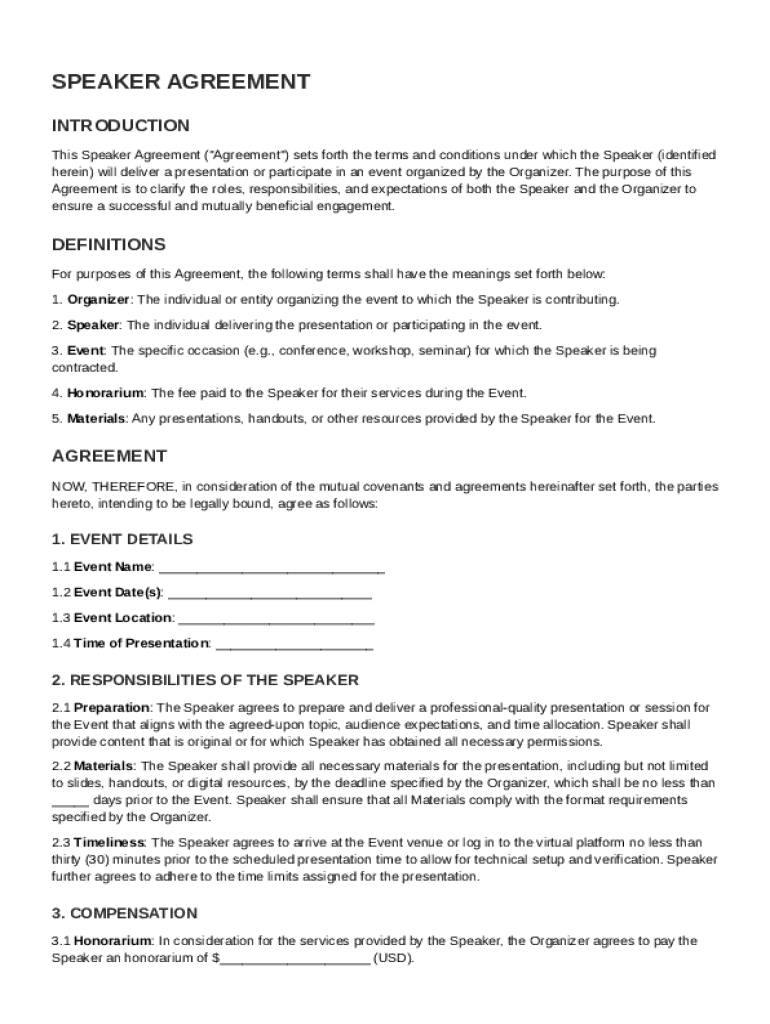
Speaker Speaker Agreement Form
Use a Speaker Speaker Agreement Template template to make your document workflow more streamlined.
What a speaker agreement form does
A Speaker Speaker Agreement Form records the terms between an event organizer and a presenter before the engagement begins. It identifies the services, presentation arrangements, compensation, cancellation terms, recording permissions, promotional use, and signatures that establish each party’s responsibilities. With signNow, upload the agreement, review automatically detected fillable fields, assign roles, send it to the speaker and organizer, and retain the completed document with its audit trail. Electronic execution may be recognized under the ESIGN Act and applicable state law, subject to statutory exceptions and any required consent or notarization.
Businesses that use speaker agreements
Speaker Speaker Agreement Form supports engagements where presenters, event organizers, and marketing teams need written terms, signatures, and an accessible record.
Independent speakers use the form to document presentation dates, compensation, cancellation terms, recording permissions, and promotional rights before accepting an engagement. Event agencies use reusable speaker agreements to coordinate presenters, approvals, payment terms, and signature collection across conferences with multiple participants. Enterprise marketing teams use controlled templates and audit trails to manage speaker engagements, brand permissions, and records across departments and locations.
These tasks are executed by both individual contributors and centralized administrators depending on organizational policy and required controls.
Features for speaker agreement workflows
signNow helps organizers prepare, route, sign, and retain Speaker Speaker Agreement Form records while keeping engagement-specific terms visible to every authorized party.
Field detection
Upload the Speaker Speaker Agreement Form and review detected fields for speaker names, engagement terms, compensation, dates, and signatures before sending it to the correct parties.
Signer roles
Assign organizer and speaker roles so each person receives only the fields and signing actions relevant to their responsibilities under the agreement.
Remote signing
Collect signatures remotely by email or shareable link, allowing presenters to review engagement terms without coordinating an in-person meeting.
Audit trail
Capture signer actions, timestamps, and document history in an audit trail that supports later review of the completed speaker agreement.
Reusable templates
Reuse an approved speaker agreement template while updating event-specific dates, fees, locations, and rights for each new engagement.
Business integrations
Connect signed agreements with supported systems such as Google Drive, Salesforce, NetSuite, Box, or Procore for organized record handling.
 Best ROI. Our customers achieve an average 7x ROI within the first six months.
 Scales with your use cases. From SMBs to mid-market, airSlate SignNow delivers results for businesses of all sizes.
 Intuitive UI and API. Sign and send documents from your apps in minutes.
How speaker agreement signing works
The signNow workflow moves the Speaker Speaker Agreement Form from an uploaded document to a signed, traceable agreement.
Upload: Upload the agreement Check fields: Review detected fields Assign roles: Assign organizer and speaker roles Send: Send for signature and tracking
Steps to complete a speaker agreement
Prepare the agreement in signNow, verify its engagement terms, collect the required signatures, and preserve the completed record.
Upload document:
Upload the Speaker Speaker Agreement Form and let signNow identify potential fields. Review fields:
Correct field placement and enter engagement-specific details before assigning signer roles. Send agreement:
Send the agreement to the organizer and speaker through email invitations or a signing link. Store records:
Monitor completion, then download the signed agreement and audit trail for controlled storage.
Recommended speaker agreement setup
Configure the Speaker Speaker Agreement Form around signer identity, agreement integrity, access control, and the organization’s contract-retention policy.
| Setting | Recommendation |
|---|---|
| Authentication method | Email verification with SMS OTP |
| Signature type | Electronic signature with signer intent |
| Audit trail | Enabled for every completed agreement |
| Document retention | Organization contract policy |
| Encryption | TLS 1.2/1.3 and AES-256 |



Security for speaker agreement records
Stored document encryption:
Secure data transfer:
Independent security report:
Information security standard:
U.S. electronic signatures:
Protected health information:
Best practices for speaker agreements
Accurate terms, controlled access, and a preserved audit trail make a signed Speaker Speaker Agreement Form easier to administer and review.
Define the engagement before sending
Review detected fields carefully
Preserve the audit trail
Archive completed agreements securely
Speaker agreement troubleshooting questions
Resolve signing, access, field, plan, and compliance questions before sending a Speaker Speaker Agreement Form through signNow.
If the agreement contains personal information, use signNow role-based access controls and limit document visibility. The Business plan includes audit trails, while HIPAA compliance requires a business associate agreement when protected health information is involved.
signNow supports legally binding electronic signatures under ESIGN and UETA when the signer demonstrates intent, consents to electronic records, and the completed agreement remains reproducible. Review state-specific requirements before adding notarization or witness provisions.
Upload the Speaker Speaker Agreement Form to signNow, then review automatically detected fields before assigning signer roles. Correct labels, dates, payment terms, and signature locations manually before sending the agreement for completion.
Business includes templates and audit trails, while Business Premium adds bulk send and kiosk mode. If several speakers receive the same agreement, Business Premium can distribute repeated signing requests more efficiently.
A completed signing request can be delayed when a signer has not opened the email or link. Resend the invitation, verify the address, or generate a shareable signing link after confirming the intended recipient.
Wills, codicils, testamentary trusts, and certain court filings are excluded from ESIGN. A Speaker Speaker Agreement Form is generally a business contract, but state law may still require special execution or notarization terms.
Key performance indicators that demonstrate SignNow's proven track record.
BE READY TO GET MORE
Get this form now!

If you believe that this page should be taken down, please follow our DMCA take-down process.