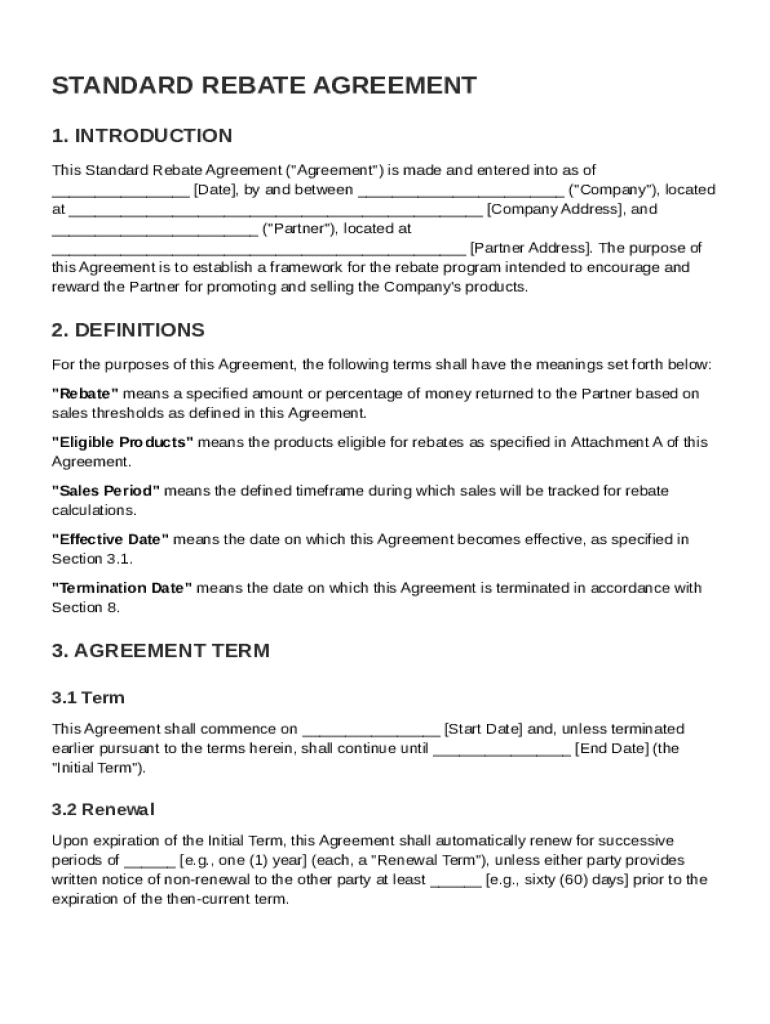
Standard Rebate Agreement Form
Use a Standard Rebate Agreement Template template to make your document workflow more streamlined.
What the Standard Rebate Agreement Form does
The Standard Rebate Agreement Form records the terms under which one business provides a rebate to another after specified purchasing or performance conditions are met. It identifies the parties, defines qualifying transactions, states the rebate amount or calculation, explains exclusions and payment timing, and records authorized approval. With signNow, a sender uploads the document, reviews or adds fields, sends it to designated representatives, and stores the completed agreement with its audit trail. The form’s legal effect depends on accurate terms, signer authority, consent, intent, and applicable state law.
Who uses this rebate agreement
Distributors and suppliers
A distributor or supplier can use the Standard Rebate Agreement Form to document customer eligibility, rebate percentages, qualifying purchases, payment timing, exclusions, and authorized signatures. The signed record can remain with invoices, purchase reports, and payment approvals for later reconciliation.
Commercial buyers
A retailer, contractor, or commercial buyer can review the agreement before accepting rebate conditions and signing through signNow. Finance and procurement teams can then compare the signed terms with purchase activity, credits, and rebate requests.
Features that support rebate agreements
Standard Rebate Agreement Form workflows benefit from reusable fields, controlled signing, audit evidence, mobile access, integrations, and legally informed record handling.
Reusable template
Upload the Standard Rebate Agreement Form and preserve its original wording while placing fields for the parties, rebate terms, signatures, and dates. This creates a repeatable signing workflow without manually rebuilding the document.
Signer routing
Send the agreement to named representatives by email or signing link, allowing each party to review the rebate conditions before signing. Signer routing keeps the intended sequence visible when multiple business approvals are required.
Audit trail
Capture signature events, timestamps, and document history in an audit trail connected to the completed agreement. The record helps explain who signed and when if rebate eligibility or payment timing is questioned.
Mobile signing
Use signNow’s mobile apps when a representative needs to review or sign the agreement away from a desk. The same rebate terms remain available for review across supported signing devices.
System connections
Connect completed agreements to systems such as NetSuite, Salesforce, Google Drive, or Box where supported. Storing the signed document with related customer, accounting, or transaction records reduces duplicate data entry.
Compliance controls
Apply signNow’s electronic-signature workflow to a business agreement while considering ESIGN, UETA, consumer disclosures, and any transaction-specific state-law requirements. Legal validity still depends on consent, intent, attribution, and record access.
How to complete the rebate agreement
Use this sequence to move the Standard Rebate Agreement Form from an editable document to an organized, signed business record.
Upload form: Upload the signed or blank agreement into signNow. Check fields: Review detected fields and add missing signature dates. Send agreement: Send the rebate terms to authorized representatives. Complete records: Collect signatures and store the audit trail.
 Best ROI. Our customers achieve an average 7x ROI within the first six months.
 Scales with your use cases. From SMBs to mid-market, airSlate SignNow delivers results for businesses of all sizes.
 Intuitive UI and API. Sign and send documents from your apps in minutes.
Platform requirements for signing
Complete the Standard Rebate Agreement Form in Chrome, Firefox, Safari, or Edge on Windows or macOS. signNow also provides mobile apps for iOS and Android, while TLS 1.2 or TLS 1.3 protects data in transit.
Supported browsers Chrome, Firefox, Safari, and Edge Operating systems Windows, macOS, iOS, and Android Connection security TLS 1.2 and TLS 1.3
Organizations should manage access through approved devices and user permissions when rebate agreements contain commercial pricing or payment information. Teams connecting signNow through an API or enterprise integration should also configure identity provisioning, access controls, and retention procedures appropriate to their records.



How the audit trail records signing
For a Standard Rebate Agreement Form, the audit trail documents the signing event separately from the agreement’s commercial rebate terms.
Authenticate signer:
Record timestamp:
Link document:
Seal history:
Track events:
Retrieve evidence:
Security for rebate agreement records
Data encryption:
Security certification:
Information security:
Healthcare safeguards:
Transport security:
Electronic signatures:
Legal standing of the agreement
A properly executed Standard Rebate Agreement Form may be admissible as a business record when the parties demonstrate intent, consent, signer attribution, and reliable record retention under the ESIGN Act, 15 U.S.C. chapter 96, and applicable UETA or New York ESRA rules. Wills, certain court orders, family law decrees, and other statutory exceptions remain outside those protections.

Privacy and disclosure pitfalls
Including bank details, tax identifiers, or personal contact information in a broadly shared rebate agreement can expose data beyond the people who need it. A signer may complete the signature field without clearly reviewing eligibility conditions, exclusions, payment timing, or the agreement’s expiration date. Sending the document to an employee without authority to bind the business can create attribution and approval disputes over the rebate obligation. Saving the signed agreement without its audit trail can make it harder to establish the signing sequence, timestamps, and document history later.
Questions about signing rebate agreements
These answers address field placement, signer routing, audit evidence, plan selection, consent, and document-scope questions for this agreement.
Upload the original PDF again and confirm that the file opens normally before placing fields. signNow can detect fillable areas, but review every detected field because rebate percentages, qualifying purchases, and payment terms require deliberate placement.
Open the recipient settings and verify the signer’s email address, signing order, and assigned fields. A signer can often review and sign without creating an account, but the sender must route fields to the correct authorized representative.
Use signNow’s audit trail to review viewed, signed, and completed events, including timestamps and document history. Compare those events with the agreement’s stated effective date; the audit trail does not correct an inaccurate rebate term.
Business includes legally binding eSignatures, templates, and audit trails at $8 per user per month with annual billing. Business Premium is $15 per user per month annually and adds bulk send, which may help distribute repeated rebate agreements.
For a consumer-facing transaction, provide the required electronic-record disclosure and ensure the signer can access and retain the agreement. ESIGN section 101, 15 U.S.C. §7001(c), addresses consent, access, and withdrawal procedures.
Electronic signing does not make every document eligible for electronic execution. Wills, certain court filings, and family law decrees are among ESIGN exceptions; confirm the agreement’s purpose and applicable state requirements before sending.
Key performance indicators that demonstrate SignNow's proven track record.
BE READY TO GET MORE
Get this form now!

If you believe that this page should be taken down, please follow our DMCA take-down process.