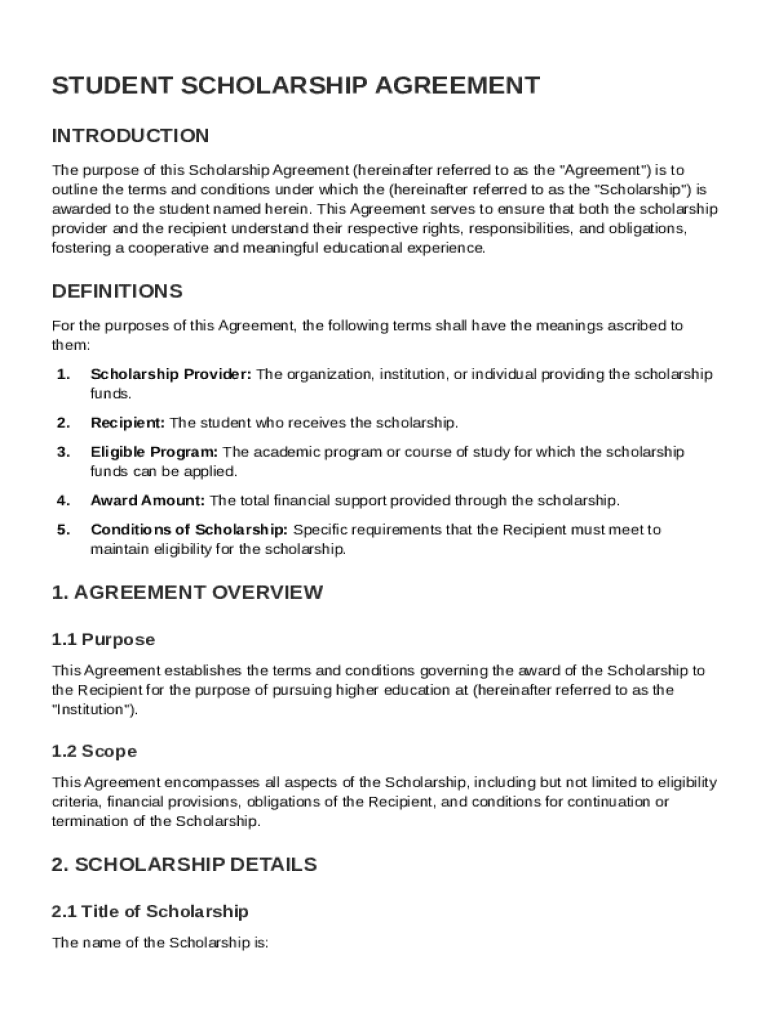
Student Scholarship Agreement Form
Use a Student Scholarship Agreement Template template to make your document workflow more streamlined.
Student scholarship agreement overview
A Student Scholarship Agreement Form records the terms under which an institution awards financial aid to a student. It typically identifies the student and scholarship program, states the award amount and academic period, and describes enrollment, performance, renewal, acknowledgment, or repayment conditions. With signNow, an administrator uploads the approved agreement, reviews detected fillable fields, assigns student and institutional signers, and sends it for completion. The finished document and audit trail can then be stored as the institution’s scholarship record. FERPA obligations and school policy govern access and retention.
Who uses scholarship agreements
Student Scholarship Agreement Form helps education offices and scholarship sponsors document award acceptance, conditions, and responsibilities before administration begins.
University financial-aid offices use the form to document award amounts, enrollment conditions, student acknowledgments, and renewal requirements before releasing scholarship funds. Private scholarship foundations use it to obtain student acceptance, define permitted award use, and preserve signed evidence for donor and program records. Community-college administrators use it for recurring awards where students, sponsors, and school representatives need a consistent agreement without coordinating in-person meetings.
These tasks are executed by both individual contributors and centralized administrators depending on organizational policy and required controls.
How to complete the scholarship agreement
Prepare the approved award document, verify its fields, collect required signatures, and retain the completed agreement with its audit evidence.
Upload agreement:
Upload the approved Student Scholarship Agreement Form to signNow. Check fields:
Review detected fields and add missing signature or date fields. Assign signers:
Assign the student and institutional signers in the required order. Complete and store:
Send the agreement, monitor completion, and preserve the signed record.
Recommended scholarship agreement setup
Configure Student Scholarship Agreement Form around verified signer identity, documented consent, accessible records, and the institution’s FERPA-aligned retention policy.
| Setting | Recommendation |
|---|---|
| Authentication method | Email verification with SMS OTP |
| Signature type | Click-to-sign with signer intent |
| Audit trail | Enabled with completion evidence |
| Document retention | Institution-approved FERPA records policy |
| Encryption | TLS 1.2/1.3 and AES-256 |
 Best ROI. Our customers achieve an average 7x ROI within the first six months.
 Scales with your use cases. From SMBs to mid-market, airSlate SignNow delivers results for businesses of all sizes.
 Intuitive UI and API. Sign and send documents from your apps in minutes.
Key features for scholarship agreements
Student Scholarship Agreement Form workflows combine structured fields, signer routing, audit evidence, and controlled storage for education offices administering scholarship awards.
Reusable template
Upload the approved scholarship agreement and place signature, date, and acknowledgment fields without recreating the document manually.
Signer routing
Route the agreement to students, sponsors, or institutional approvers in the required sequence before final completion.
Audit trail
Capture timestamps, signer activity, and completion evidence alongside the signed scholarship record for later review.
Mobile signing
Let students review and sign the agreement from supported desktop or mobile experiences when remote completion is appropriate.
Record control
Keep award terms, signatures, and completion records together so scholarship administrators can locate the final agreement efficiently.
Guided completion
Use structured fields for award details, enrollment conditions, acknowledgments, and renewal requirements to reduce incomplete submissions.



Security for scholarship records
Data in transit:
Data at rest:
Service controls:
Security management:
Education records:
Electronic signatures:
What the scholarship audit trail records
The signNow audit trail preserves evidence connecting each Student Scholarship Agreement Form signature to the signer, document, time, and completion event.
Authenticate signer:
Capture timestamps:
Hash document:
Seal document:
Log actions:
Export audit trail:
Best practices for scholarship agreements
Accurate award terms, clear consent, and controlled records make Student Scholarship Agreement Form easier to administer and review.
Match award terms exactly
Name every scholarship detail
Capture electronic consent clearly
Archive the signed record securely
Privacy and disclosure pitfalls
Including student Social Security numbers, bank details, or unnecessary academic information can expose more personal data than scholarship administration requires. Failing to document electronic-record consent may weaken evidence that the student agreed to receive and sign the scholarship agreement electronically. Giving every staff member edit or export access can expose education records and undermine the institution’s FERPA-aligned access controls. Sending an outdated award amount or renewal condition can create conflicting records and disputes over the scholarship’s obligations.
Student scholarship agreement processing stages
Processing time depends on document readiness and signer response; the workflow below separates preparation, delivery, signature, and archival.
Prepare the document
Deliver to signers
Collect signatures
Archive completion
Student scholarship agreement troubleshooting
Resolve signing, consent, plan, and record-control questions before distributing a Student Scholarship Agreement Form to students or sponsors.
On the Business plan, upload the approved Student Scholarship Agreement Form and place signature, date, and acknowledgment fields before sending. If automatic field detection does not identify a field correctly, review and reposition it manually in the document editor.
Business includes legally binding eSignatures, templates, audit trails, and mobile apps. Business Premium adds bulk send, while Enterprise adds advanced signer authentication and conditional or formula fields for more complex scholarship workflows.
signNow identifies completed records through its audit trail, while ESIGN and UETA provide the U.S. legal framework for electronic signatures. Preserve the signed agreement and completion evidence so the record remains accessible and reproducible.
If students are consumers, provide the electronic-record disclosure required by ESIGN, 15 U.S.C. §7001(c). Confirm access to the electronic format and explain how consent can be withdrawn before requesting a signature.
Business provides audit trails and document history. Export the completed Student Scholarship Agreement Form with its audit evidence, then retain both according to the institution’s records policy and applicable FERPA obligations.
Use role-based access and limit sending, editing, and exporting permissions to scholarship staff. signNow paid plans include unlimited users, but administrators should still assign access according to institutional policy.
Key performance indicators that demonstrate SignNow's proven track record.
BE READY TO GET MORE
Get this form now!

If you believe that this page should be taken down, please follow our DMCA take-down process.