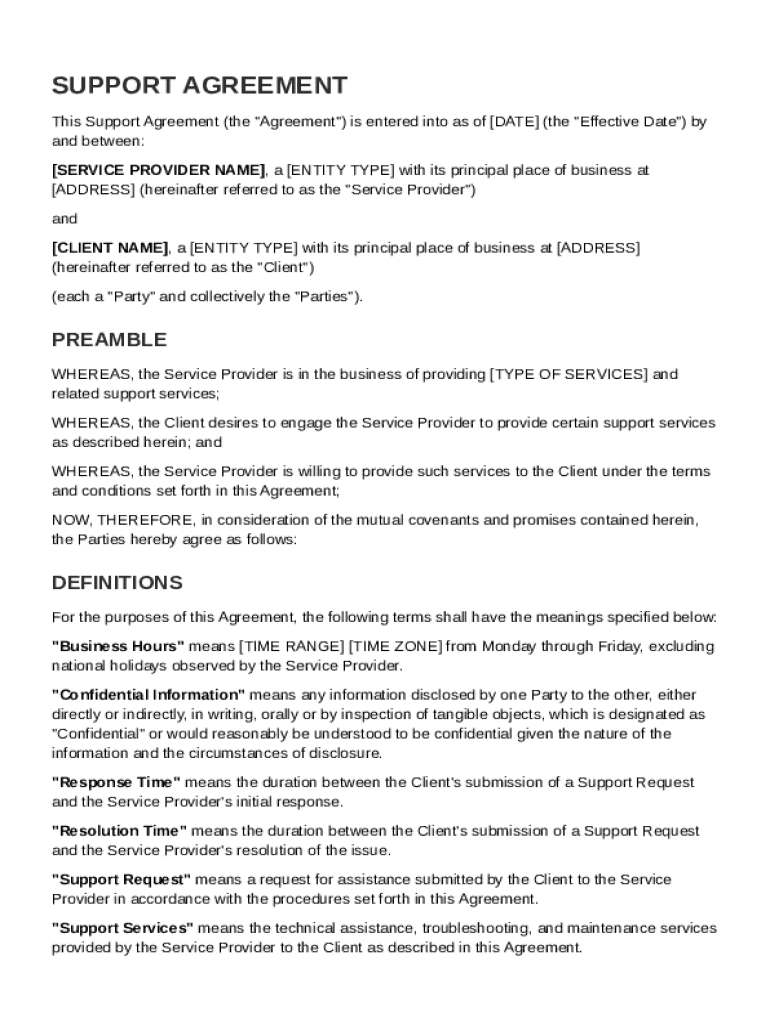
Support Agreement Form
Use a Support Agreement Template template to make your document workflow more streamlined.
What is a Support Agreement Form?
A Support Agreement Form records the terms under which one party provides support services to another. It identifies the covered services, responsibilities, response expectations, fees, term, and approval details agreed by the parties. In the United States, parties can generally use electronic records and signatures for business transactions under the ESIGN Act and applicable state law, including UETA. Upload the completed form to signNow, place or review signature fields, send it to the named parties, and retain the completed record with its audit trail.
How the support agreement works
A Support Agreement Form moves from agreed service terms to an attributable electronic record through four controlled actions.
Upload form: Upload the completed Support Agreement Form to signNow. Check fields: Review detected fields and add signer-specific signature, date, and approval fields. Send agreement: Enter signer details, set signing order, and send the agreement. Store record: Collect signatures and retain the executed form with its audit trail.
What the audit trail records
The audit trail documents who handled the Support Agreement Form, what actions occurred, and when the executed record was completed.
Authenticate signer:
Capture timestamp:
Track document history:
Seal record:
Review activity:
Export evidence:
 Best ROI. Our customers achieve an average 7x ROI within the first six months.
 Scales with your use cases. From SMBs to mid-market, airSlate SignNow delivers results for businesses of all sizes.
 Intuitive UI and API. Sign and send documents from your apps in minutes.
Choose a signing method
- Use the signNow web app when administrators need to upload the Support Agreement Form, assign fields, set signing order, and monitor completion from a desktop browser.
- Use the signNow mobile app when a support provider or customer must review and sign the agreement from an iOS or Android device.
- Use kiosk mode when staff and an on-site customer complete the Support Agreement Form on a controlled shared device during a service interaction.
- Use a shareable signing link when the same approved Support Agreement Form must be offered to authorized signers without sending individual email invitations.
Recommended agreement setup
Configure the Support Agreement Form around signer identity, document integrity, access control, and the records policy governing the agreement.
| Setting | Recommendation |
|---|---|
| Authentication method | Email invitation with SMS OTP |
| Signature type | Typed or drawn electronic signature |
| Audit trail | Capture signer actions and timestamps |
| Document retention | Follow the applicable records policy |
| Encryption | TLS 1.2/1.3 and AES-256 protection |
Security for signed agreements
Transit encryption:
Stored encryption:
Security certification:
Security management:
Healthcare protection:
U.S. e-signature:
Features for support agreements
signNow organizes the Support Agreement Form workflow from field preparation through signature collection, audit evidence, and controlled reuse.
Field detection
Upload the Support Agreement Form, review detected fields, and prepare signature locations without rebuilding the document manually.
Signer assignment
Assign each signature, date, and approval field to the correct support provider or customer representative.
Signing order
Route the agreement in a defined order when service approval requires operations, procurement, and customer review.
Audit trail
Preserve signer actions, timestamps, and document history so the executed support terms remain reviewable.
Reusable templates
Use templates for recurring support arrangements while limiting editing access to approved team members.
Mobile signing
Review and sign the agreement from signNow mobile apps when support work occurs away from a desk.
Support agreement processing stages
Use these four stages to move a Support Agreement Form from final review through signed-record retention.
Prepare the document
Deliver to signers
Complete signer review
Archive completed records
Best practices for this form
Accurate service terms, deliberate signer controls, and complete records make a Support Agreement Form easier to administer and review.
State the support scope precisely
Verify fields before sending
Match authentication to risk
Archive the complete record
Support agreement troubleshooting
Resolve the issues that most often affect field accuracy, signer attribution, electronic consent, plan selection, and retention for this agreement.
Business includes legally binding eSignatures, audit trails, templates, and mobile apps at $8/user/month with annual billing. Upload the Support Agreement Form, review its fields, assign signers, and send it through the completed workflow. Month-to-month Business pricing is $20/user/month.
Open the uploaded Support Agreement Form and inspect each detected field before sending. Add missing signature, date, or approval fields manually, then assign every field to a named signer. A preview and test send can identify misaligned fields before external delivery.
The Business Premium plan adds bulk send at $15/user/month with annual billing. It is relevant when separate Support Agreement Forms must be sent repeatedly, but each agreement should still contain the correct customer, service scope, fees, and authorized signer.
Use email or SMS authentication when the agreement’s risk requires stronger attribution, and restrict editing access to authorized senders. signNow lists advanced signer authentication with Enterprise, priced at $30/user/month annually; select controls according to the agreement and organization’s risk assessment.
Electronic signatures generally receive legal effect under ESIGN and applicable state law, including UETA, when intent, consent, attribution, and record retention requirements are satisfied. Consumer-facing records may require the disclosure and access procedures in 15 U.S.C. §7001(c).
Export the executed Support Agreement Form with its audit trail and store both where authorized personnel can retrieve and reproduce them. signNow’s audit trails provide signing history, but the applicable contract, tax, healthcare, or organizational policy determines how long records must remain available.
Key performance indicators that demonstrate SignNow's proven track record.
BE READY TO GET MORE
Get this form now!

If you believe that this page should be taken down, please follow our DMCA take-down process.