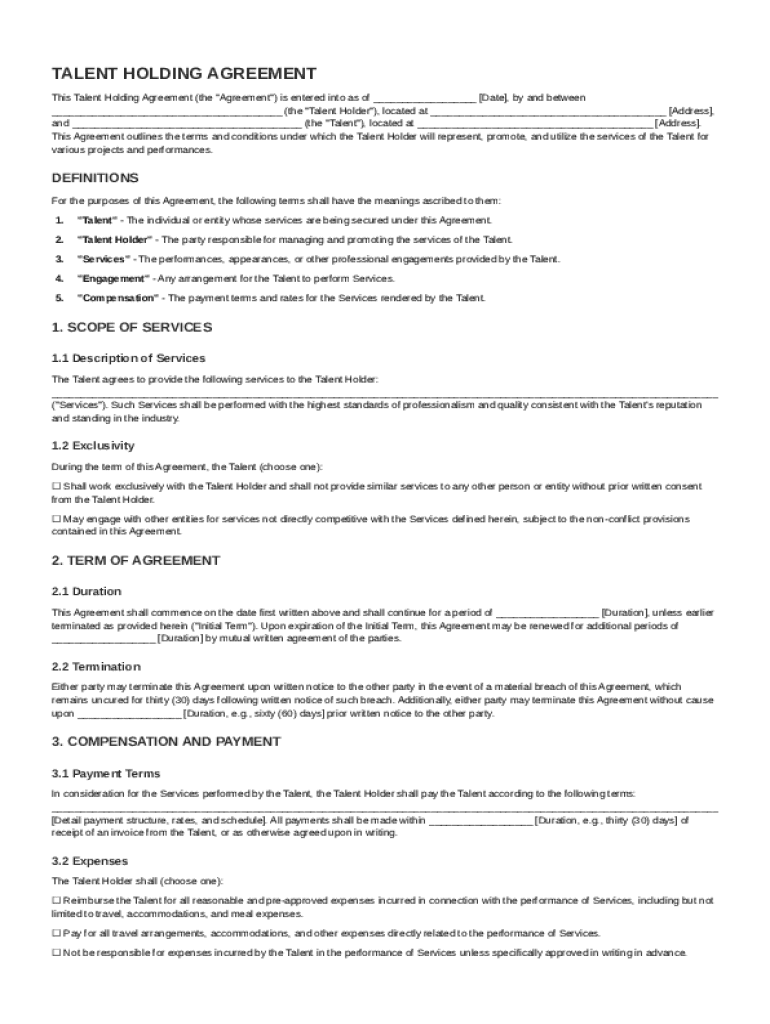
Talent Holding Agreement Form
Use a Talent Holding Agreement Template template to make your document workflow more streamlined.
What the Talent Holding Agreement Form does
The Talent Holding Agreement Form records the terms under which a talent professional, performer, creator, or representative is held for a potential engagement. It can identify the parties, describe the proposed opportunity, define availability or exclusivity terms, and capture signatures. With signNow, a sender uploads the agreement, reviews detected fillable fields, assigns signature and date fields, sends it to the designated parties, and stores the completed record with its audit trail. The exact legal effect depends on the agreement language and applicable state law.
Who uses this talent agreement form
Talent agencies
Talent agencies and independent representatives can use the form for engagement terms, availability confirmations, representation agreements, and related approvals. Reusable templates and assigned fields reduce repeated preparation while keeping each signer’s obligations visible.
Hiring organizations
Production companies, studios, event organizers, and marketing teams can route agreements to talent, representatives, and internal approvers. Audit trails preserve completion evidence when participants work across locations or use mobile devices.
Business types that use talent agreements
The form fits organizations that repeatedly coordinate talent, representatives, approvers, and commercial terms across distributed signing workflows.
Independent talent representatives can prepare recurring agreements, assign talent and client fields, and preserve signed terms without maintaining separate paper packets for each proposed engagement. Production and event companies can route Talent Holding Agreement Forms to performers, managers, and internal approvers, using templates and audit trails to coordinate participants across locations. Enterprise media and marketing teams can delegate sending while administrators control templates, permissions, and retention practices for high-volume talent onboarding and campaign agreements.
These tasks are executed by both individual contributors and centralized administrators depending on organizational policy and required controls.
How to complete this talent agreement
Prepare the Talent Holding Agreement Form in signNow, route it to the intended parties, and preserve the completed agreement with its audit evidence.
Upload form:
Upload the Talent Holding Agreement Form into signNow. Check fields:
Review detected fields and add missing fields manually. Assign roles:
Assign signatures, dates, and text fields to recipients. Send agreement:
Send the agreement and monitor completion status. Store evidence:
Download the signed form with its audit trail.
Ways to send and sign this agreement
- Use the signNow web app when preparing the Talent Holding Agreement Form, placing fields, assigning recipients, and monitoring the signing sequence from a desktop browser.
- Use the signNow mobile app when talent or representatives need to review and sign the Talent Holding Agreement Form from an iOS or Android device.
- Use kiosk mode for supervised, on-site completion when several people sign the Talent Holding Agreement Form on one managed device during an event or appointment.
- Use a shareable signing link when recipients should open the Talent Holding Agreement Form from a controlled URL without receiving a separate email invitation.
 Best ROI. Our customers achieve an average 7x ROI within the first six months.
 Scales with your use cases. From SMBs to mid-market, airSlate SignNow delivers results for businesses of all sizes.
 Intuitive UI and API. Sign and send documents from your apps in minutes.
What the audit trail records
The audit trail preserves evidence of who handled the Talent Holding Agreement Form, what actions occurred, and when the signed record was completed.
Signer authentication:
Timestamp capture:
Document integrity:
Event logging:
Completion sealing:
Audit export:
Features that support agreement completion
signNow connects document preparation, signer routing, completion tracking, and record preservation for Talent Holding Agreement Form workflows.
Field detection
Upload the existing Talent Holding Agreement Form and let signNow identify fillable areas, reducing manual field placement before the agreement reaches talent or representatives.
Role assignment
Assign each signature, initials, date, and text field to the correct participant so every party sees only the information needed for completion.
Reusable templates
Reuse a prepared Talent Holding Agreement Form template when agencies or production teams send similar agreements repeatedly, preserving consistent wording and routing.
Signing order
Send the agreement in a defined signing order when representatives, talent, managers, or business contacts must review it sequentially before completion.
Status tracking
Track outstanding signatures and completion status in one workspace instead of relying on separate email threads for each Talent Holding Agreement Form.
Audit evidence
Store the signed agreement with its audit trail so authorized personnel can review the completed terms and signing history later.
Platform requirements for signing
Open the Talent Holding Agreement Form in Chrome, Firefox, Safari, or Edge on Windows or macOS. signNow also provides mobile apps for iOS and Android, allowing recipients to review and sign from supported phones or tablets.
Supported browsers Chrome, Firefox, Safari, and Edge Desktop systems Windows and macOS desktop access Mobile apps iOS and Android signNow apps
Organizations should manage access through approved devices and user permissions when agreements contain compensation, availability, or representation details. Confirm that recipients can access the email invitation or signing link, complete any required authentication, and receive a reproducible copy of the finished agreement.
Security controls for signed agreements
Transport encryption:
Stored data protection:
Service assurance:
Security management:
U.S. e-signature:
Privacy controls:
Recommended agreement workflow setup
Configure the Talent Holding Agreement Form around verified signer identity, clear signature roles, audit evidence, and a retention policy matched to the underlying record.
| Setting | Recommendation |
|---|---|
| Authentication method | Email verification with SMS OTP |
| Signature type | Typed or drawn electronic signature |
| Audit trail | Enabled with completion certificate |
| Document retention | Retain under applicable state law |
| Encryption | TLS 1.2/1.3 and AES-256 |
Best practices for retaining agreements
Accurate fields, controlled routing, and preserved completion evidence make a Talent Holding Agreement Form easier to administer and review.
Review every business term before sending
Assign recipients and signing order carefully
Preserve the signed record and audit trail
Match retention to the underlying record
Legal standing of electronic agreements
For a U.S. business transaction, an electronically signed Talent Holding Agreement Form may carry legal effect when the parties show intent, consent to electronic records, signer attribution, and the ability to retain and reproduce the record under ESIGN and applicable state law, including UETA or New York ESRA. Wills, codicils, testamentary trusts, and certain court or family-law documents remain outside ESIGN’s general coverage.

Risks of incomplete agreement handling
Contract interpretation dispute
Incomplete execution evidence
Party attribution challenge
Document integrity dispute
Examples of agreement workflows
These documented signNow customer examples show how mobile access and structured routing can inform Talent Holding Agreement Form administration.
Real estate workflow
Martin Properties uses signNow for property documents and represents a comparable mobile workflow for talent agreements requiring signatures away from an office.
- Mobile signing supports field-based document completion.
Tim Martin, founder of Martin Properties, describes processing documents online, on mobile, and offline with built-in security. That documented customer example illustrates how a distributed team could route a Talent Holding Agreement Form while preserving a completed record for later administration.
Enterprise operations
Tech Data uses airSlate SignNow for internal and external customer service, offering a relevant example of controlled business document routing.
- Structured routing supports faster agreement handling.
Bob Dutkowsky, CEO of Tech Data, reports using airSlate SignNow to improve internal and external customer service while increasing speed to revenue. A talent operations team can apply the same routing model to recurring agreement reviews without inventing a separate paper process.
Key performance indicators that demonstrate SignNow's proven track record.
Troubleshooting Talent Holding Agreement workflows
Resolve field, routing, authentication, plan, and retention questions before sending the Talent Holding Agreement Form to its final signers.
Upload the original Talent Holding Agreement Form again, then inspect whether signNow detected the intended fillable areas. If fields are absent or misplaced, add them manually and assign each field to the correct signer before sending.
The Business plan includes templates and audit trails, while Business Premium adds bulk send and kiosk mode. Select Business Premium when the same Talent Holding Agreement Form must reach many recipients or be completed on-site.
signNow states that its eSignatures comply with ESIGN and UETA. Legal enforceability still depends on signer intent, consent, attribution, and retaining a reproducible record under the applicable transaction and state law.
Verify the recipient’s email address, confirm the signing order, and resend the invitation from the transaction workspace. Do not create a second agreement unless the original routing cannot be corrected safely.
Use SMS OTP or another available authentication control when the agreement contains sensitive compensation, availability, or representation terms. Record the selected authentication method and preserve the resulting audit trail.
After completion, download the signed Talent Holding Agreement Form and its audit trail, then place both in the authorized record system. Retention depends on the underlying business record and applicable law, not solely on signNow.
BE READY TO GET MORE
Get this form now!

If you believe that this page should be taken down, please follow our DMCA take-down process.