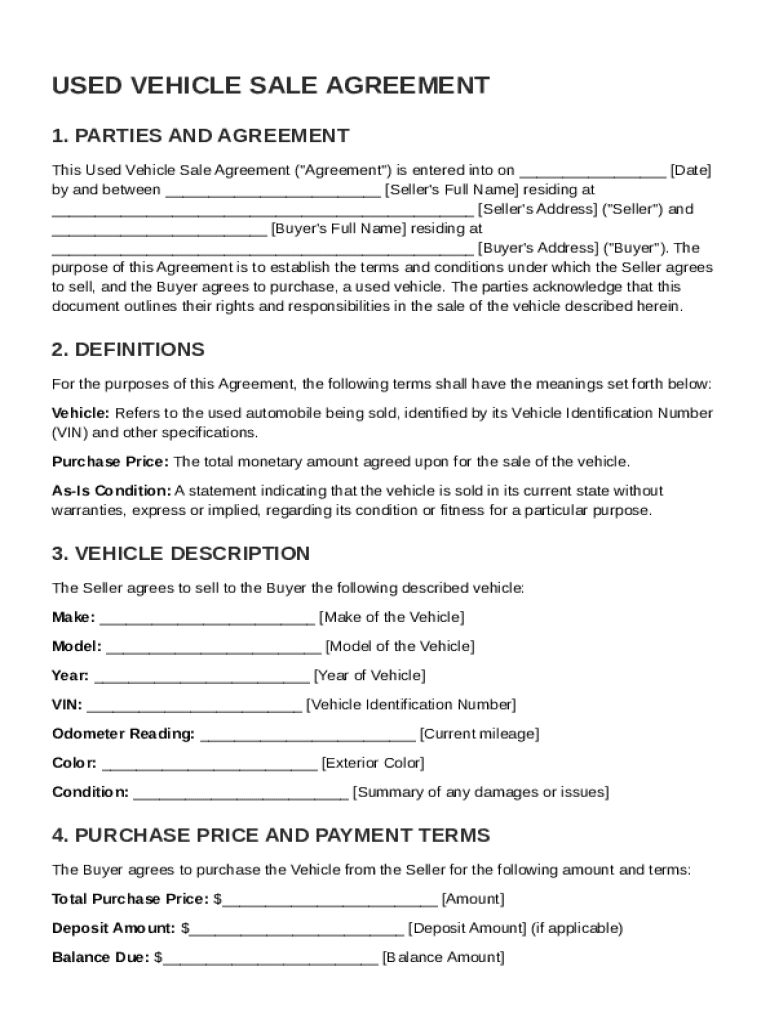
Used Vehicle Sale Agreement Form
Use a Used Vehicle Sale Agreement Template template to make your document workflow more streamlined.
What a used vehicle sale agreement does
A Used Vehicle Sale Agreement Form records the buyer, seller, vehicle identification number, purchase price, payment terms, mileage, title information, disclosures, and signatures for a private or dealer vehicle transaction. It gives both parties a dated record of what they agreed to transfer and under which conditions. With signNow, the sender uploads the agreement, reviews detected fields, assigns buyer and seller signature fields, sends the document, and preserves the completed PDF with an audit trail. State title, odometer, disclosure, and registration requirements remain separate obligations governed by applicable state law.
Who uses this vehicle agreement
Private vehicle sellers
Private sellers use the form to document the vehicle’s VIN, mileage, price, payment terms, known defects, title information, and delivery conditions before transferring possession.
Dealership and fleet teams
Dealership and fleet teams use reusable signNow templates while changing vehicle-specific data, assigning buyer and seller fields, and preserving each completed agreement with its audit trail.
How the used vehicle agreement works
The workflow converts a vehicle sale agreement into a controlled signing sequence while preserving the transaction record and signer activity.
Upload the form: Upload the completed Used Vehicle Sale Agreement Form and let signNow detect available fillable fields. Check transaction details: Review vehicle, buyer, seller, price, title, mileage, and disclosure fields before sending. Send for signatures: Add buyer and seller recipients, assign signature fields, and send the agreement securely. Store the completed record: Collect signatures, download the executed agreement, and retain its audit trail.
Challenges when completing a used vehicle agreement
Missing vehicle identification details can create disputes over the exact year, make, model, VIN, mileage, or condition transferred. Unrecorded lien status, title defects, or odometer discrepancies can delay registration and leave the buyer with unresolved ownership problems. Unsigned disclosures about known defects, warranties, or as-is terms can weaken evidence when the buyer and seller disagree. Handwritten amendments made after signing may lack clear initials, dates, or mutual consent, creating uncertainty about the final agreement.
 Best ROI. Our customers achieve an average 7x ROI within the first six months.
 Scales with your use cases. From SMBs to mid-market, airSlate SignNow delivers results for businesses of all sizes.
 Intuitive UI and API. Sign and send documents from your apps in minutes.
Features for a used vehicle agreement
A structured Used Vehicle Sale Agreement Form keeps vehicle facts, commercial terms, disclosures, signatures, and completion evidence together.
Vehicle details
Capture the VIN, vehicle description, mileage, purchase price, payment terms, and delivery details in one transaction record for buyer and seller review.
Signer fields
Assign separate fields to the buyer and seller so each party signs the agreement and confirms the information attributed to them.
Sale disclosures
Record as-is language, warranties, known defects, and other negotiated terms directly in the agreement before signatures are collected.
Audit evidence
Keep the executed agreement connected to signNow’s audit trail, including signing activity and completion information for later transaction review.
Reusable templates
Use reusable fields and templates for recurring dealership or fleet transactions while reviewing every vehicle-specific value before sending.
Remote signing
Send the agreement for remote completion when the parties cannot meet, while retaining a downloadable signed copy for transaction records.
Recommended agreement workflow setup
Configure the signing process around the parties, vehicle details, ownership records, and retention obligations for each transaction.
| Setting | Recommendation |
|---|---|
| Authentication method | Email link with SMS verification |
| Signature type | Typed or drawn electronic signature |
| Audit trail | Enable completion certificate and history |
| Document retention | Apply state-law transaction policy |
| Encryption | TLS 1.2/1.3 and AES-256 protection |
What the audit trail records
A signNow audit trail helps connect the buyer’s and seller’s actions to the final Used Vehicle Sale Agreement Form and its completion record.
Authenticate the signer:
Capture timestamps:
Protect document integrity:
Export transaction evidence:
Seal the record:
Archive the evidence:
Security for vehicle agreements
Transport encryption:
Storage encryption:
Security certification:
Information security:
U.S. eSignature framework:
Signer authentication:
Record-keeping practices for vehicle agreements
Preserve the signed agreement with its supporting ownership, payment, disclosure, and audit records for the applicable legal and business period.
Apply the correct retention period
Export the audit trail
Archive records securely
Separate contract from title filings



Why teams look for DocuSign alternatives
Organizations seek alternatives when they need different pricing models, stronger native automation, simpler bulk affidavit workflows, or more flexible identity-verification options than those available in a legacy envelope-based vendor.

Key performance indicators that demonstrate SignNow's proven track record.
Used vehicle agreement troubleshooting
Resolve field, authentication, plan, electronic-signature, and record-retention questions before releasing the vehicle or closing the transaction.
Upload the agreement again in an editable PDF format, then review signNow’s detected fields manually. Confirm that VIN, mileage, purchase price, buyer, seller, and signature areas are assigned correctly before sending the transaction.
Use signNow’s Business plan for legally binding eSignatures, templates, and audit trails at $8/user/month when billed annually. Confirm the plan’s 100 signature invites per user annually and any applicable overage terms.
ESIGN and UETA generally recognize electronic signatures when intent, consent, attribution, and record retention are established. State title, odometer, notarization, or registration rules may still require separate documents or procedures.
Use two-factor authentication or SMS verification when the transaction requires stronger signer attribution. signNow records signing activity in an audit trail, but authentication settings should match the parties, vehicle value, and organizational policy.
Use Business Premium when recurring vehicle transactions require bulk send; the plan costs $15/user/month with annual billing and includes bulk send. Review each generated agreement because VIN, mileage, price, and title details differ.
Download the completed PDF and audit trail after signing, then store them with title, odometer, payment, and disclosure records. Apply the retention period required by the applicable state law, tax rule, or business policy.
BE READY TO GET MORE
Get this form now!

If you believe that this page should be taken down, please follow our DMCA take-down process.