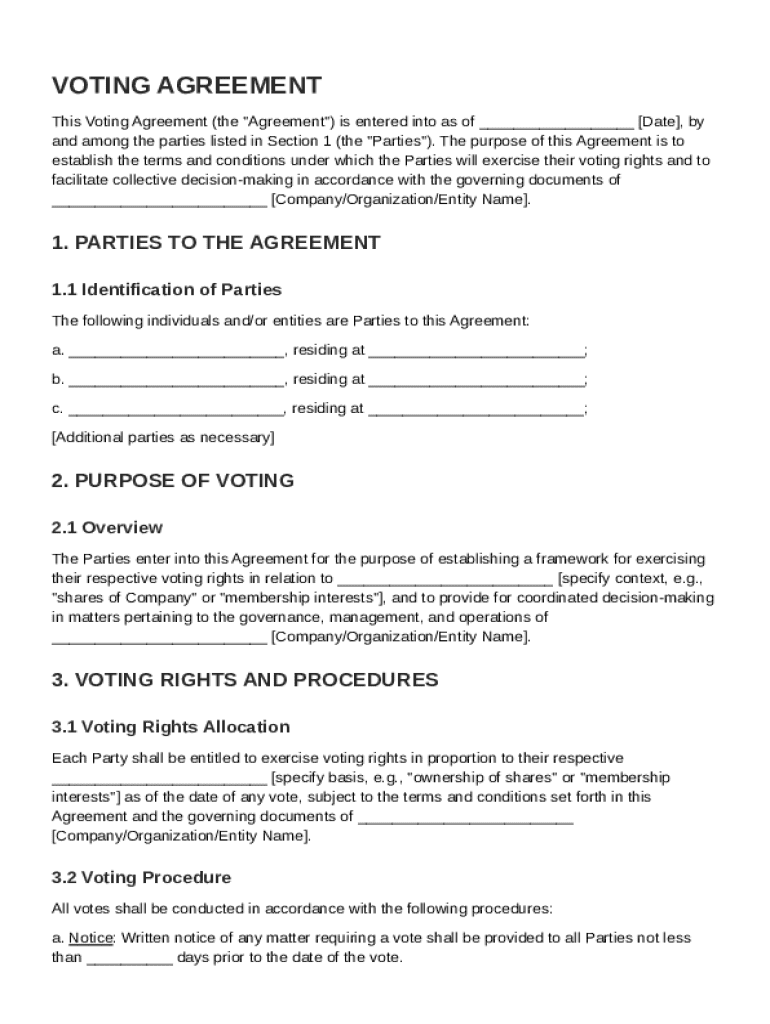
Voting Agreement Form
Use a Voting Agreement Template template to make your document workflow more streamlined.
What a Voting Agreement Form does
A Voting Agreement Form records a shareholder’s commitment to vote shares in an agreed manner on specified corporate matters. It identifies the parties, covered shares or voting rights, decisions or actions covered, and signing requirements. In a U.S. transaction, the completed agreement should be read with the company’s charter, bylaws, shareholder agreements, and applicable state law. signNow lets the sender upload the document, place assigned fields, invite shareholders, capture signatures and timestamps, and retain the executed record with its audit trail.
Who uses a Voting Agreement Form
Shareholders
Shareholders use a Voting Agreement Form to document how they will vote their shares on identified corporate matters. The agreement should match the company’s governing documents and transaction terms, identify each party accurately, and preserve signed records for later review.
Legal teams
Corporate counsel and transaction teams coordinate execution among multiple shareholders, often using a reusable signNow template. They can assign signing order, confirm party details, and retain the completed agreement with its audit trail alongside board, financing, or acquisition records.
Business types using voting agreements
Voting Agreement Forms are most useful where several shareholders must document coordinated voting commitments for a defined corporate decision or transaction.
Solo corporate attorneys use a Voting Agreement Form to collect aligned shareholder commitments for a focused financing, acquisition, or governance matter while preserving a clear execution record for the client file. Private companies use reusable signNow templates to coordinate shareholder approvals, assign parties accurately, and retain executed agreements with transaction materials rather than circulating paper copies between offices. Enterprise legal and transaction teams manage multiple shareholder groups through controlled templates, delegated sending, and audit trails that help organize execution evidence across subsidiaries, financing rounds, or strategic transactions.
These tasks are executed by both individual contributors and centralized administrators depending on organizational policy and required controls.
How the voting agreement workflow works
The signNow workflow turns a prepared Voting Agreement Form into an assigned, traceable signing process for shareholders, counsel, or transaction administrators.
Upload: Upload the Voting Agreement Form Add fields: Place fields for each shareholder Send: Send assigned signing invitations Preserve: Store the executed agreement and audit trail
 Best ROI. Our customers achieve an average 7x ROI within the first six months.
 Scales with your use cases. From SMBs to mid-market, airSlate SignNow delivers results for businesses of all sizes.
 Intuitive UI and API. Sign and send documents from your apps in minutes.
Recommended voting agreement setup
Configure the Voting Agreement Form so each shareholder’s identity, signature, consent, and completed record can be reviewed after execution.
| Setting | Recommendation |
|---|---|
| Authentication method | Email invitation with stronger verification when required |
| Signature type | Typed or drawn electronic signature with intent |
| Audit trail | Retain completion certificate and signing history |
| Document retention | Follow transaction and state-law retention policy |
| Encryption | Use TLS 1.2/1.3 and AES-256 protection |
Features that support voting agreements
signNow organizes the Voting Agreement Form from document preparation through shareholder execution, while preserving evidence that identifies the completed signing event.
Structured fields
Upload the Voting Agreement Form and use signNow’s field tools to place signature, date, initials, and text fields where each shareholder must complete the agreement.
Assigned signers
Send one agreement to several shareholders with clearly assigned fields, reducing uncertainty about who must sign and which provisions each party must acknowledge.
Audit trail
Capture signer actions, timestamps, and document history in an audit trail that can accompany the executed voting agreement during legal or transaction review.
Reusable template
Use a reusable template for recurring shareholder consents or financing transactions while keeping party-specific names, share details, and voting commitments editable.
Mobile signing
Complete the agreement from a desktop or mobile device, allowing shareholders and counsel to review and sign without coordinating a single physical meeting.
Secure records
Keep the signed agreement and completion evidence together in signNow, supporting controlled retrieval when a company later reviews voting obligations or transaction records.
Security for signed voting agreements
Transport encryption:
Stored-data encryption:
Independent assurance:
Security management:
U.S. eSignature compliance:
Signing evidence:



Best practices for voting agreements
Accuracy matters because a Voting Agreement Form records shareholder commitments that may be reviewed alongside corporate and transaction documents.
Verify parties and voting rights
Assign every required field
Preserve execution evidence
Review governing documents
What the audit trail records
A signNow audit trail adds technical evidence to the Voting Agreement Form without replacing the agreement’s substantive terms or corporate-law review.
Authenticate signer:
Capture timestamp:
Record document history:
Seal completion:
Review audit trail:
Export evidence:
Legal standing of a voting agreement
A Voting Agreement Form can carry electronic signatures when the parties demonstrate intent, consent, attribution, and the ability to retain and reproduce the record under ESIGN, 15 U.S.C. ch. 96, and applicable state law, including UETA or New York ESRA. Wills, court orders, and certain family-law documents remain excluded.

Risks from incomplete execution
Party dispute
Document conflict
Evidentiary gap
Ambiguous terms
Voting Agreement Form troubleshooting
Resolve field, signer, authentication, and legal-record questions before distributing a Voting Agreement Form for execution.
Upload the original Voting Agreement Form as a PDF or supported document, then inspect the detected fields before sending. If fields are missing, add signature, date, initials, or text fields manually and confirm every shareholder has the required assignment.
The signNow Business plan includes templates and audit trails, while Business Premium adds bulk send. For a single Voting Agreement Form, assign each shareholder directly; use bulk send only when sending substantially similar agreements to multiple separate groups.
signNow records signing activity in an audit trail, but the agreement’s enforceability still depends on intent, consent, attribution, and record retention under ESIGN and applicable state law. Review corporate documents and transaction requirements before relying on the form.
If a shareholder cannot access the invitation, verify the email address, resend the request, or provide a controlled signing link. Confirm the recipient’s identity before signing and avoid forwarding an invitation when party attribution matters.
Use signNow’s signer authentication options when shareholder identity requires more than an email invitation. Advanced authentication availability depends on the plan and configuration; document the chosen method in the transaction file and follow counsel’s identity-verification requirements.
For a consumer-facing transaction, ESIGN requires disclosure of the right to receive paper records, access to the electronic format, and a withdrawal procedure under 15 U.S.C. §7001(c). Obtain legal review if shareholders sign in a consumer capacity.
Key performance indicators that demonstrate SignNow's proven track record.
BE READY TO GET MORE
Get this form now!

If you believe that this page should be taken down, please follow our DMCA take-down process.