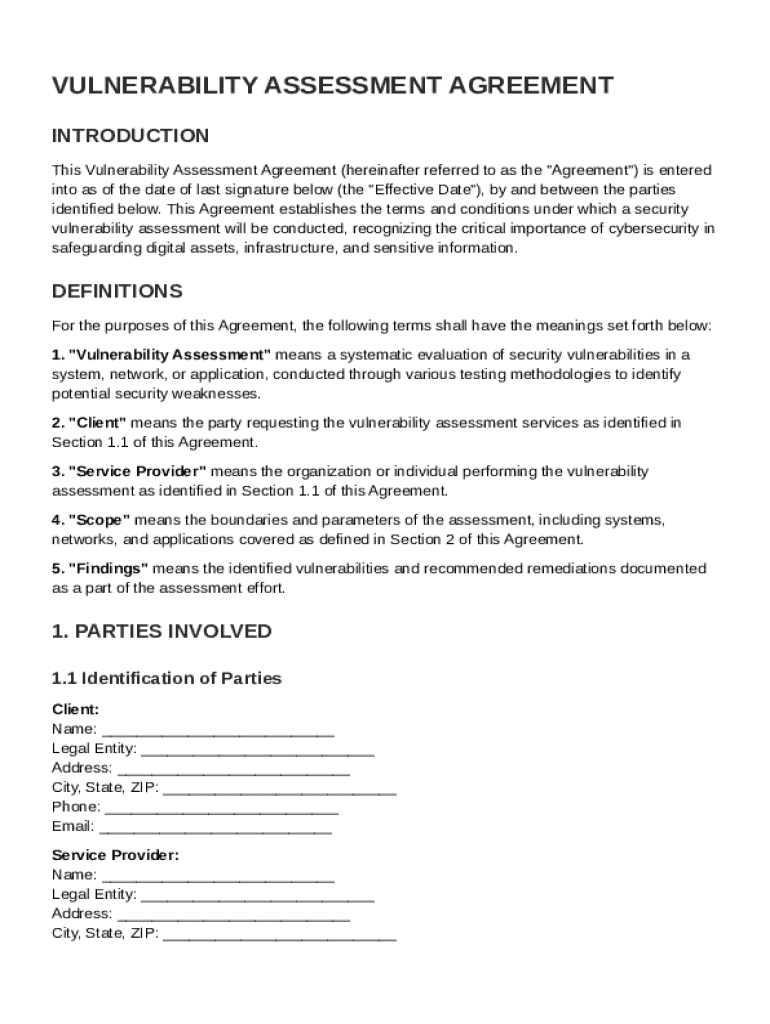
Vulnerability Assessment Agreement Form
Use a Vulnerability Assessment Agreement Template template to make your document workflow more streamlined.
What this agreement does
A Vulnerability Assessment Agreement Form records permission and operating rules for a defined security assessment. It identifies the client, assessor, systems, environments, testing scope, approved dates, prohibited actions, contacts, confidentiality expectations, and signature responsibilities. The parties complete it before testing begins so the assessor can demonstrate authorization and the system owner can confirm boundaries. With signNow, a sender uploads the document, reviews detected fields, assigns signers, sends it for electronic signature, and retains the executed agreement with an audit trail showing document activity and completion.
Business types that use the form
The agreement fits organizations that authorize security testing across internal teams, clients, vendors, and regulated environments.
Solo security consultants use the form to document client permission, testing boundaries, and emergency contacts before beginning an assessment. A signNow template reduces repeated drafting while keeping each engagement’s systems, dates, and signers specific. Mid-sized technology providers use the agreement to coordinate approvals among client representatives, system owners, and assessors. Shared templates, delegated sending, and role-based access help standardize authorization without giving every participant administrative control. Enterprise security departments use the form across business units and external vendors. Administrators can control templates and permissions, while authorized senders route each agreement to the correct approvers and preserve a consistent audit record.
These tasks are executed by both individual contributors and centralized administrators depending on organizational policy and required controls.
Features for vulnerability assessment agreements
Build a clear authorization record, collect approvals from the right participants, and preserve the signed vulnerability assessment agreement with its completion evidence.
Defined scope
Capture the systems, applications, environments, and testing boundaries covered by the vulnerability assessment before work begins.
Testing rules
Record authorized testing dates, methods, exclusions, and escalation contacts so assessors and system owners share the same instructions.
Role-based signing
Assign signature fields to the client, assessor, system owner, and approving manager for clear responsibility and attribution.
Reusable template
Use signNow templates to preserve recurring agreement language while updating engagement-specific scope and contacts for each assessment.
Remote signing
Collect signatures through email or signing links when assessors and approvers work from different locations or devices.
Audit evidence
Keep the completed agreement and signNow audit trail available as evidence of authorization, signer activity, and completion history.
How the agreement workflow works
The signNow workflow turns the vulnerability assessment agreement into a controlled authorization record from upload through storage.
Upload form: Upload the agreement and let signNow detect fillable fields. Prepare fields: Review scope fields and assign each signature or approval role. Send document: Send the agreement to assessors, system owners, and approvers. Complete record: Collect signatures and store the completed record with its audit trail.
Ways to send and sign the agreement
- Use the signNow web app when preparing a detailed agreement, assigning multiple roles, reviewing fields, and sending the final authorization record from a desktop workspace.
- Use the mobile app when a security lead or client representative must review and sign the assessment agreement away from the office or during onsite coordination.
- Use kiosk mode for controlled in-person signing when several authorized participants complete the same agreement at a managed workstation under staff supervision.
- Use a shareable signing link when approved recipients need access without a separately addressed email invitation, while preserving the agreement’s assigned fields and audit trail.
 Best ROI. Our customers achieve an average 7x ROI within the first six months.
 Scales with your use cases. From SMBs to mid-market, airSlate SignNow delivers results for businesses of all sizes.
 Intuitive UI and API. Sign and send documents from your apps in minutes.
Recommended workflow setup
Configure the agreement around identifiable signers, controlled access, documented authorization, and secure retention of the completed assessment record.
| Setting | Recommendation |
|---|---|
| Authentication method | Two-factor authentication for external assessors |
| Signature type | Electronic signature with signer intent |
| Audit trail | Retain completion history with the agreement |
| Document retention | Follow the engagement and industry retention policy |
| Encryption | TLS 1.2/1.3 and AES-256 protection |
What the audit trail records
The audit trail documents the technical and signer events that turn this authorization form into a traceable completed record.
Authenticate signer:
Capture timestamp:
Record document hash:
Seal record:
Link audit trail:
Export evidence:
SignNow security and compliance
Transport security:
Storage encryption:
Control assurance:
Security management:
Privacy controls:
Healthcare deployments:



Privacy and disclosure pitfalls
Including system names, credentials, or personal data in the agreement can expose sensitive information if access permissions are too broad. Missing electronic-consent language may make it harder to show that each signer agreed to receive and sign the document electronically. Sending the completed agreement to the wrong recipient can disclose assessment scope, testing windows, or security contacts. Using one shared account obscures who approved the assessment and weakens attribution in the audit record.
Best practices for this agreement
Use the agreement to create a precise authorization record while keeping credentials and unnecessary sensitive information outside the signed document.
Define scope without exposing secrets
Verify every signer and role
Archive the executed record
Review amendments before testing
Vulnerability assessment agreement examples
Organizations use this form to document authorization, assessment boundaries, and accountability before security testing begins.
Healthcare security
Healthcare security teams use vulnerability assessment agreements to authorize testing, define scope, and document safeguards before an assessment begins.
- Defines authorized testing scope
- Records responsible parties and approvals
A completed agreement gives security teams and service providers one signed record covering authorization, boundaries, responsibilities, and handling expectations. signNow keeps the executed document and audit trail together, helping teams demonstrate that assessment activity was approved before sensitive systems were examined.
Vendor assessments
Construction and technology vendors use vulnerability assessment agreements to coordinate testing permissions across contractors, platforms, and operational contacts.
- Clarifies systems and testing windows
- Captures vendor and client signatures
The signed agreement creates a clear reference for the client, assessor, and subcontractors involved in the engagement. With signNow, teams can route the document to the appropriate parties, track completion, and retain evidence of each signing event.
Mobile options for assessment agreements
The signNow mobile apps support completing the Vulnerability Assessment Agreement Form on iOS and Android devices, including mobile signing, offline work, and camera-based document capture.
Mobile apps iOS and Android apps Offline work Offline signing support Document capture Camera document capture
Teams can prepare assessment agreements on managed mobile devices, collect signatures at a client site, and synchronize completed records when connectivity returns. Enterprise deployments should also evaluate API access, SSO provisioning, device controls, and retention requirements for sensitive assessment information.
Key performance indicators that demonstrate SignNow's proven track record.
Troubleshooting the agreement workflow
Resolve field, delivery, authentication, plan, privacy, and legal issues before the assessment agreement is executed.
Upload the original Vulnerability Assessment Agreement Form again and review the detected fields before sending. If a field is missing, add it manually and assign it to the correct assessor, system owner, or approving representative. The Business plan includes templates and audit trails for this workflow.
Confirm that the recipient address is correct, then resend the agreement or provide a controlled signing link. Check whether the recipient’s mail system blocked the message. signNow supports email delivery and link-based signing, while the audit trail records later activity.
Use SMS-based authentication or another available signer verification method when the assessment involves production systems or sensitive information. Advanced authentication availability depends on the signNow configuration and plan; Enterprise adds advanced signer authentication capabilities.
The Business plan is listed at $8 per user per month with annual billing, and Business Premium at $15. Business Premium adds bulk send. Subscription plans include 100 signature invites per user per year, with overage fees applying after the included allowance.
For healthcare assessments involving protected health information, signNow states that HIPAA compliance requires a business associate agreement. Confirm that the required BAA and organizational safeguards are in place before including or authorizing access to PHI.
Electronic signing can support the agreement when the parties demonstrate intent, consent, attribution, and record retention under the ESIGN Act and applicable state law. Do not use electronic signing for excluded records such as wills, codicils, or certain court filings.
BE READY TO GET MORE
Get this form now!

If you believe that this page should be taken down, please follow our DMCA take-down process.