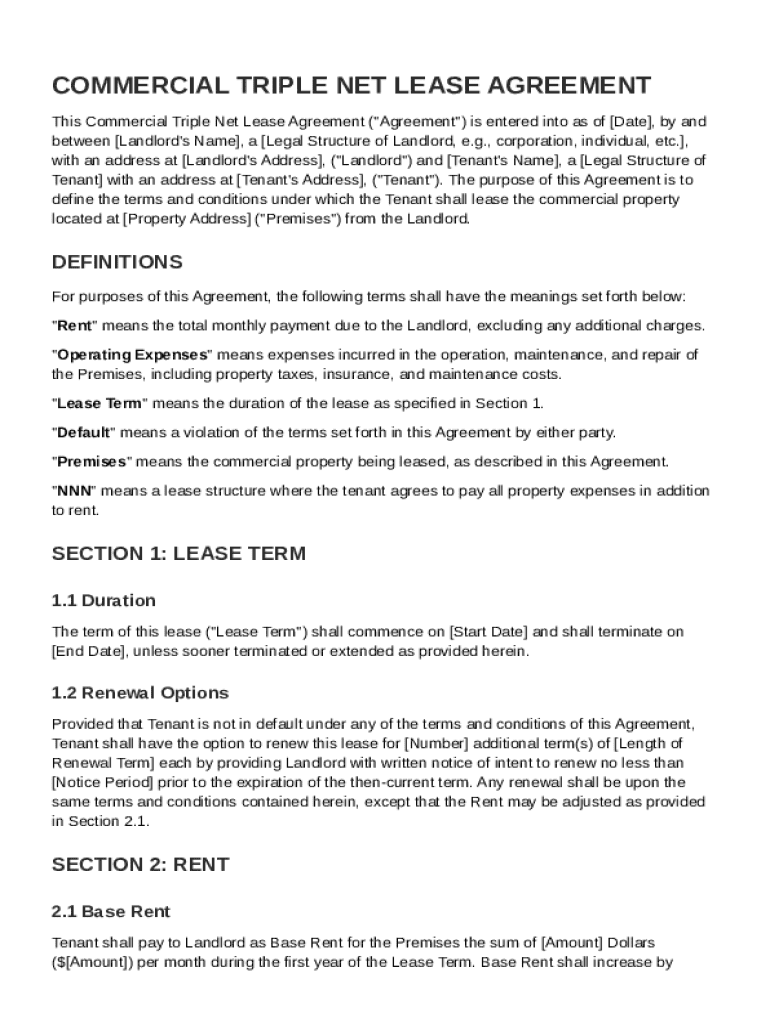
Commercial Triple Net Lease Agreement Form
Use a Commercial Triple Net Lease Agreement Template template to make your document workflow more streamlined.
What this commercial lease form covers
A Commercial Triple Net Lease Agreement Form is a business lease that assigns the premises, rent, and operating-cost responsibilities between a landlord and tenant. In a triple-net structure, the tenant generally pays base rent plus specified property taxes, insurance, and maintenance expenses, subject to the agreement’s actual language and state law. The form records the property address, term, renewal rights, permitted use, default remedies, notices, and signatures. Upload the completed agreement to signNow, place fields, route it to authorized parties, and retain the executed lease with its audit trail.
Business types using commercial lease forms
Commercial lease workflows serve brokers, property managers, tenants, and enterprise real-estate teams with different approval and recordkeeping needs.
Solo commercial brokers can prepare property-specific leases, route landlord and tenant signatures, and keep the completion record without coordinating an in-person signing appointment. Property management companies can reuse approved lease templates while assigning premises, rent, tax, insurance, maintenance, renewal, and notice fields for each commercial property. Enterprise real-estate departments can connect lease execution with NetSuite, Salesforce, Google Drive, or Box while controlling access to executed agreements and audit trails.
These tasks are executed by both individual contributors and centralized administrators depending on organizational policy and required controls.
Who uses this commercial lease form
Commercial landlords
Commercial landlords and property managers use the form to identify the premises, base rent, expense pass-throughs, insurance duties, maintenance allocation, permitted use, renewal options, default remedies, and notice addresses. signNow can route the lease to each required party, capture signatures and dates, and preserve the completed agreement with its audit trail.
Tenant teams
Tenants, brokers, attorneys, and corporate real-estate teams use the form to review operating expenses, tax and insurance allocations, assignment restrictions, delivery conditions, guaranties, and renewal mechanics. A signNow template can standardize recurring lease packages while allowing property-specific fields and signer order for each transaction.
 Best ROI. Our customers achieve an average 7x ROI within the first six months.
 Scales with your use cases. From SMBs to mid-market, airSlate SignNow delivers results for businesses of all sizes.
 Intuitive UI and API. Sign and send documents from your apps in minutes.
Key features for commercial lease execution
A structured commercial lease workflow keeps financial obligations, property terms, signer roles, and executed records together from drafting through storage.
Cost allocation
Separate base rent, property taxes, insurance, and maintenance obligations in the lease workflow. Clear field placement helps landlords and tenants review each financial responsibility before signing and reduces omissions during commercial property negotiations.
Signer routing
Route the agreement to landlord, tenant, guarantor, or broker in a defined sequence. Role-specific fields keep signatures, initials, dates, and approvals attached to the correct party within one lease record.
Lease terms
Capture renewal terms, notice periods, permitted use, and operating requirements alongside financial provisions. A structured agreement gives both parties a readable record for administration after execution.
Reusable templates
Use reusable templates for recurring commercial properties while preserving property-specific rent, address, expense, and renewal data. Templates reduce reformatting and help teams maintain a consistent lease package.
Audit evidence
Keep the executed lease, completion certificate, timestamps, and activity history together. The resulting record supports internal review and provides transaction evidence under ESIGN and applicable state electronic-transactions law.
Remote signing
Collect signatures from desktop or mobile devices without requiring a shared meeting. signNow supports online execution for commercial lease agreements when the parties consent and the transaction is not excluded by law.
How commercial lease signing works
Complete the property and financial terms first, then use this signNow flow to prepare, sign, and preserve the commercial lease.
Upload agreement: Upload the completed lease PDF. Prepare fields: Auto-detect and place signature fields. Route signing: Send to authorized parties in order. Archive record: Store the signed lease and audit trail.
How the lease audit trail is recorded
For a commercial lease, signNow records signer activity and document events so the executed agreement can be reviewed as one traceable transaction.
Authenticate signers:
Capture timestamps:
Hash document:
Seal record:
Attach certificate:
Export history:
Platform requirements for lease signing
Complete the Commercial Triple Net Lease Agreement Form in a current Chrome, Firefox, Safari, or Edge browser on Windows or macOS. signNow also provides mobile applications for iOS and Android, allowing authorized parties to review and sign the lease away from a desk.
Browsers Chrome, Firefox, Safari, and Edge Desktop systems Windows and macOS desktop access Mobile systems iOS and Android mobile applications
Use managed devices and approved accounts when lease records contain tenant, guarantor, payment, or property information. Organizations connecting signNow to Salesforce, NetSuite, Google Drive, Box, or another approved system should configure access permissions, retention rules, and any required SSO or API controls before production use.
Security controls for lease records
Encryption:
Transport security:
Security reporting:
Information security:
Electronic signatures:
Regulated data:
Rules outside electronic lease signing
Missing notarization
Wills and codicils
Court orders
Real-estate deeds
State variation
Troubleshooting commercial lease signing
Resolve signing issues by checking the lease fields, signer authority, authentication method, plan capabilities, and required record controls before sending the agreement.
Upload the final commercial lease as a PDF, then use signNow’s field tools to place signatures, initials, dates, and required property or financial fields. Review every page before sending because changing the lease after invitations can require a new signing transaction.
The signNow Business plan includes templates, audit trails, and legally binding eSignatures at $8/user/month when billed annually. If the lease requires bulk sending, Business Premium adds that capability at $15/user/month annually; confirm current plan limits before deployment.
ESIGN and UETA generally recognize electronic signatures when intent, consent, attribution, and record retention are established. For a commercial lease, obtain party consent, preserve the signed record, and check state law or transaction-specific exclusions before relying on electronic execution.
Use signNow’s signer authentication options, including email delivery and SMS-based verification where configured, to strengthen attribution. Advanced authentication requirements may depend on the plan and workflow; confirm identity controls before sending a high-value lease.
Business Premium includes bulk send, while the Business plan does not. For one commercial lease, send the prepared agreement directly; for multiple substantially similar leases, use bulk send only after confirming property-specific fields and signer assignments.
Keep the completed lease, certificate of completion, and audit trail together in the organization’s approved repository. signNow supports audit trails and integrations, but the landlord or tenant must set the retention period required by applicable contract, tax, accounting, or state rules.
Key performance indicators that demonstrate SignNow's proven track record.
BE READY TO GET MORE
Get this form now!

If you believe that this page should be taken down, please follow our DMCA take-down process.