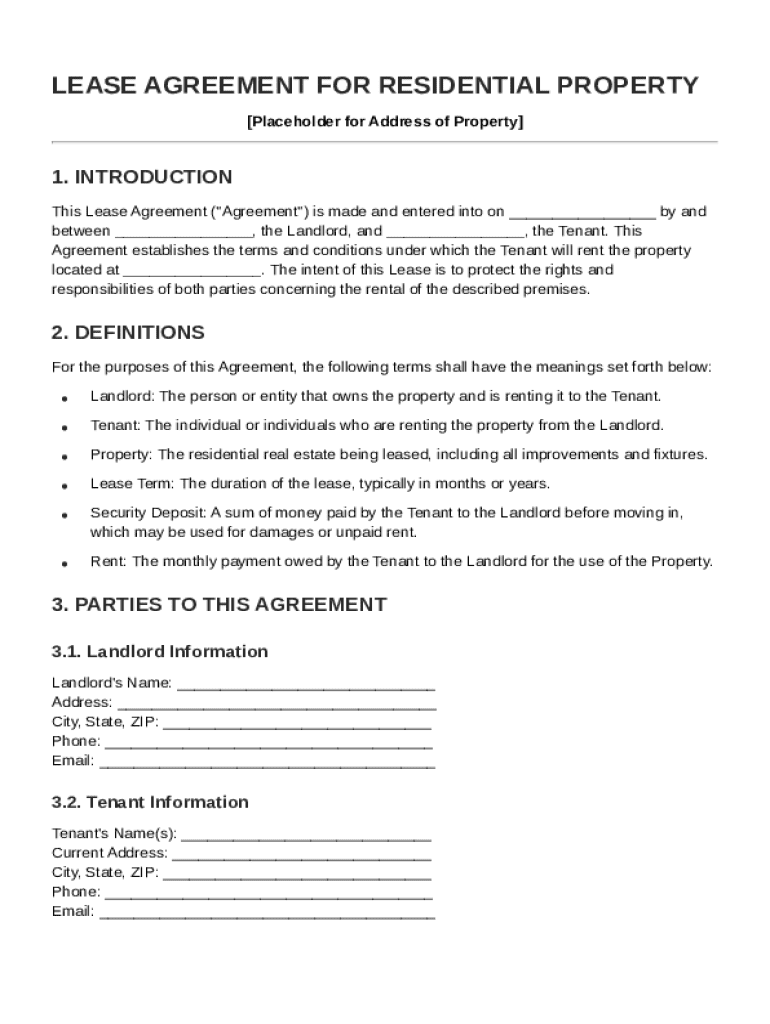
Lease For Renting A House Agreement Form
Use a Lease For Renting A House Agreement Template template to make your document workflow more streamlined.
What this house rental agreement covers
A Lease For Renting A House Agreement Form records the terms under which a landlord rents a residential house to a tenant. It identifies the property and parties, states the lease term and rent, and documents deposits, utilities, maintenance duties, occupancy limits, notices, and signatures. In signNow, the sender uploads the lease, reviews detected fillable fields, adds tenant and landlord signing roles, and sends it electronically. The completed PDF and audit trail preserve the agreed terms, but state landlord-tenant law still governs required notices, disclosures, and enforceability.
Who benefits from digital house leases
Landlords, property managers, and housing operators use this form to document residential rental terms and collect signatures with a traceable record.
Independent landlords can send a house lease to tenants and guarantors, collect signatures remotely, and retain the executed agreement without coordinating an office appointment. Property management firms can reuse reviewed lease templates, delegate sending to leasing staff, and preserve separate audit trails for each residential property and tenant. Enterprise housing operators can route high-volume rental agreements through controlled teams, integrations, and authentication policies while retaining consistent records across multiple properties.
These tasks are executed by both individual contributors and centralized administrators depending on organizational policy and required controls.
How the rental lease workflow works
A completed rental lease moves from document preparation to verified signing and organized storage through four clear signNow steps.
Upload lease: Upload the completed lease and verify its pages. Check fields: Auto-detect fields, then add missing dates and initials. Add signers: Enter tenant and landlord details before sending. Complete record: Collect signatures and store the executed lease with its audit trail.
Features for house rental agreements
signNow helps property owners and managers prepare, route, sign, and retain house rental agreements while keeping each property’s negotiated terms visible and traceable.
Lease fields
Upload a house lease PDF, place tenant and landlord fields, and preserve the agreed rent, deposit, property address, term, and maintenance obligations in one controlled document.
Signer routing
Route the same house rental agreement to multiple tenants, guarantors, or property representatives in the required signing order without recreating the document.
Reusable template
Use reusable lease templates for recurring properties while reviewing each address, rent amount, occupancy term, and special provision before sending.
Audit trail
Capture signer actions, timestamps, and document history so property managers can demonstrate how the executed rental agreement was completed.
Mobile signing
Use mobile apps for on-site property leasing when tenants or agents need to review and sign away from an office.
Record storage
Store the signed lease and completion evidence together, supporting retrieval when rent, repairs, renewal, or termination questions arise.
 Best ROI. Our customers achieve an average 7x ROI within the first six months.
 Scales with your use cases. From SMBs to mid-market, airSlate SignNow delivers results for businesses of all sizes.
 Intuitive UI and API. Sign and send documents from your apps in minutes.
Steps to complete the rental agreement
Use this sequence to prepare a house rental agreement accurately before sending it to every required signer.
Upload document:
Upload the house rental agreement PDF. Review details:
Check property, rent, term, and party fields. Assign signers:
Assign tenant and landlord signature fields. Send lease:
Send the lease for electronic signing. Store records:
Download the executed agreement and audit trail.
What the lease audit trail records
The signNow audit trail separates the rental agreement’s negotiated terms from evidence showing who acted, when they acted, and how completion occurred.
Signer authentication:
Timestamp capture:
Document history:
Tamper evidence:
Completion certificate:
Audit retrieval:
Recommended setup for house leases
Configure the signing workflow around tenant identity, negotiated lease terms, audit evidence, and the retention policy applicable to the property and jurisdiction.
| Lease setting | Recommended configuration |
|---|---|
| Authentication method | Email verification with two-factor authentication |
| Signature type | Electronic signature with recorded intent |
| Audit trail | Enable completion certificate and action history |
| Document retention | Follow applicable state record policy |
| Encryption | TLS 1.2/1.3 and AES-256 protection |
Security controls for signed leases
Transit encryption:
Stored encryption:
Security reporting:
Security certification:
Two-factor access:
Event history:
Platform access for house leases
Property owners and tenants can access the Lease For Renting A House Agreement Form through Chrome, Firefox, Safari, or Edge on Windows and macOS, with signNow apps available for iOS and Android devices. Use a current browser with TLS support for secure access.
Supported browsers Chrome, Firefox, Safari, Edge Mobile apps iOS and Android apps Document capture Camera capture for lease pages
For property teams, managed Windows, macOS, iOS, and Android devices can support controlled lease signing. Review organizational requirements for SSO, API access, and retention before deployment. Camera capture can help digitize paper lease pages, but users should verify every captured field before sending the agreement.
Lease agreement risks to address
Missing payment terms
Unclear responsibilities
Defective termination clause
Incomplete signature record
Best practices for lease records
Accurate terms, controlled access, and complete execution records make a signed house rental agreement easier to administer and retrieve.
Archive the executed lease with evidence
Limit access to tenant information
Verify every negotiated lease term
Apply the correct retention rule
Troubleshooting signed house leases
Resolve field, signer, consent, plan, and document-scope questions before relying on an electronically completed house rental agreement.
Upload the original PDF again and check whether the file is password-protected or image-only. signNow can place fields after upload, but missing source text may require manually adding text, date, and signature fields for the lease.
Open the recipient settings and confirm each tenant, landlord, guarantor, or property representative has the correct role and email address. Reassign fields before sending so one signer cannot complete another party’s obligations.
Business includes legally binding eSignatures, audit trails, templates, and mobile apps at $8/user/month with annual billing. Confirm the account plan and available signature invites before sending multiple house leases.
Use signNow’s two-factor authentication options where stronger identity evidence is needed, and preserve the audit trail with the executed lease. ESIGN and UETA support electronic signatures when intent, consent, attribution, and record reproduction are established.
For consumer-facing electronic records, review the ESIGN Act’s disclosure requirements at 15 U.S.C. §7001(c), including paper-copy access and withdrawal procedures. Obtain the required consent before relying on electronic delivery for a residential tenant.
A rental lease is not a will, court order, family law decree, or real-estate deed. ESIGN exceptions remain relevant, and a deed generally requires notarized acknowledgment under state law before recording.
Key performance indicators that demonstrate SignNow's proven track record.
BE READY TO GET MORE
Get this form now!

If you believe that this page should be taken down, please follow our DMCA take-down process.