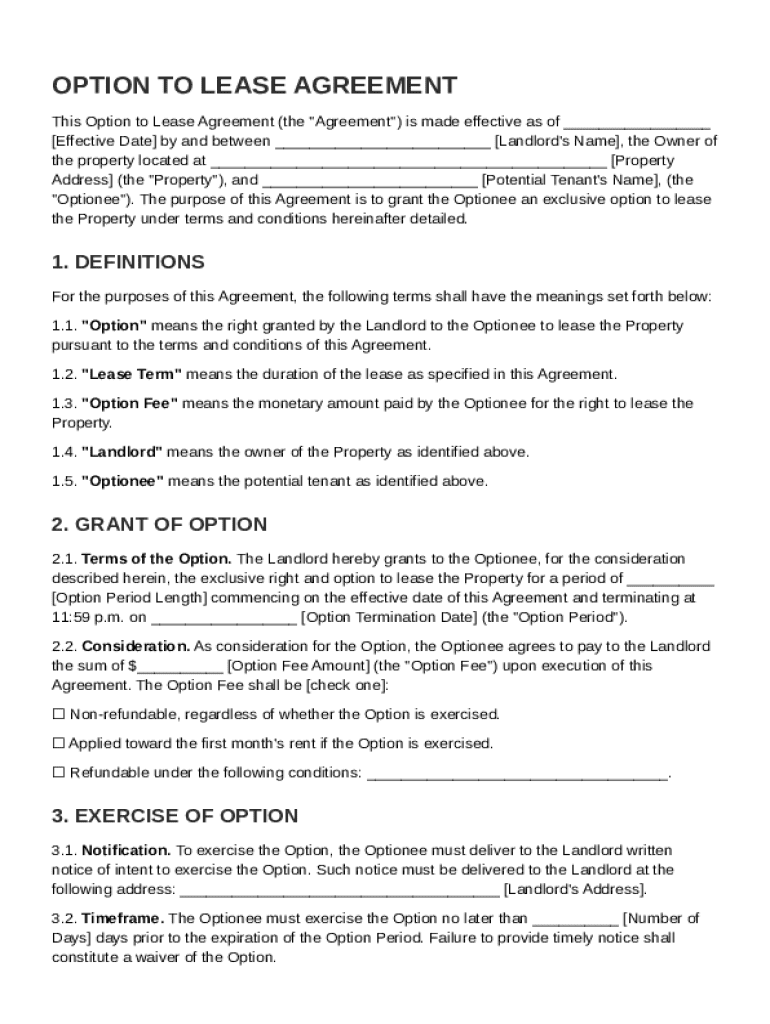
Option To Lease Agreement Form
Use a Option To Lease Agreement Template template to make your document workflow more streamlined.
What an option to lease agreement does
An Option To Lease Agreement Form records a tenant’s right to lease identified property under stated conditions during a defined option period. It normally identifies the parties, premises, rent or purchase terms, option fee, exercise deadline, notice method, and signatures. The document is a private contract, so state law and the agreement’s exact language control enforceability. With signNow, upload the form, review automatically detected fillable fields, assign each signer, collect signatures, and retain the completed document with its audit trail.
Useful signNow features for this form
The right workflow keeps the property terms, option deadline, signer assignments, and evidence of execution together in one record.
Reusable templates
Reusable templates preserve approved clauses, party roles, option dates, and signature locations for repeated lease-option transactions.
Field detection
Auto-detected fields help convert an uploaded agreement into an editable signing package without rebuilding every field manually.
Signer routing
Role-based routing sends the Option To Lease Agreement Form to the tenant, owner, broker, or reviewer in the intended order.
Audit trail
Audit trails record signing activity, timestamps, and document history to support later review of the completed agreement.
Mobile signing
Mobile apps let parties review and sign the lease option document when property work occurs away from an office.
Record storage
Completed agreements remain organized with their signing records, making retrieval easier during lease administration or a later dispute.
Complete and sign the lease option form
Use this signNow workflow to prepare the Option To Lease Agreement Form, route it to the parties, and preserve the completed agreement.
Upload form:
Upload the completed Option To Lease Agreement Form and review detected fields. Add signers:
Add names, email addresses, and signing order for every required party. Place fields:
Place signatures, dates, initials, and lease-option fields where needed. Complete signing:
Send the agreement, monitor status, and download the completed record.
Recommended setup for lease option signing
Configure the Option To Lease Agreement Form around signer identity, clear consent, document integrity, and a retention policy appropriate to the property transaction.
| Setting | Recommendation |
|---|---|
| Authentication method | Email verification with SMS authentication |
| Signature type | Electronic signature with intent and consent |
| Audit trail | Enable completion certificate and action history |
| Document retention | Retain signed copy under applicable state policy |
| User provisioning | Assign authorized senders and shared templates |
 Best ROI. Our customers achieve an average 7x ROI within the first six months.
 Scales with your use cases. From SMBs to mid-market, airSlate SignNow delivers results for businesses of all sizes.
 Intuitive UI and API. Sign and send documents from your apps in minutes.



Processing stages for the lease option form
Processing time depends on document accuracy, signer availability, and any required review of state-specific lease terms.
Prepare document
Deliver to signers
Signer turnaround
Archive completion
Risks of incomplete lease options
Unclear option terms
Missing signature evidence
Omitted option deadline
Incomplete lease provisions
Challenges when preparing this agreement
Parties omit the exact option exercise deadline, creating uncertainty about when the tenant’s lease right expires. The form identifies rent but fails to state the option fee, credit treatment, or payment deadline. Property descriptions, legal addresses, or unit identifiers do not match the underlying ownership records. The agreement lacks a clear notice method, leaving exercise communications vulnerable to delivery disputes.
Legal standing of the lease option form
For a U.S. business transaction, an electronically signed Option To Lease Agreement Form can be admissible when the parties show intent, consent, attribution, and retain a reproducible record under ESIGN, 15 U.S.C. ch. 96, and applicable state law. Wills, court orders, family law decrees, and other statutory exclusions require separate treatment.

Best practices for lease option records
Accurate terms, controlled signer assignments, and documented retention make the completed Option To Lease Agreement Form easier to administer and review.
Verify every property and option term
Assign fields to the correct signer
Preserve the signed agreement and audit trail
Use the correct retention policy
What the audit trail records
The audit trail gives the Option To Lease Agreement Form a chronological record of signer activity and document completion.
Signer authentication:
Timestamp capture:
Document integrity:
History sealing:
Completion certificate:
Audit export:
Questions about signing this agreement
These answers address the signing, field, authentication, and recordkeeping issues that arise when preparing an Option To Lease Agreement Form online.
Business includes legally binding eSignatures, templates, mobile apps, and audit trails at $8/user/month with annual billing. Confirm that the lease-option workflow needs only those features before selecting a higher plan.
Business Premium adds bulk send and costs $15/user/month with annual billing. It may suit repeated lease-option packages, but signNow’s subscription plans include 100 signature invites per user annually, with overage fees.
ESIGN and UETA generally recognize electronic signatures when intent, consent, attribution, and record retention requirements are satisfied. State law and the agreement’s property provisions still require legal review.
If the lease option includes notarization, a separate notarial process may be required. signNow’s eSignature workflow does not by itself replace state-specific acknowledgment or recording requirements.
Use templates and automatic field detection to check whether the uploaded form contains signature, date, initials, and notice-related fields. Review every detected field before sending because field detection does not validate legal terms.
Use the audit trail and signed copy as evidence of the signing event. For consumer-facing electronic records, ESIGN requires disclosure of paper-record rights, electronic access, and consent-withdrawal procedures under 15 U.S.C. §7001(c).
Key performance indicators that demonstrate SignNow's proven track record.
BE READY TO GET MORE
Get this form now!

If you believe that this page should be taken down, please follow our DMCA take-down process.