Room Rentalresidential Lease Agreement Form
Use a Room Rentalresidential Lease Agreement Template template to make your document workflow more streamlined.
What this room rental lease form does
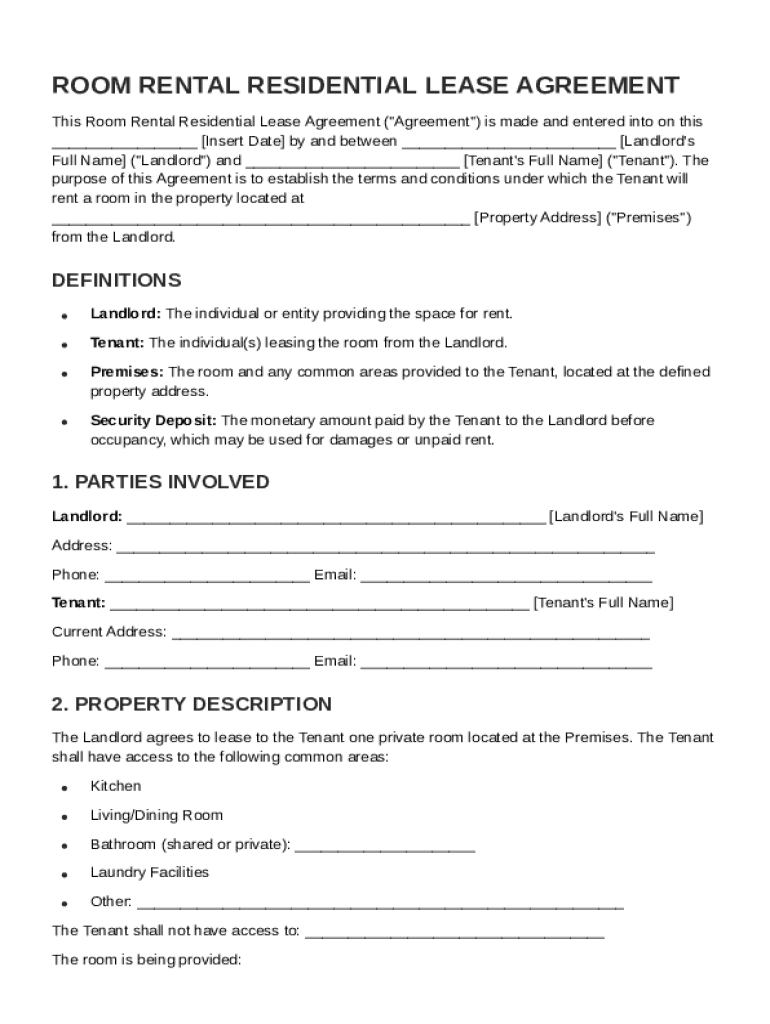
A Room Rentalresidential Lease Agreement Form records the terms between a property owner or primary tenant and someone renting a room. It identifies the parties, rental address, room or shared-area arrangements, rent, deposit, utilities, duration, house rules, and signatures. State landlord-tenant law controls required disclosures, notices, deposits, and enforceability; no single federal form governs every room rental. signNow can convert an uploaded lease into a fillable document, route it for signatures, and preserve the completed agreement with an audit trail under ESIGN and applicable state electronic-transactions law.
Who benefits from a room rental lease
Room owners, property managers, and primary tenants use this form to document the exact living arrangement before signatures are collected.
Independent landlords use the form to document a room, shared-space access, rent, deposits, utilities, and house rules before occupancy begins. Property management companies use reusable lease templates, assigned signing roles, and audit trails for room rentals across multiple properties. Primary tenants subletting a room use defined payment, access, guest, and termination terms, subject to the main lease and state law.
These tasks are executed by both individual contributors and centralized administrators depending on organizational policy and required controls.
How the room lease moves from draft to signed
A room rental agreement becomes usable when its specific property, payment, occupancy, and signature terms are complete.
Identify parties: Confirm the rental address, room, parties, and occupancy terms. Complete terms: Enter rent, deposit, utilities, dates, and house rules. Place fields: Add initials and signatures for each required person. Finalize agreement: Send the lease, collect signatures, and retain the audit trail.
 Best ROI. Our customers achieve an average 7x ROI within the first six months.
 Scales with your use cases. From SMBs to mid-market, airSlate SignNow delivers results for businesses of all sizes.
 Intuitive UI and API. Sign and send documents from your apps in minutes.
How to complete this room lease
Use this sequence to prepare, sign, and retain a complete Room Rentalresidential Lease Agreement Form in signNow.
Upload lease:
Upload the room lease PDF or document. Check fields:
Review detected fields and add missing details. Assign signers:
Assign landlord and renter signing fields. Send document:
Send the lease by email or link. Save records:
Download the signed lease and audit trail.
Recommended room lease workflow setup
Configure the document around signer identity, complete lease terms, auditability, and retention requirements that apply in the property’s state.
| Setting | Recommendation |
|---|---|
| Authentication method | Email link with SMS OTP |
| Signature type | Typed or drawn electronic signature |
| Audit trail | Enabled for every signing event |
| Document retention | Keep through applicable state limitation periods |
| Encryption | TLS 1.2/1.3 and AES-256 |
Security for room rental agreements
Transport encryption:
Stored encryption:
Security reporting:
Information security:
Electronic signatures:
Signer authentication:
What the room lease audit trail records
The audit trail connects each signer and action to the completed Room Rentalresidential Lease Agreement Form without replacing the lease’s substantive terms.
Authenticate signer:
Capture timestamp:
Hash document:
Seal record:
Track actions:
Export trail:
Room lease signing timeline
No universal federal deadline governs a private room lease; completion depends on the agreed occupancy date and applicable state requirements.
Prepare the lease
Send to signers
Collect signatures
Archive completion
Best practices for retaining room leases
A reliable record combines complete lease terms, an accessible signed copy, and evidence of each electronic signing event.
Set a state-specific retention schedule
Keep the audit trail with the lease
Limit access to personal information
Verify every material lease term
Troubleshooting a room rental lease
Resolve field, signer, plan, and enforceability questions before sending a Room Rentalresidential Lease Agreement Form.
Upload the lease as a PDF or supported document, then review signNow’s detected fields. Add missing rent, deposit, room, utility, or house-rule fields manually before sending. The Business plan includes templates and legally binding eSignatures, so the document can be reused after review.
A roommate or landlord can sign without editing another party’s fields when each field is assigned to the correct signer. Check email addresses, signing order, and role assignments before sending. The audit trail records actions and timestamps for the completed Room Rentalresidential Lease Agreement Form.
A lease signature may be recognized under ESIGN and applicable state law when intent, electronic consent, attribution, and record retention are established. For consumer-facing electronic records, 15 U.S.C. §7001(c) also requires access and paper-copy disclosures where applicable.
Business pricing is $8 per user monthly when billed annually, while Business Premium is $15 and Enterprise is $30. Paid plans include 100 signature invites per user annually; additional invites may incur overage fees. Confirm the current plan before sending high volumes.
Business Premium includes bulk send, while Business does not list that feature in the supplied plan details. For one room lease, send individually; for multiple substantially similar leases, review recipient-specific fields before using bulk send.
signNow lists HIPAA compliance with a business associate agreement, but a residential lease is not automatically a HIPAA record. Do not add health information unnecessarily. Apply state landlord-tenant rules, fair-housing requirements, and the actual lease purpose separately.
Key performance indicators that demonstrate SignNow's proven track record.
BE READY TO GET MORE
Get this form now!

If you believe that this page should be taken down, please follow our DMCA take-down process.