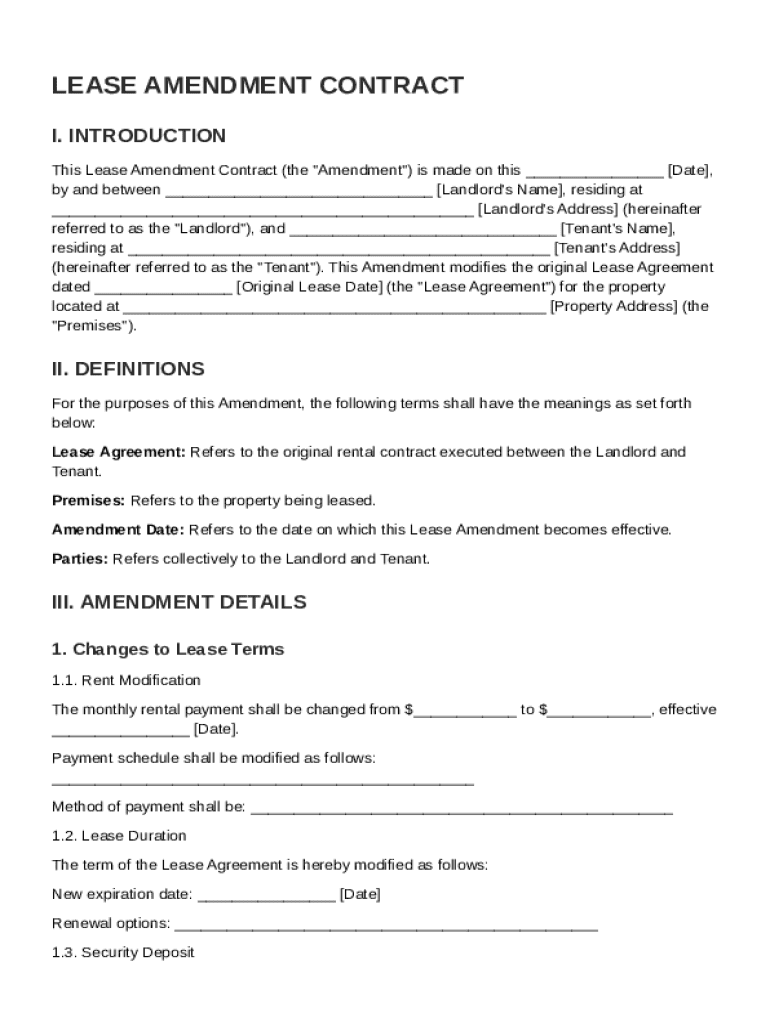
Lease Amendment Contract Form
Use a Lease Amendment Contract Template template to make your document workflow more streamlined.
What a lease amendment contract form does
A Lease Amendment Contract Form records an agreed change to an existing lease without replacing the entire agreement. It identifies the original lease, property, landlord, tenant, amended provision, effective date, and signatures. In signNow, upload the amendment, review detected fillable fields, add or assign landlord and tenant signature fields, and send it for execution. The completed amendment should remain with the original lease and its audit trail. ESIGN and UETA may recognize electronic execution when intent, consent, attribution, and record retention requirements are satisfied, subject to state law and exclusions.
Who uses a lease amendment form
Landlords and property managers
Property managers and landlords use amendments to document rent changes, renewal terms, occupants, parking, repairs, or other negotiated changes. They can preserve the original lease reference while routing the amendment to every required party for review and signature.
Tenants and legal teams
Commercial tenants and legal teams use amendments to record negotiated premises, term, operating-cost, assignment, or compliance changes. A controlled signing workflow helps separate draft review from final execution and keeps the signed amendment with supporting lease records.
How the lease amendment process works
A lease amendment records agreed changes to an existing lease, then routes the updated terms for review, signature, and retention.
Prepare document: Upload the completed lease amendment and confirm the existing lease details. Add amendment terms: Review detected fields and add missing dates, terms, and signature fields. Send for signature: Send the amendment to landlords and tenants in the required signing order. Archive records: Store the signed amendment with its completion certificate and audit trail.
Steps to complete a lease amendment
Use this sequence to prepare, route, sign, and retain a Lease Amendment Contract Form in signNow.
Upload amendment:
Upload the lease amendment as a PDF or supported document. Check fields:
Review detected fields and add dates, initials, and signatures. Assign signers:
Assign landlord and tenant roles before sending. Complete signing:
Send, monitor completion, and download the signed record.
 Best ROI. Our customers achieve an average 7x ROI within the first six months.
 Scales with your use cases. From SMBs to mid-market, airSlate SignNow delivers results for businesses of all sizes.
 Intuitive UI and API. Sign and send documents from your apps in minutes.
What the lease amendment audit trail records
The audit trail documents signer access, signing events, document history, and retrieval evidence separately from the lease amendment’s substantive terms.
Authenticate signer:
Capture timestamps:
Protect document history:
Export evidence:
Archive lease record:
Retrieve records:
Features for lease amendment workflows
signNow connects the document, parties, signing evidence, and retained record around the specific changes documented in a Lease Amendment Contract Form.
Field preparation
Upload an existing lease amendment and review detected fields before adding missing dates, initials, or signatures. This keeps the electronic workflow aligned with the document prepared by the landlord or tenant.
Signer routing
Assign separate landlord, tenant, guarantor, or manager roles and send the amendment in a defined order. Each recipient receives only the signing tasks assigned to that role.
Reusable templates
Use reusable templates for recurring rent, renewal, occupancy, or maintenance amendments. Templates reduce repeated setup while leaving the substantive amendment language available for review.
Audit trail
Record recipient activity, signing events, timestamps, and completion history with the amendment. The resulting audit evidence helps connect the final document to its execution process.
Mobile signing
Use signNow mobile apps when property managers or tenants need to review and sign away from a workstation. The signed amendment can then be retained with the lease record.
Record integration
Connect completed amendments with supported storage or business systems, including Google Drive, Box, Egnyte, Salesforce, and NetSuite. Connected workflows reduce duplicate filing after execution.
Best practices for lease amendments
Accurate cross-references, deliberate signer assignment, and complete records reduce disputes about what changed and when the amendment became effective.
Identify every changed lease provision
Assign each party’s signing role
Preserve the amendment with its lease
Check state-specific execution requirements
Lease amendment processing stages
Processing depends on document preparation, recipient access, negotiated terms, and the parties’ agreement about when the amendment becomes effective.
Prepare the amendment
Deliver to signers
Await signatures
Archive the record
State rules and document boundaries
State execution rule
Real-estate ownership
Notice exclusions
Required party approval
Security for signed lease amendments
Transport encryption:
Storage encryption:
Security certification:
Information security:
Electronic signatures:
Signing evidence:
Lease amendment troubleshooting questions
These answers address signing, field, plan, and record-keeping questions that arise when preparing a Lease Amendment Contract Form.
Business includes legally binding eSignatures, templates, and audit trails. For a Lease Amendment Contract Form, upload the amendment, assign landlord and tenant fields, and preserve the completed document and certificate. ESIGN and applicable state law support electronic contracting when intent, consent, attribution, and record retention are established.
Yes. signNow records the signing event through its audit trail, including timestamps and action history. Under ESIGN and UETA, an electronic signature can have legal effect when the parties intend to sign, consent to electronic records, and can retain and reproduce the signed amendment.
Use signNow’s template workflow to standardize recurring amendment fields, such as revised rent, term dates, parking rights, or authorized occupants. Confirm every field against the underlying lease before sending; signNow does not determine whether a state requires additional notices or notarization.
Business Premium includes bulk send, while Business provides templates and audit trails. Choose the plan based on the number of separate amendments and sending patterns. Plan limits and overage terms should be checked before a large landlord portfolio is migrated.
If a signer cannot access the email, resend the invitation or provide a controlled signing link. Verify the recipient address and signer role first. For stronger attribution, configure available authentication options, such as SMS verification, before sending the amendment.
A signed amendment should remain associated with the original lease, party identities, effective date, and completion certificate. Export the audit trail and retain the record under the applicable lease-management policy and state requirements; ESIGN does not create one universal retention period.
Key performance indicators that demonstrate SignNow's proven track record.
BE READY TO GET MORE
Get this form now!

If you believe that this page should be taken down, please follow our DMCA take-down process.